28 Setting the Remote Control to Operate a Cable Box/DBS
• If you had to program the remote
control to operate your Cable
Box/DBS, whenever you replace the
batteries in the remote control, you
must program the remote control
again.
• The remote control may only
operate some features of your
Cable Box/DBS.
• Some Cable Boxes/DBSs can only
be turned on at the Cable Box/DBS.
• There is no guarantee that the
remote control will operate your
Cable Box/DBS.
Helpful Hints
Your VCR remote control may operate your Cable Box/DBS.
Follow these steps to set the remote control code.
1
Turn on your Cable Box/DBS.
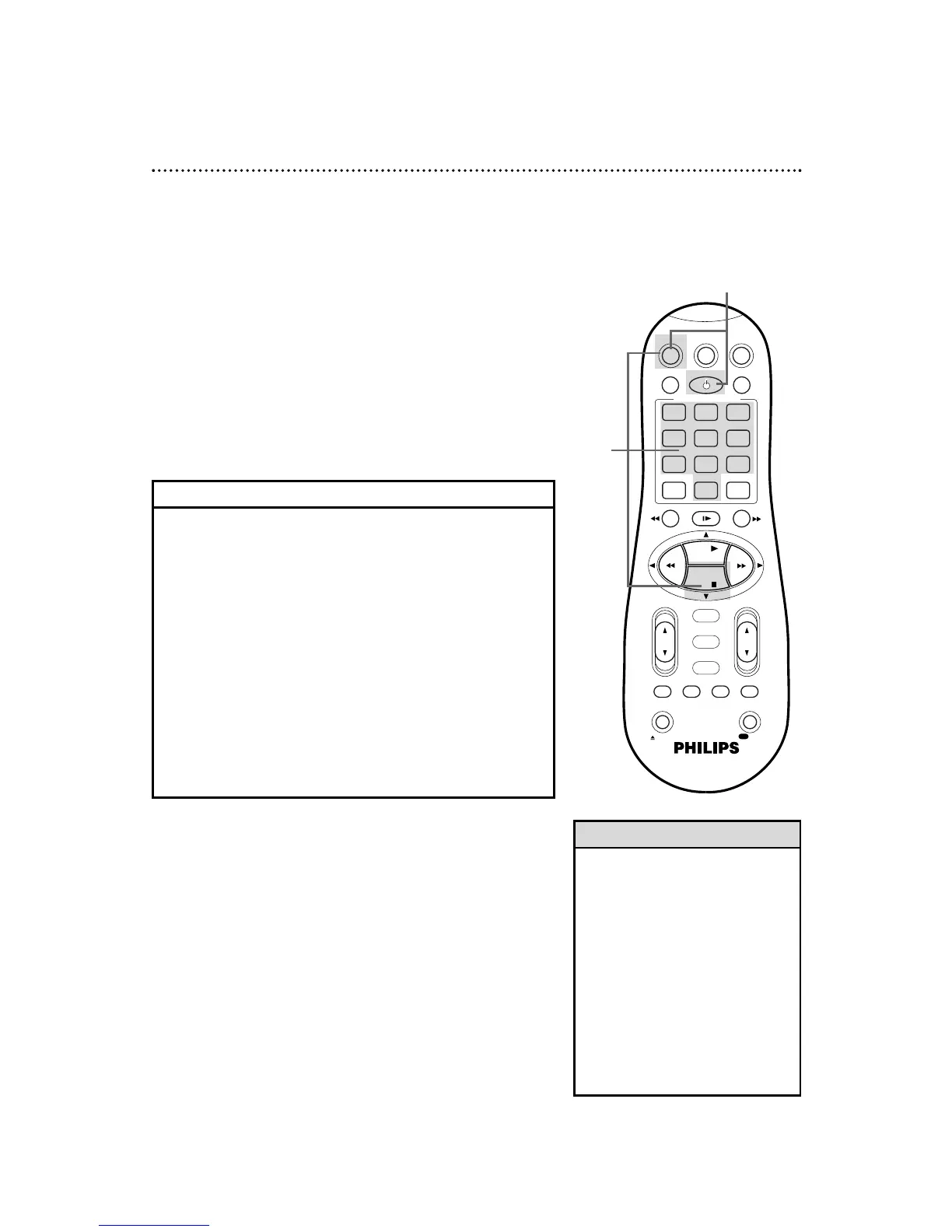
Point the remote control at your Cable Box/DBS. Press
the CBL/DBS button, then press the POWER button. If
your Cable Box/DBS turns off, turn on the power again and try the
CH(annel) 8/9 button. If the remote control operates the Cable
Box/DBS, you’re finished. If your Cable Box/DBS does not turn off,
or if the CH(annel) 8/9 button doesn’t work, go to step 2.
2
Find the code for your
Cable Box/DBS.
ARCHER . . . . . . . . . . . .01, 05, 17
CABLETENNA . . . . . . . . . .01, 17
CABLEVIEW . . .15, 16, 17, 21, 25
CITIZEN . . . . . .15, 16, 17, 21, 25
CURTIS . . . . . . . . . . . . . . .02, 08
DIAMOND . . . . . . . . . . . . .01, 17
EASTERN . . . . . . . . . . . . . . . . .19
GC BRAND . . .15, 16, 17, 21, 25
GEMINI . . . . . . . . . . . . . . . . . .15
GENERAL INSTRUMENTS
. . . . . . . . . .01, 04, 06, 11, 12, 15
HAMLIN . . . . . . . . .10, 18, 19, 23
JASCO . . . . . . . . . . . . . . . . . . .15
JERROLD . .01, 04, 06, 11, 12, 15
NOVAVISION . . . . . . . . . .02, 08
OAK . . . . . . . . . . . . . . . . . .07, 20
PANASONIC . . . . . . . . . . .13, 14
PULSAR . . . . . .15, 16, 17, 21, 25
RCA . . . . . . . . . . . . . . . . . .13, 14
REGAL . . . . . . . . . .10, 18, 19, 23
REGENCY . . . . . . . . . . . . . . . .19
REMBRANDT . . . . . . .01, 16, 17
SAMSUNG . . . . . . . . . .05, 16, 24
SCIENTIFIC ATLANTA . . .02, 08
SIGMA . . . . . . . . . . . . . . . .07, 20
SL MARX . . . . .05, 16, 17, 24, 25
SPRUCER . . . . . . . . . . . . . .13, 14
STARGATE . . . . . .05, 15, 16, 17,
. . . . . . . . . 21, 24, 25
TELEVIEW . . . . . . . . . .05, 16, 24
TOCOM . . . . . . . . . . . .01, 04, 16
UNIKA . . . . . . . . . . . . . . . .01, 17
UNIVERSAL . . . . . . . . .16, 17, 25
VIDEOWAY . . . . . . . . .03, 09, 22
ZENITH . . . . . . . . . . . .03, 09, 22
MAGNAVOX DBS . . . . . . .42, 43
RCA DBS . . . . . . . . . . . . . . . . .40
SONY DBS . . . . . . . . . . . . . . . .41
CABLE BOX/DBS CODES
3
While you press and hold the CBL/DBS button, press two
Number buttons to enter the two-digit code for your Cable
Box/DBS. For example, if you have a Zenith Cable Box, press
Number buttons 0, 3. Then, still pressing the CBL/DBS
button, press the STOP 9 button. The Cable Box/DBS might
turn off automatically.
4
Repeat step 1. If the remote control still does not work your
Cable Box/DBS, repeat steps 2-3 using a different code for your
brand, if available.
2
Find the brand of your Cable Box/DBS on the list below
and remember the two-digit number beside it.
1,4
3


 To Next Page