When shipped from the factory, this VCR was set to automatically
select S-VHS format for recording on an S-VHS tape, and VHS format
for recording on a VHS tape. If you want to make a recording using
VHS format on an S-VHS tape, follow the steps below.
1
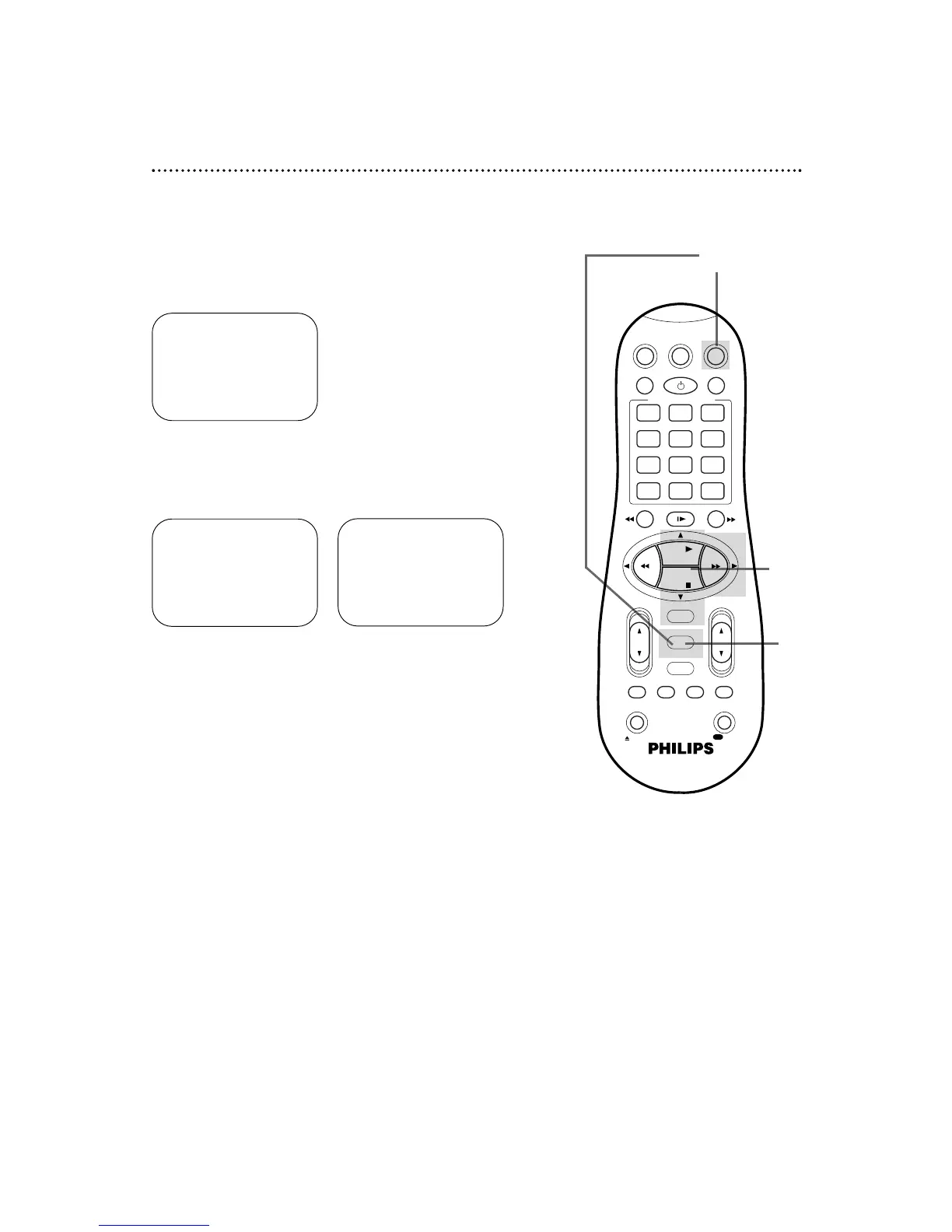
Press the VCR button, then press the MENU button.
1
5
2-4
2
Press the PLAY 8 or STOP 9 button to select VCR SET
UP, then press the OK/STATUS button. The first page of
the VCR SET UP menu will appear.
3
Press the STOP 9 button repeatedly so that the second
page of the VCR SET UP menu appears.
4
Press the PLAY 8 or STOP 9 button to select S-VHS
MODE on the second page of the VCR SET UP menu,
then press the FF : button.
Each time you press the FF : button, the setting changes to ON
or OFF.
• ON: The VCR automatically selects S-VHS format when
recording on an S-VHS tape.
• OFF: Allows you to record in VHS format on an S-VHS tape.
5
Press the MENU button.
➔ VCR SET UP
TUNER SET UP
INITIAL SET UP
SELECT: 89 CONFIRM: OK
END: MENU
➔ DSPC ON
ON SCREEN MODE ON
BLUE BACKGROUND ON
TIMER REC SPEED MANUAL
VIDEO STABILIZER OFF
AUDIO OUT HIFI
NEXT PAGE
SELECT: ,9 CHANGE: 3
END: MENU
PREVIOUS PAGE
STEREO/SAP STEREO
AUTO DBS
RECORD LINK OFF
S-VHS MODE ON
REAR A/V INPUT VIDEO
SELECT: ,9 CHANGE: 3
END: MENU


 To Next Page