FL EPA 2
28 / 50
PHOENIX CONTACT 108452_en_01
5.1.5 WLAN settings - Access point mode
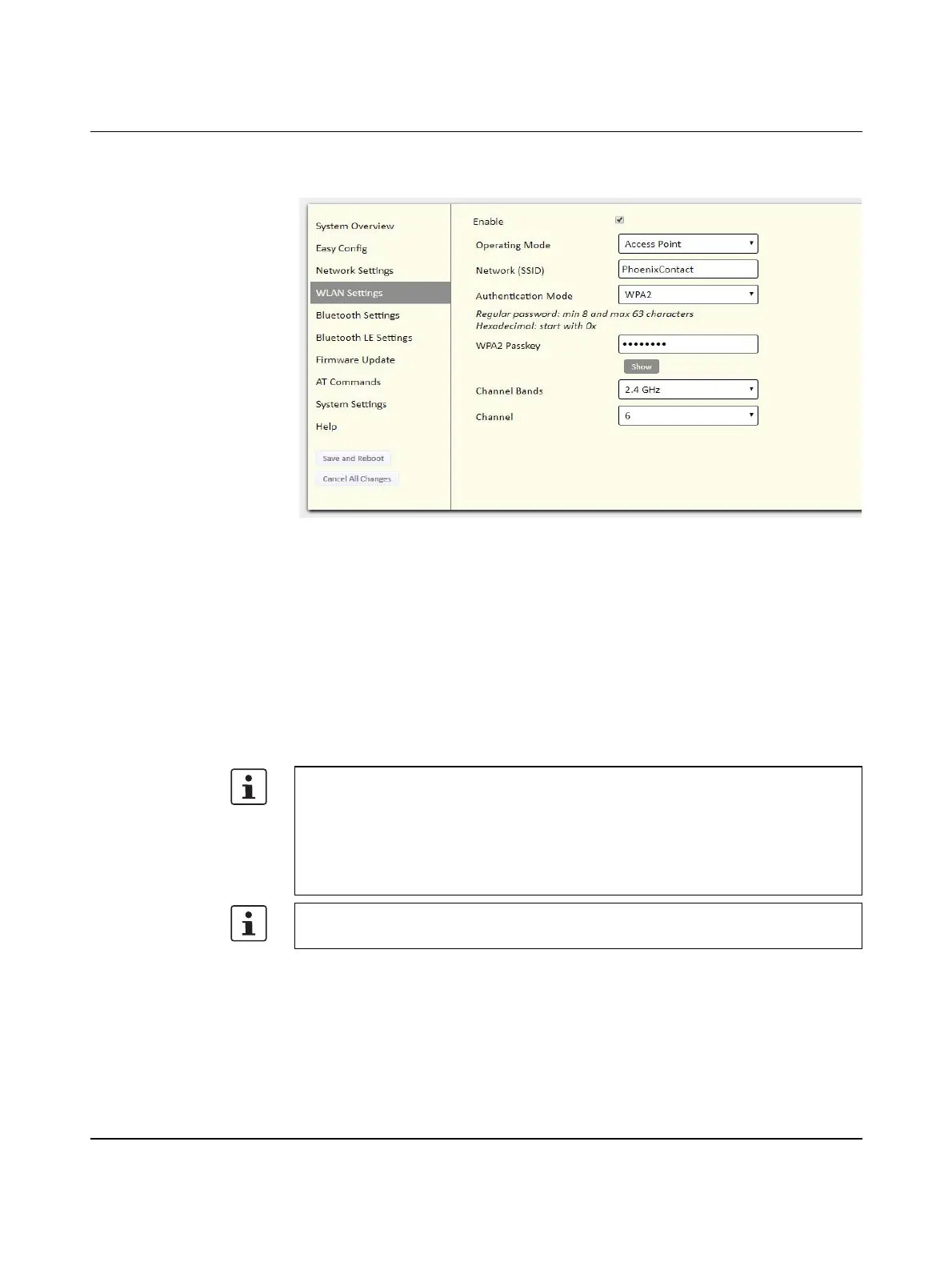
Figure 5-7 “WLAN Settings” web page
Settings for “Access Point” mode.
Network (SSID) - Enter an SSID (network name).
Authentication Mode - Select the authentication/encryption mode to use for the access
point.
Open = No encryption (not recommended)
WPA2 = WPA2 PSK authentication with AES/CCMP encryption
Other authentication and encryption modes can be selected using AT commands.
WPA2 Passkey - Enter a string in plain text or hexadecimal format to use for authentication.
Channel Bands, Channel
Select both a frequency band and channel for the access point (the client follows the access
point settings).
The WPA2 passkey must consist of 8 ... 63 characters from the following character set:
1234567890
abcdefghijklmnopqrstuvwxyzäöüß
ABCDEFGHIJKLMNOPQRSTUVWXYZÄÖÜ
!§$%&/()=?{[]}+*#'-_.:;@€<>|μ
The characters " (ASCII 34) and , (ASCII 44) as well as \ (ASCII 92) may not be used.
Make sure to use an individual and secure password.








 To Next Page