FL EPA 2
32 / 50
PHOENIX CONTACT 108452_en_01
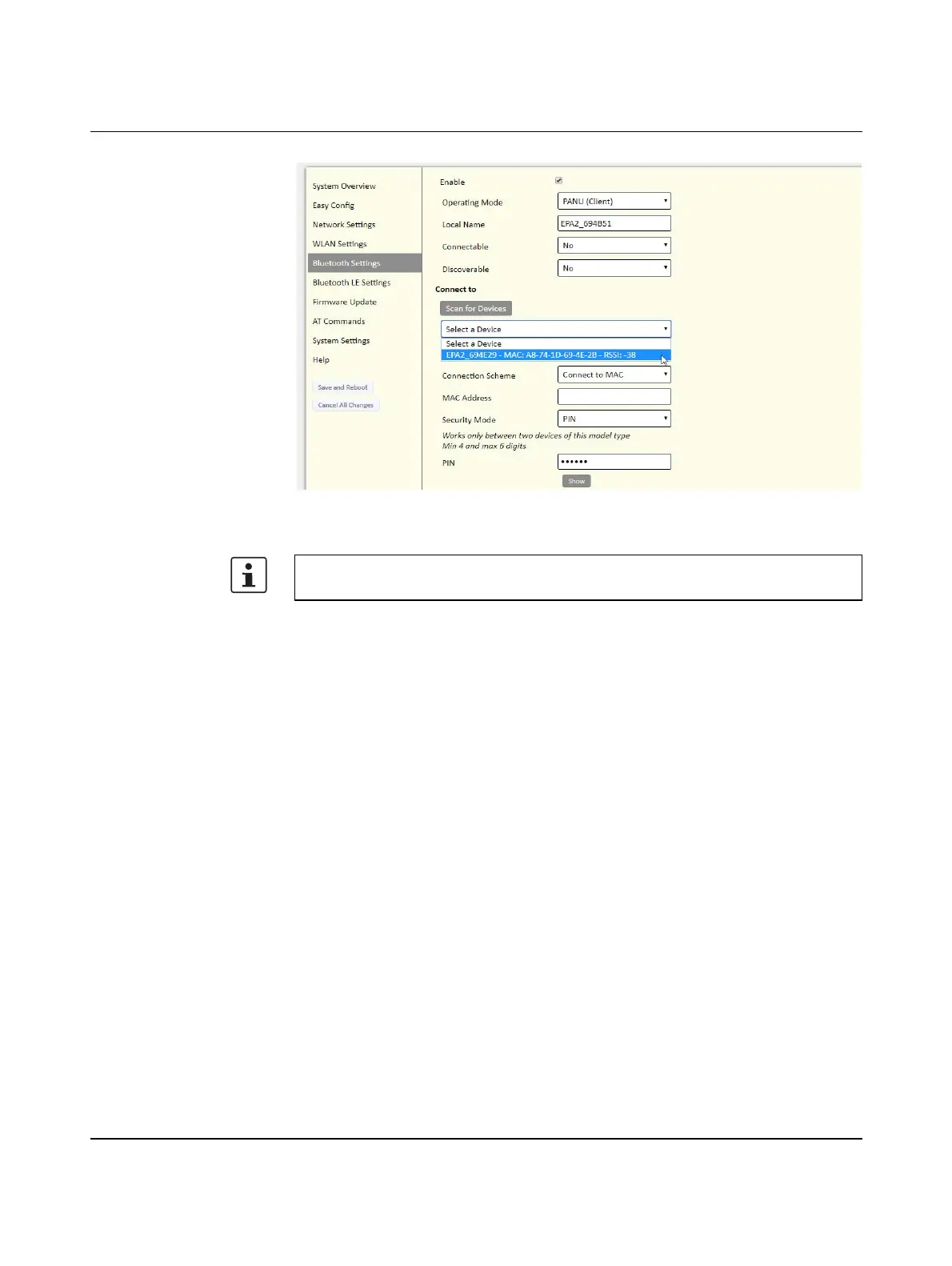
Figure 5-11 “Bluetooth settings” web page with example PANU values
Apply the settings with “Save and Reboot”.
Connection in “Connect to Name” mode
A connection based on the “Local Name” network name is established using the “Connect
to Name” concept. This simplifies the replacement of devices, as the name, in contrast to
the MAC address, can be configured freely. The name must be “Visible”, i.e., the device
responds with its name during a Bluetooth scan.
Configuring the central device (“NAP”)
Assign a unique IP address on the “Network Settings” page.
Modify the following data on the “Bluetooth Settings” page:
– Operating Mode: NAP (Access Point)
– Connectable: Yes
– Visible: Yes
– Local Name (Descriptive name for the wireless cell)
– PIN: (Unique key, 4 ... 6 digits, e.g., “123456”)
Apply the settings with “Save and Reboot”.
The MAC address of the Bluetooth module is two hex values higher than the MAC address
printed on it.








 To Next Page