4 SUMMIT
PART ONE: OVERVIEW AND INSTALLATION
Introduction
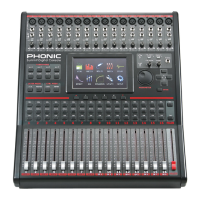
Congratulations on your purchase of the SUMMIT digital mixer,
the rst full-digital mixing console from Phonic. With ultra low-
noise circuitry, including high quality, low-loss analog to digital
converters, the SUMMIT offers everything a digital mixer should
in a sleek, attractive design.
The SUMMIT offers 16 mono input channels – offering XLR Mic
and 1/4” Line inputs – all of which can be assigned to any of the 8
AUX or 8 Subgroup mixes. A total of 8 ‘Multi’ outputs are offered
in addition to the main stereo output. AES/EBU digital inputs and
outputs can be used to send and receive signals to and from the
Main mix.
Any AUX mix or input channel can be assigned directly to one
of the digital effect processors, each of which offers at least 8
effects with multiple user-denable parameters. Effect Processor
1 also offers an additional 24 reverb effects with up to 7 adjustable
parameters each. Gate, Expander, Compressor and Limiter
dynamic processes can be assigned to all input channels. Also
available on input channels is a 4-band semi-parametric EQ and
a delay function.
While the SUMMIT is intuitive and user-friendly, there is still more
than likely a thing or two you’ll need a bit of help with. That being
the case, we suggest users take a quick look at this user’s manual
and keep it handy in the event that it is required.
Features
• 16 mono mic/line with grouped phantom power and pad
control
• Internal digital sampling rate up to 96 kHz in 24-bit
resolution
• C o m p a c t d e s i g n a c h i e v e d t h r o u g h 1 6 f a d e r s
encompassing three layers (Channel, AUX/Group, and
Multi)
• 17 ultra-smooth 100 mm automated faders arranged in a
familiar analog mixer arrangement
• High quality GUI interface onboard accessed through a full-
color touch-screen
• 4-band parametric EQs assignable to input channels, multi
outputs and main outputs
• Digital AES/EBU input and output onboard
• Eight balanced 1/4" TRS phone jack 'multi' outputs
• Up to 8 AUX and 8 Group buses assignable to ‘multi’
outputs
• Two professional quality digital EFX processors assignable
to any AUX mix or input channel
• Dynamic processors assignable to input channels, “main”
and ‘multi’ outputs
• Save and instantly recall scenes at the touch of a button
• Stereo headphone mix with independent level control
• Processing accomplished through a high quality 40-bit
oating point digital signal processor
• Optional FireWire & USB 2.0 expansion card (16-in, 16-out)
for multi-track recording
• FireWire & USB card compatible with Windows XP/Vista/7
and Mac OSX operating systems
System Components
All SUMMIT systems include the following:
• SUMMIT Console
• Power Supply (100V to 240V, 50–60 Hz)
• Rack mount ears
• User’s manual
The following components are optional and must be purchase
separately:
• 16 x 16 FireWire + USB 2.0 Expansion Card (16-in, 16-out)
• SD card (Secure Digital Memory Card)
• Headphones with ¼” phone jack
• Condenser or dynamic microphone
Operational Requirements
During operation, the front and rear panels of Summit should be
exposed to ambient air. Please do not block the ventilation holes
on the rear panels of Summit console. Please do not operate in
direct sunlight or at any extreme temperature. The ideal operating
environment is from 10 to 38 degrees Celsius (or 50 to 100 degrees
Fahrenheit).
Maintenance
Please do not use any alcohol cleaning solutions on the surface
of Summit. Use a non-abrasive dry cloth only.
Power Connections
Each SUMMIT requires its own power supply unit. The SUMMIT’s
PSU is capable of operating at 50 to 60 Hz across a voltage range
of 100 to 240 V. In addition, a power-conditioner (not included) is
highly recommended.
Analog and Digital Audio Connections
The SUMMIT analog inputs and outputs (with exception to the
headphone outputs) are balanced XLR and balanced ¼” TRS
connections. The headphone outputs are unbalanced stereo
¼” TRS jacks. Digital audio input and output is achieved through
AES/EBU (XLR) connections. Please use only 110-ohm cables
for digital connections.
Digital Synchronization
A word clock is provided to sync external digital devices, such as
DAT player. A master clock (e.g. Aardsync) is highly recommended,
which maintains the word clock on a network. Please make sure
to use only 75-ohm BNC cables for proper transmission of the
word clock signal.
Typical Setup: connect the Word Clock Out on the “Master Clock
Device” to the Word Clock In of SUMMIT. Then enter the Setup
menu and set the Clock Source section to “Word Clock” to allow
the incoming word clock signal.
Glossary
The following are a few words that may serve you well while
reading this manual. These aren’t in depth explanations, but should
hopefully give you the basics and a place to start.


 To Next Page