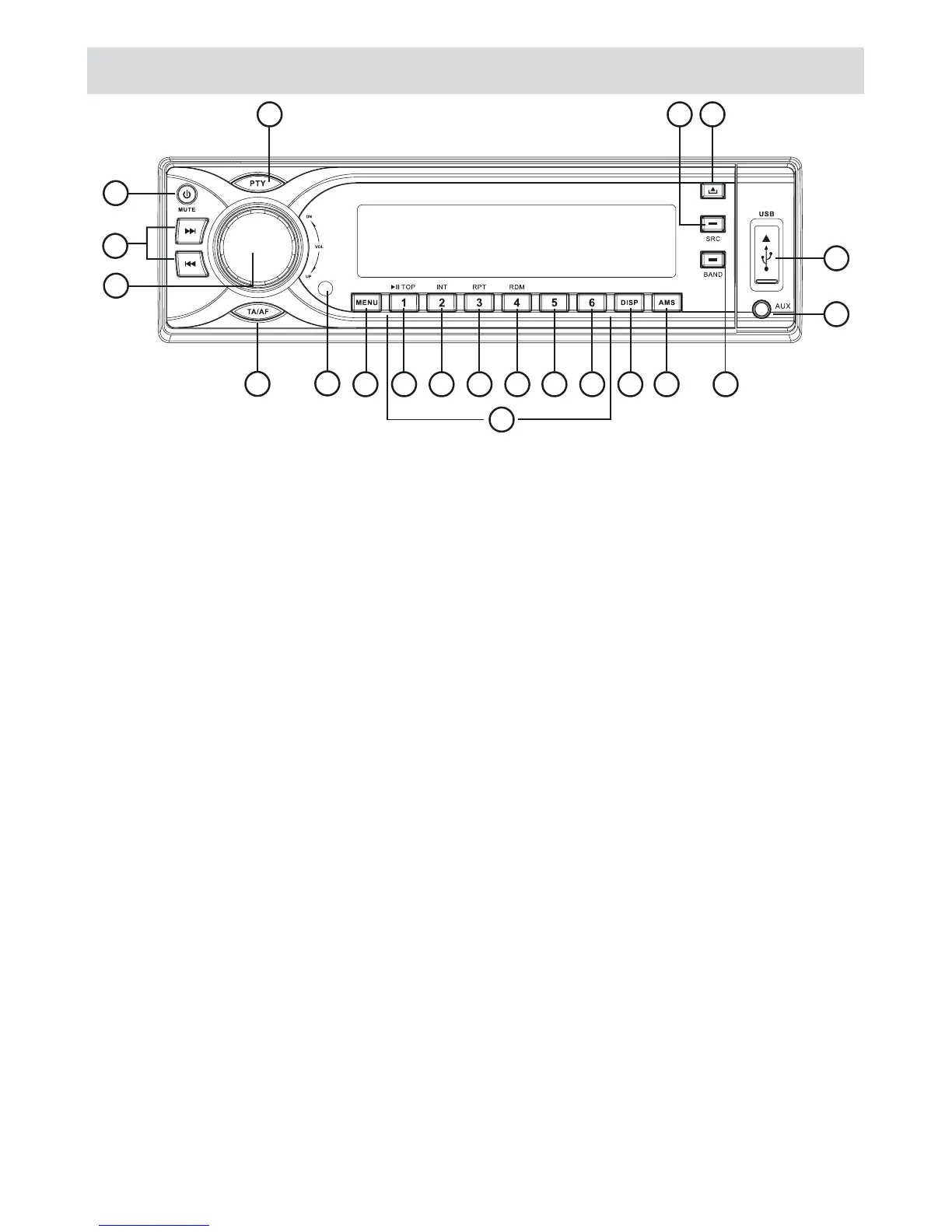
Panel controls
NOTE: Certain tuner button and menu functions e.g. TA, AF, PTY, EON, only operate for users in areas with RDS service receptionavailability.
Riproduzione disco
1 Power On/Off
Mute
Press for more than 2 seconds to power off
2 Radio Tune
Track skip/seek
3 Press to pop out/push back the knob
Rotate the knob to adjust volume level
4 REG On/Off -AF Alternative Frequency
TA Trafic Announcements. Press for more than 2 seconds
5 Remote sensor
6 Push once or more to select VOLUME/BASS/TREBLE/ BALANCE/FADER
Rotate the control to adjust level
7 Press briefly for Play/Pause function
Press for more than 2 seconds if you want to start playback from the beginning of the first track of your disc.
8 INTRO PLAY (10 sec)
9 RPT Track repeat play
10 RDM Track random play
11 Cartella precedente
MP3 -10 MP3 track-10 down (Press for more than 2 seconds)
12 Cartella seguente
MP3 +10 MP3 track-10 up (Press for more than 2 seconds)
13 Tasti 1-6 - audio PRESET. Press to listen to a preset station.
Hold for more than 2 seconds to store station.
14 Display Mode
15 AMS - Radio AUTO PRESET
- Radio PRESET SCAN
- MP3 track/file/character search
16 Band switch: FM1 FM2 FM3 MW1 MW2
17 AUX-IN
18 USB CONNECTOR
19 Panel Open
20 - Radio
- Disc play (when disc inserted)
- USB-drive (when USB inserted)
- MEM-card (when SD/MMC inserted)
- AUX-IN
21
20
19
1511 129 105
3
4
1
2
18
17
13
168 146
7



 To Next Page