USB/SD/MMC MP3 playback
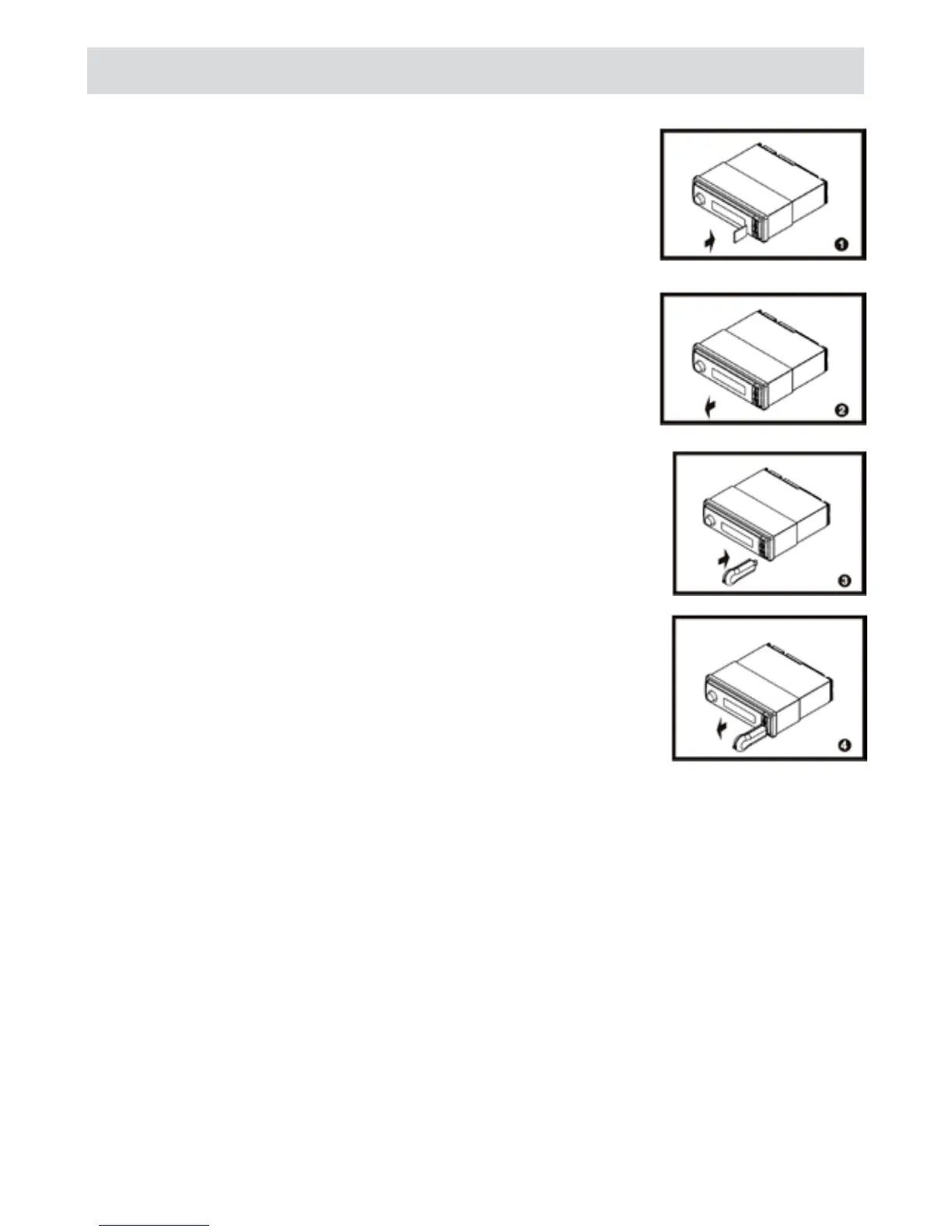
1 - Loading SD/MMC card
Insert the SD/MMC card into the slot, with the front side at right.
The unit will play the music automatically and the LCD will show
MEM-CARD.
2 - Take out SD/MMC Card
Push SRC button and switch to non MEM-CARD mode, slight press SD/
MMC card, take out the card when it was pop out.
3 - Loading USB equipment
Open the rubber cap, insert the USB into the connector and the unit play
the music in the USB storer automatically, and the LCD will show USB-
DRIV.
4 - Take out USB equipment
Push the SRC button and switch to non USB-DRIV mode, then take off the
USB storer, close the rubber cap.
USB/SD/MMC notes
USB functions (flash memory type) MP3 music play
(1) SD/ MMC card support (max 2 Gb)
(2) USB flash memory 2in 1 (SD/MMC ) support
(3) Fat 12/fat 16/fat 32 is possible
fat 12/16 (dir: 200 support, file : 1000 support)
fat 32 (dir : 200 support, file : 1000 support)
(4) File name : 32 byte/dir name : 32 byte/tag name: 32 byte
(5) Tag (id3 tag ver 2.0)
title / artist / album: 32 byte support
(6) Multi card reader not support
(7) USB 1.1 support, USB 2.0 support( it can not support USB2.0 speed. Just, get be same speed with
USB1.1)



 To Next Page