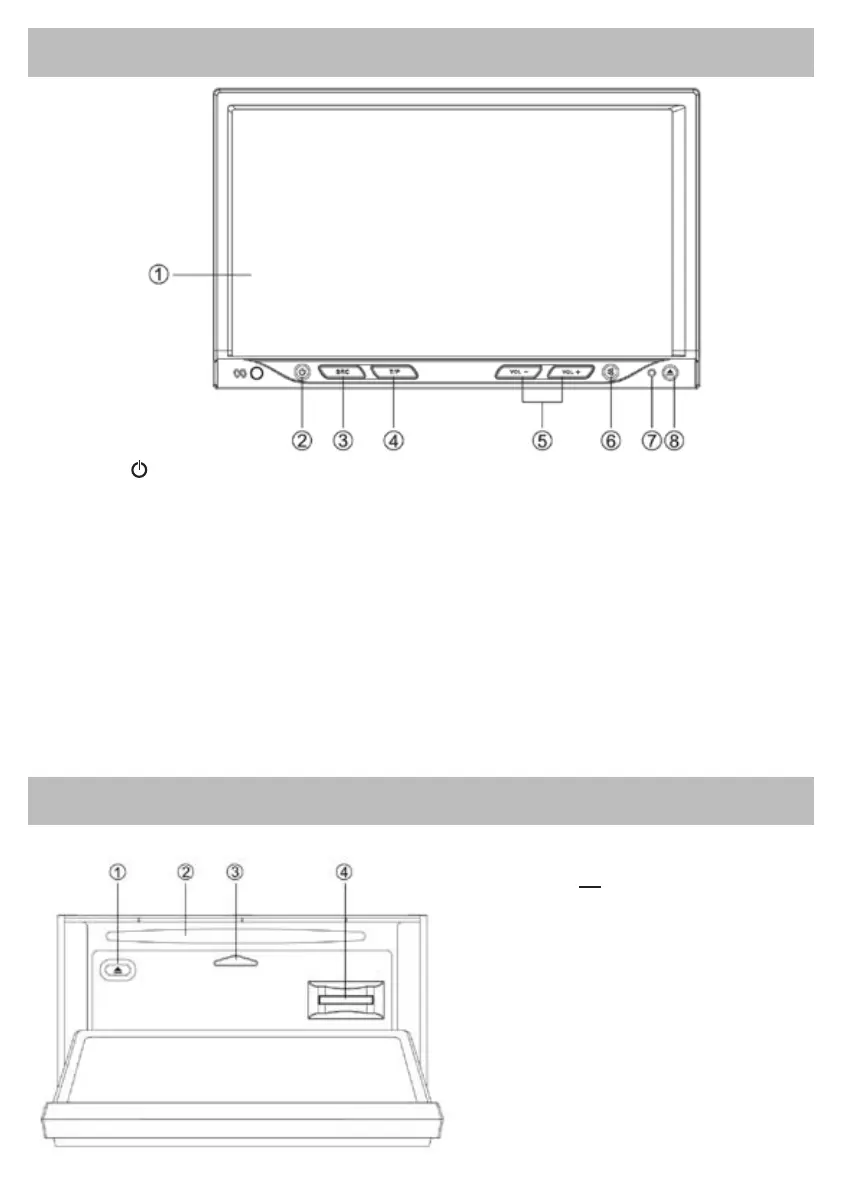
Panel Control
Getting Started
Press the button on the panel to slide down
the panel.
1. Disc eject
2. Disc slot
Insert disc.
3. Panel status indicator
Lights up when you slide the panel down.
4. SD/MMC card slot
Press button
to turn on/off the unit.
1. Touch panel
2. Power on/off
3. Source
- Radio
- Disc (when disc inserted)
- USB (when USB connected)
- SD/MMC card (when SD/MMC card inserted)
- Audio in
4. - Press to turn RDS TA on/off
- Press more than 2 seconds to enter RDS PTY
mode.
5. Press to adjust volume level.
6. - Mute
- Press more than 2 seconds to enter LCD OFF
mode.
7. Reset hole
8. - Open the panel / Close the panel
- Press more than 2 seconds to enter panel
menu.
- Open the panel
- Eject the disc
- Close the panel
- Adjust the panel angle (TILT+/-)



 To Next Page