General Operation
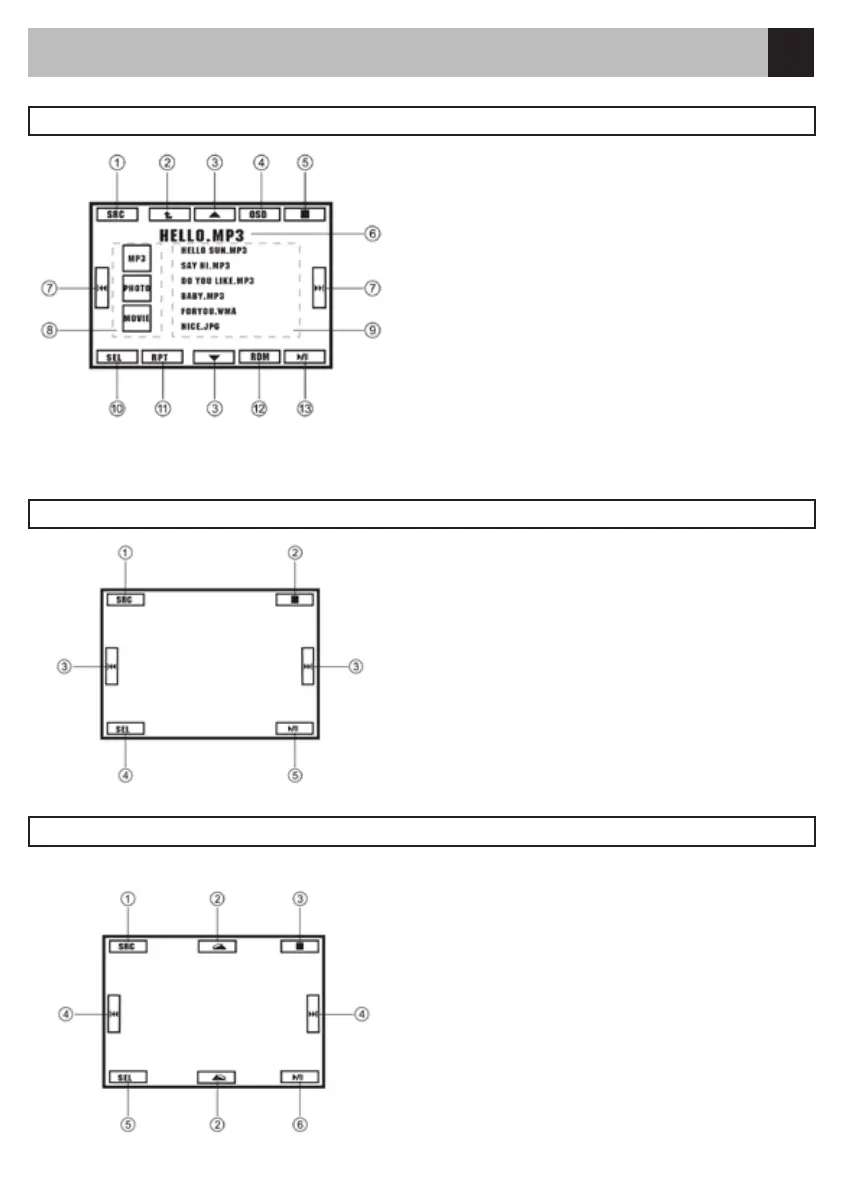
Touch the center of the screen, then control icons
appear:
Touch the icon to access desired function.
1. Display source menu.
2. Stop.
3. Track skip/seek.
4. Display select menu.
5. Play/Pause
Hidden Touch:
Touch directly the position of the icon to access
function.
Touch the center of the screen, then control icons
appear:
Touch the icon to access desired function.
1. Display source menu.
2. Rotate clockwise/counterclockwise
3. Stop.
4. Skip back/forward
5. Display select menu
6. Play/Pause
Hidden Touch:
Touch directly the position of the icon to access
function.
MP3/MP4/PHOTO Menu
Touch to access desired function.
1. Display source menu
2. Back to upper folder
3. Track up/down
4. Display playback info
5. Stop
6. Track and ID3 display
7. Track skip/seek
8. MP4/MP3/PHOTO select
9. Track Select/Folder select
10. Display select menu
11. Repeat play
12. Random play
13. Play/Pause
MP4 Playback
PHOTO Playback



 To Next Page