5-3
PSS WIN-PRO Service Version: Getting Started
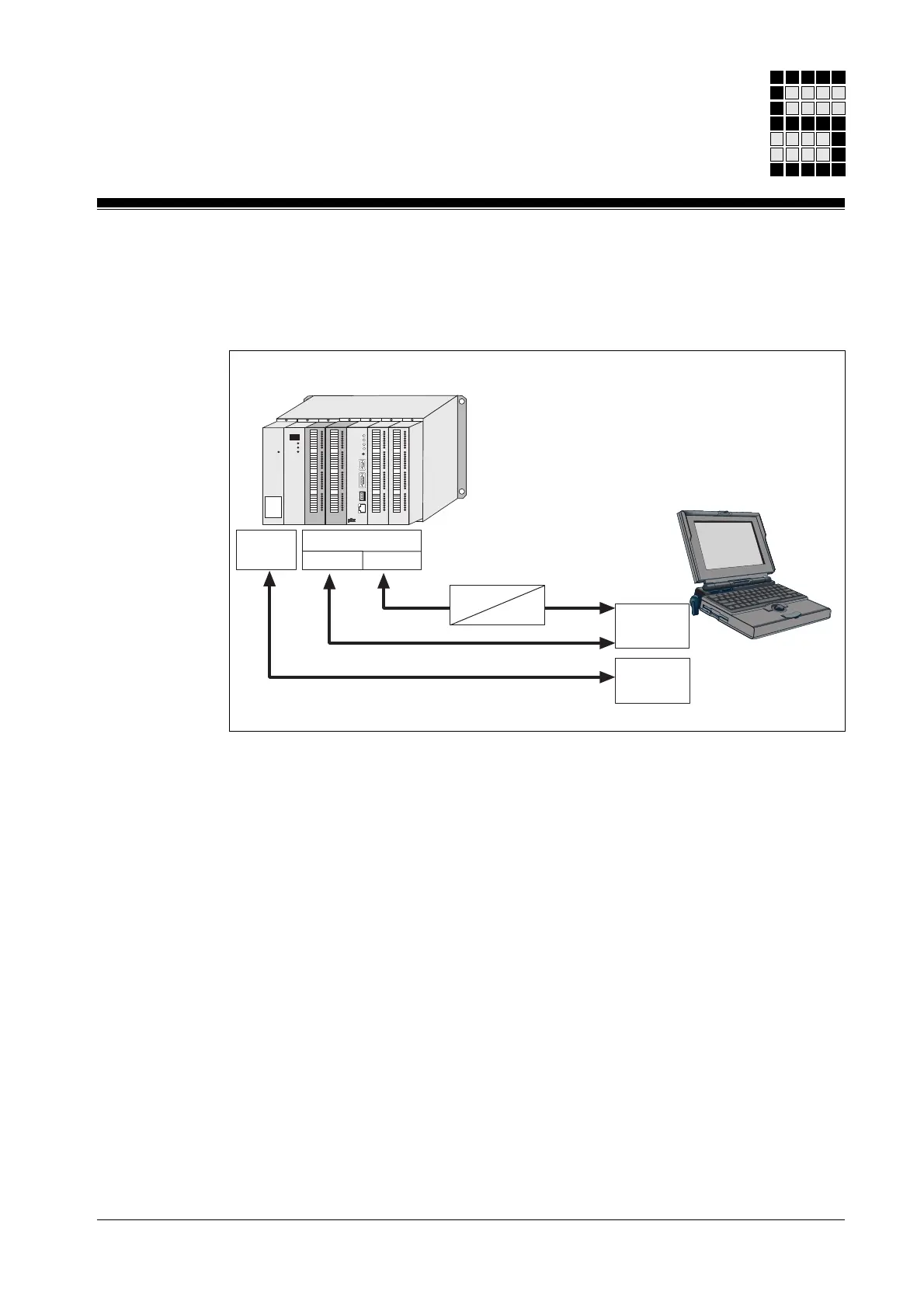
Connect computer to PSS
Most functions require a connection between the computer and the PSS.
The PG interface on the PSS may be an RS 232 and/or an RS 485
interface (see the operating manual for the relevant safety system). If the
PG interface on the PSS is different to the interface on the computer, you
will need to connect via an interface adapter.
If the programmable safety system has an ETH-2 interface, data can also
be transferred via Ethernet.
Once you have established a physical connection between the PSS and
the computer you will need to set the correct interface in PSS WIN-PRO:
Check that the correct interface is set on the
PG Interface
tab under
Tools
-> Options
.
In the
Online Timeout
field you can state the length of time for which PSS
WIN-PRO should attempt to establish a connection with the PSS, when
switching to online mode. If the connection cannot be made after the
preset time, an error message will be displayed.
Fig. 5-2: Connect computer to PSS
Ethernet
COM
RS 485RS 232
RS 232
RS 232
RS 485
PSS
PAP
ETH-2
Ethernet



 To Next Page