Installation Procedures
Metal Box Controller Module
15
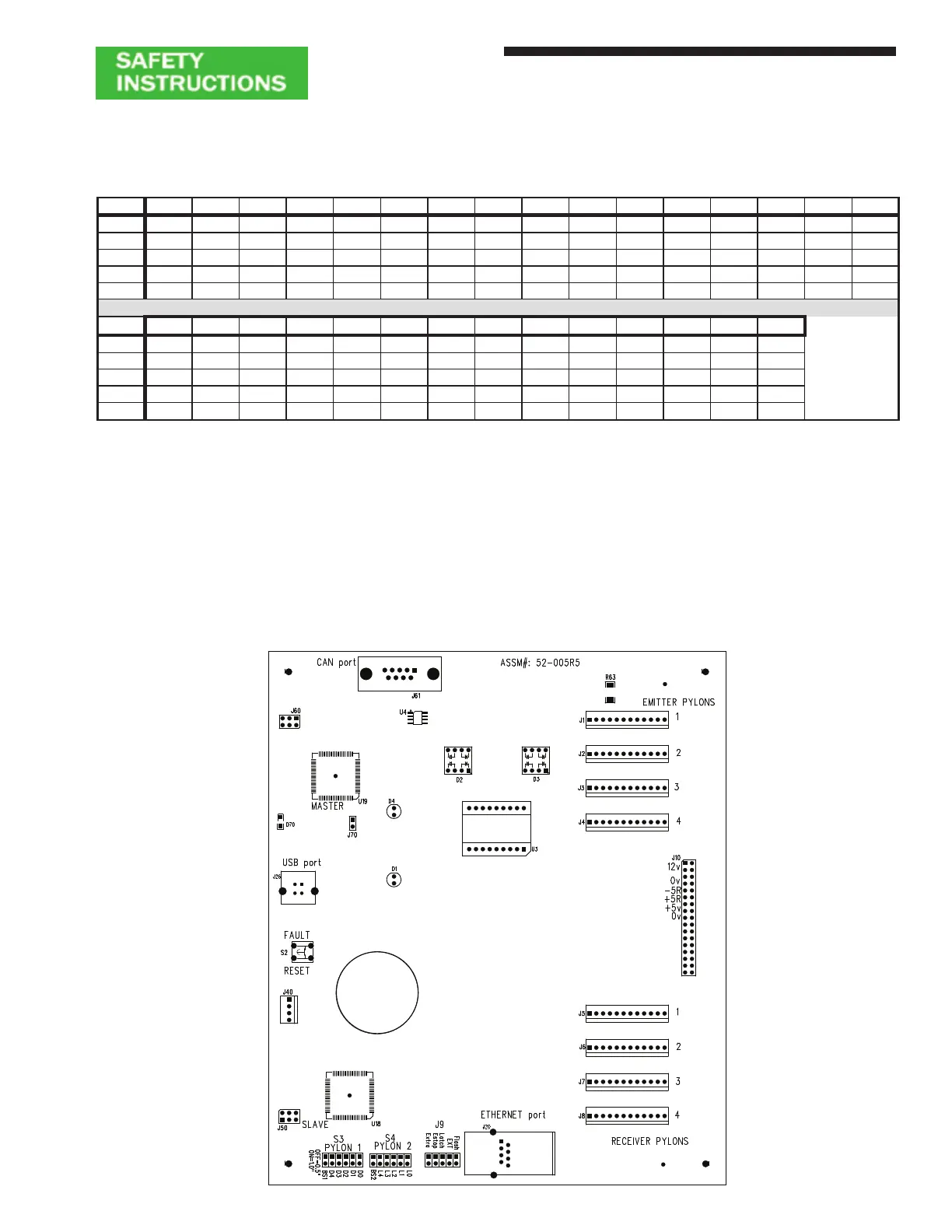
Auto Blank / Floating Blank Keyswitch................................................................................................................ J40
Pylon Length Selector ..................................................................................................................................S3 & S4
1 = Jumper
For pylons with 1” beam spacing, install the Jumper plug (just Left of D4/L4)
For pylons with 1/2” beam spacing, remove the Jumper plug (just Left of D4/L4)
EXT (Activates External Relay Check, see Standard Features) .......................................................................... J9
FLASH (Doubles response time of light curtain allow for Arc Weld Flash near light curtain ................................ J9
LATCH (Activates remote latch resetting (see Resettable Latching Relays) ....................................................... J9
FAULT RESET BUTTON (Push button to reset faults, do not hold button in) .......................................................S2
Figure 7: Multiple Pylon Controller Module Connector/Jumper Detail
Table 5: Multiple Pylon Set Controller (DUAL - SC) Module Length Jumper Chart
4" 8" 12" 16" 20" 24" 28" 32" 36" 40" 44" 48" 52" 56" 60" 64"
D0/L0 1 1 1 1 1 1 1 1
D1/L1 1 1 1 1 1 1 1 1
D2/L2 1 1 1 1 1 1 1 1
D3/L3 1 1 1 1 1 1 1 1
D4/L4 1 1 1 1 1 1 1 1 1 1 1 1 1 1 1 1
68" 72" 76" 80" 84" 88" 92" 96" 100" 104" 108" 112" 116" 120"
D0/L0 1 1 1 1 1 1 1
D1/L1 1 1 1 1 1 1 1 1
D2/L2 1 1 1 1 1 1 1 1
D3/L3 1 1 1 1 1 1 1 1
D4/L4


 To Next Page