EasyManua.ls Logo

Pioneer RX-310 - Page 5

Pioneer RX-310
20 pages
Print Icon
To Next Page IconTo Next Page
To Previous Page IconTo Previous Page
Loading...
CONNECTIONS
Sea
1
|
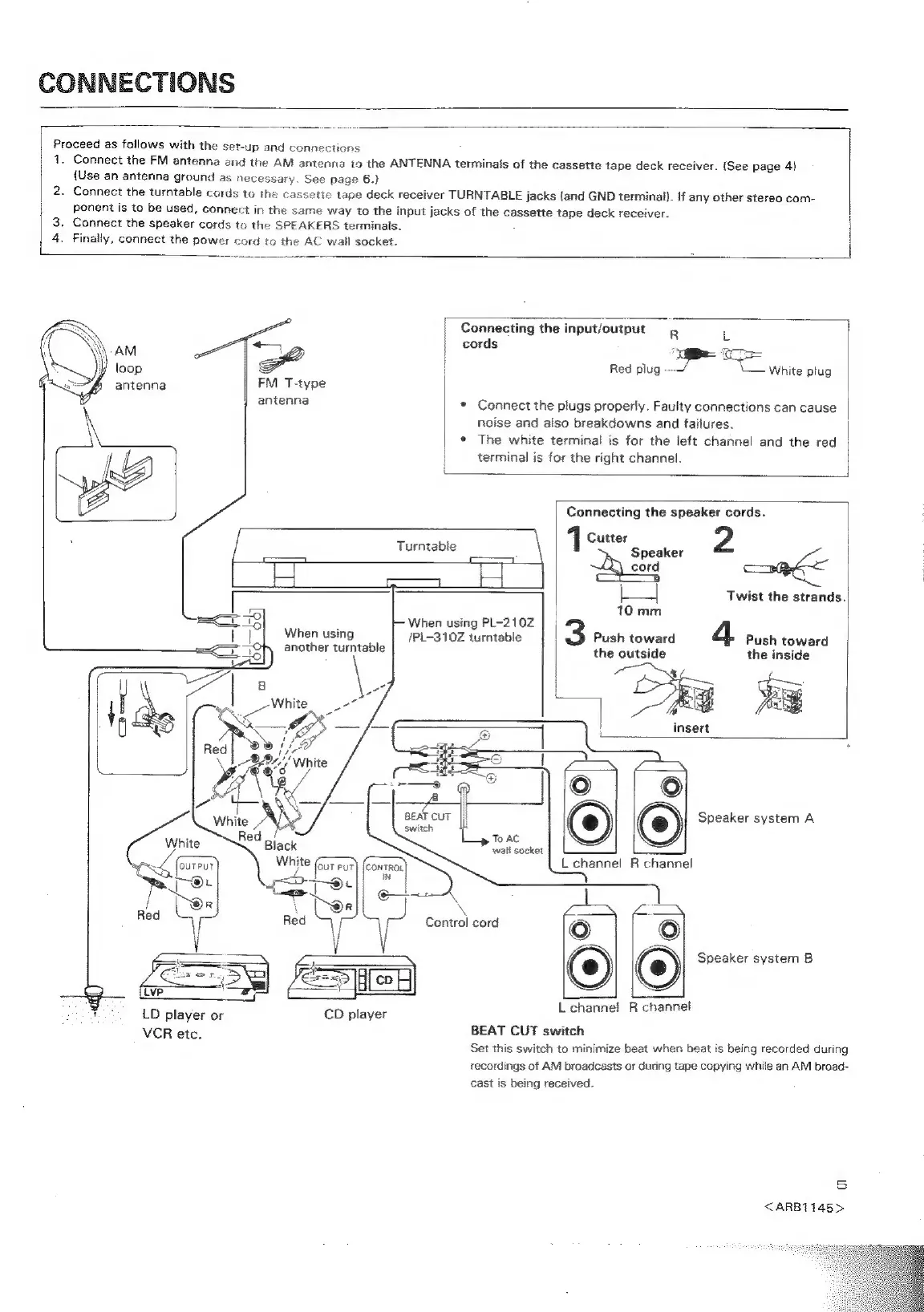
Proceed
as
follows
with
the
set-up
and
connections
1.
Connect
the
FM
antenna
and
the
AM
antenna
io
the
ANTENNA
terminals
of
the
cassette
tape
deck
receiver.
(See
page
4)
{Use
an
antenna
ground
as
nec
sary.
See
page
6.}
2.
Connect
the
turntable
cords
to
+
ette
tape
deck
receiver
TURNTABLE
jacks
(and
GND
terminal).
if
any
other
stereo
com-
ponent
is
to
be
used,
connect
in
the
same
way
to
the
input
jacks
of
the
cassette
tape
deck
receiver.
3.
Connect
the
speaker
cords
to
the
SPEAKERS
terminals.
4.
Finally,
connect
the
power
cord
to
the
AC
wall
socket.
Connecting
the
input/output
R
L
AM
|
cords
x
2
|
ae
loop
|
|
Red
plug
White
plug
antenna
|
FM
T-type
antenna
e
Connect
the
plugs
properly.
Faulty
connections
can
cause
|
noise
and
also
breakdowns
and
failures.
|
¢
The
white
terminal
is
for
the
left
channel
and
the
red
|
terminal
is
for
the
right
channel.
|
Connecting
the
speaker
cords.
:
Cutter
2
|
|
Turntable
1
Speaker
|
:
2d
cord
ag
:
j=]
Twist
the
strands.
|
10
mm
F
When
using
PL-210Z
When
using
/Pi-310Z
turntable
Push
toward
Push
toward
another
turntable
the
outside
the
inside
:
eo
||
6
@)
(e)
Speaker
system
A
Ld
L
channel
R
channel
ic)
BEAT
CUT
switch
Ly
Teac
wall
socket
|
Control
cord
Speaker
system
B
Feet
ceat
7]
We.
*
LD
player
or
CD
player
VCR
etc
BEAT
CUT
switch
:
Set
this
switch
to
minimize
beat
when
beat
is
being
recorded
during
recordings
of
AM
broadcasts
or
during
tape
copying
while
an
AM
broad-
L
channel
R
channel
cast
is
being
received.
5
<ARB1145>

Related product manuals