EasyManua.ls Logo

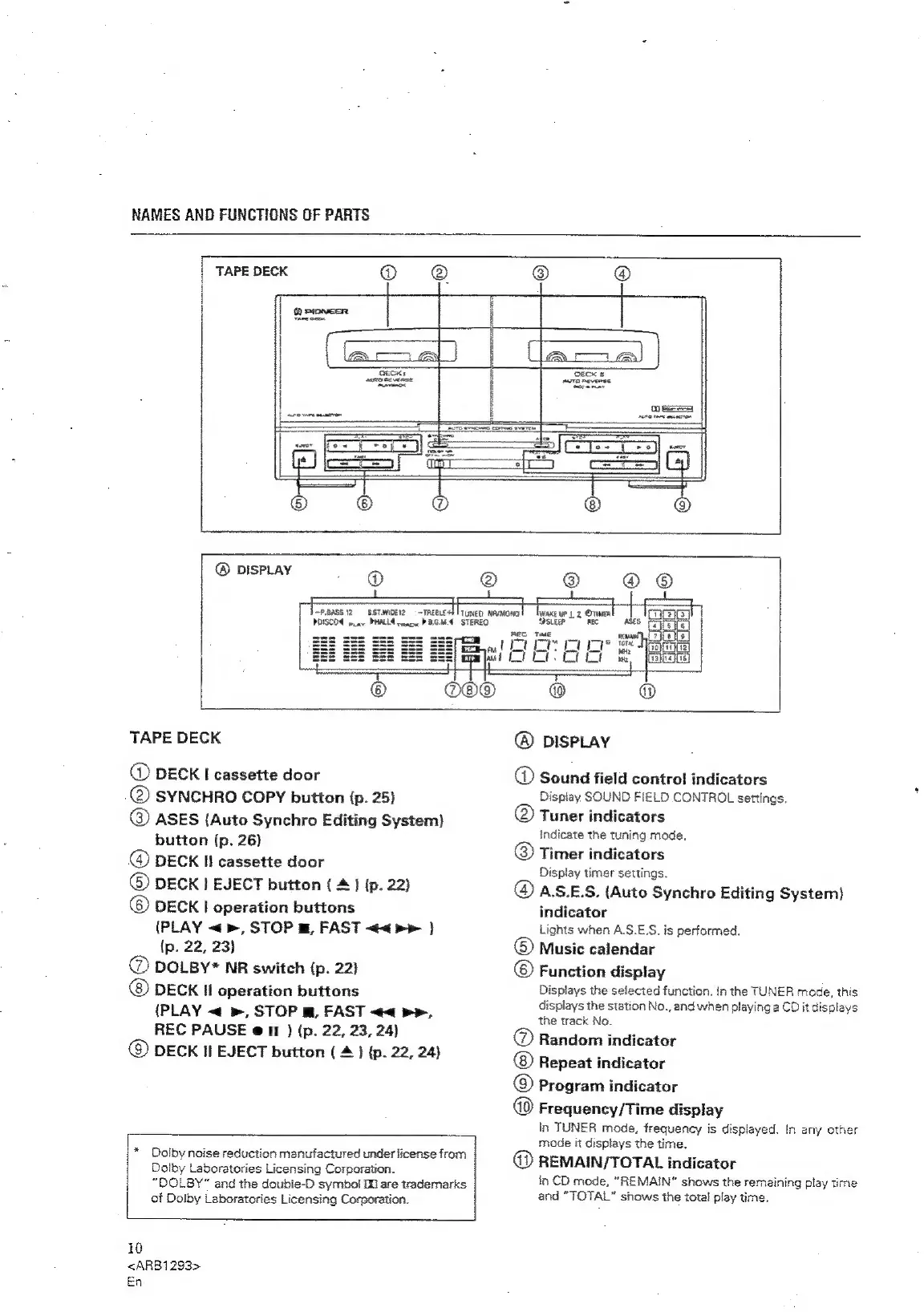
Pioneer XR-P310 - TAPE DECK FUNCTIONS; Tape Deck Controls and Indicators; Display Indicators Explained

Pioneer XR-P310
36 pages
Print Icon
To Next Page IconTo Next Page
To Previous Page IconTo Previous Page
Loading...
NAMES
AND
FUNCTIONS
OF
PARTS
TAPE
DECK
~P.BASS
12
SST.WIOE12
=
—TREBLE-
PDISCOE
mae
PHALLA
reac
PGMA
AWAKE
UP
1
2
@TIMER
‘SLEEP
REC
TAPE
DECK
@)
DECK
I
cassette
door
@
SYNCHRO
COPY
button
(p.
25)
@
ASES
(Auto
Synchro
Editing
System)
button
(p.
26}
@
DECK
Il
cassette
door
©)
DECK
|
EJECT
button
(
4)
(p.
22)
©
DECK!
operation
buttons
(PLAY
«>,
STOP
m,
FAST
<<
pe
}
(p.
22,
23)
@
DOLBY*
NR
switch
(p.
22)
©
DECK
HI
operation
buttons
(PLAY
«
»,
STOP
m,
FAST
<<
pe,
REC
PAUSE
@
11
)
(p.
22,
23,
24)
@
DECK
Il
EJECT
button
(
4
}
(p.
22, 24)
*
Dolby
noise
reduction
manufactured
under
license
from
Dolby
Laboratories
Licensing
Corporation.
“DOLBY”
and
the
doubie-D
symbol
I
are
trademarks
of
Dolby
Laboratories
Licensing
Corporation.
i0
<ARB1283>
En
@
DISPLAY
®
Sound
field
control
indicators
Display
SOUND
FIELD
CONTROL
settings.
Tuner
indicators
indicate
the
tuning
mode.
Timer
indicators
Display
timer
settings.
@
A.S.E.S.
(Auto
Synchro
Editing
System)
indicator
Lights
when
A.S.E.S.
is
performed.
©
Music
calendar
©
Function
display
Displays
the
selected
function.
In
the
TUNER
mode,
this
displays
the
station
No.,
and
when
playing
a
CD
it
displays
the
track
No.
®
Random
indicator
Repeat
indicator
©
Program
indicator
Frequency/Time
display
in
TUNER
mode,
frequency
is
displayed.
in
any
other
mode
it
displays
the
time.
@
REMAIN/TOTAL
indicator
in
CD
mode,
“REMAIN”
shows
the
remaining
play
time
and
“TOTAL”
shows
the
total
play
time.

Related product manuals