EasyManua.ls Logo

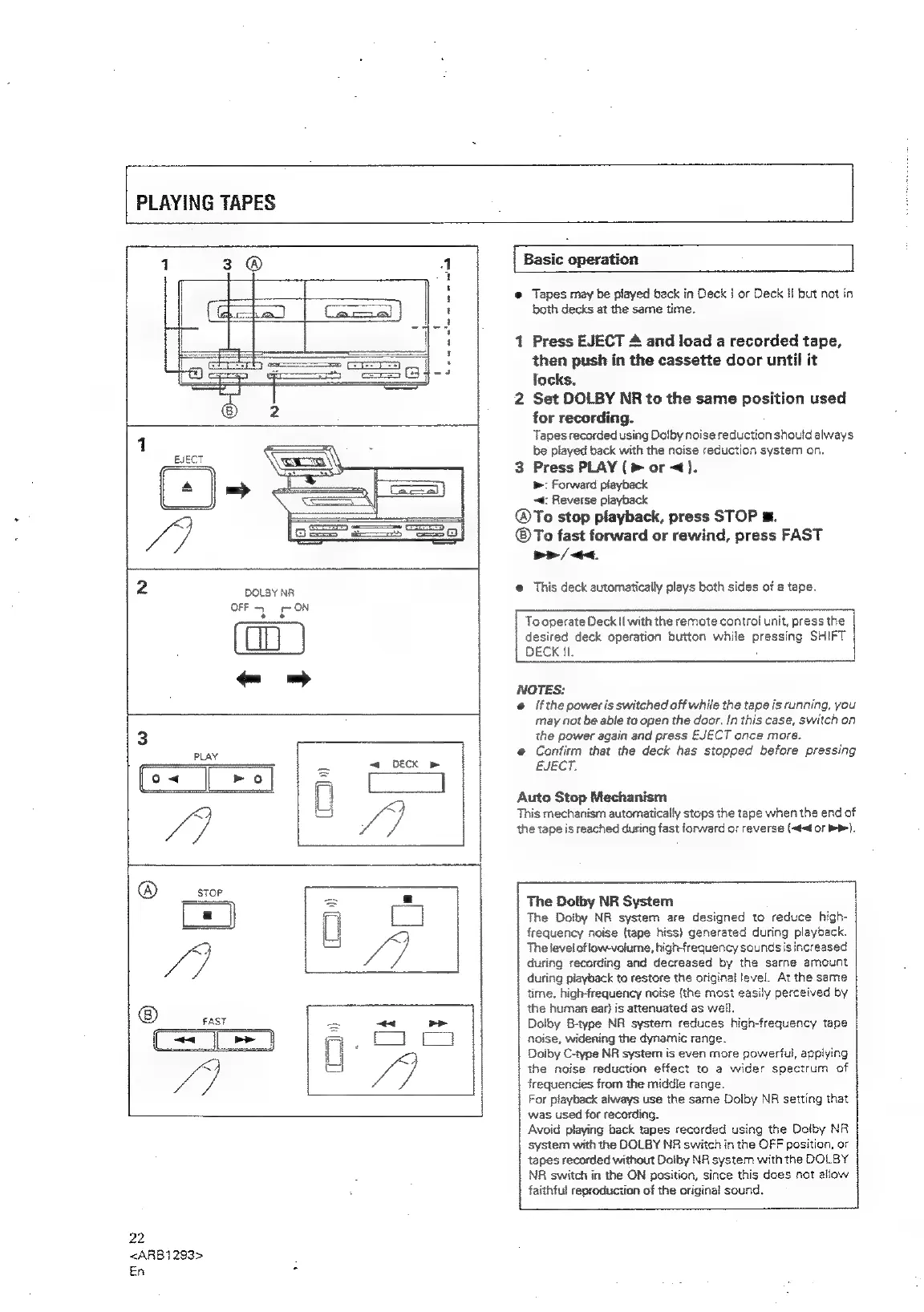
Pioneer XR-P310 - PLAYING CASSETTE TAPES; Basic Tape Playback; Auto Stop Mechanism; Dolby Noise Reduction System

Pioneer XR-P310
36 pages
Print Icon
To Next Page IconTo Next Page
To Previous Page IconTo Previous Page
Loading...
PLAYING
TAPES
be
we
an
lee
ot
oe
oe
oto
DOLBY
NR
OFF
~~
ON
te
22
<ARB1293>
En
Basic
operation
Tapes
may
be
played
back
in
Deck
|
or
Deck
Hf
but
not
in
both
decks
at
the
same
time.
Press
EJECT
A
and
load
a
recorded
tape,
then
push
in
the
cassette
door
until
it
locks.
Set
DOLBY
NR
to
the
same
position
used
for
recording.
Tapes
recorded
using
Dolby
noise
reduction
should
always
be
played
back
with
the
noise
reduction
system
on.
Press
PLAY
(>
or
<).
»:
Forward
playback
~t:
Reverse
playback
®To
stop
playback,
press
STOP
m.
®To
fast
forward
or
rewind,
press
FAST
Pp
/
<<.
This
deck
automatically
plays
both
sides
of
a
tape.
To
operate
Deck
il
with
the
remote
control
unit,
press
the
desired
deck
operation
button
while
pressing
SHIFT
DECK
11.
NOTES:
If
the
power
is
switched
off
while
the
tape
is
running,
you
may
not
be
able
to
open
the
door.
In
this
case,
switch
on
the
power
again
and
press
EJECT
ance
more.
Confirm
that
the
deck
has
stopped
before
pressing
EJECT.
Auto
Stop
Mechanism
This
mechanism
automatically
stops
the
tape
when
the
end
of
the
tape
is
reached
during
fast
forward
or
reverse
(~#<d
oF
bP).
The
Dolby
NR
System
The
Doiby
NR
system
are
designed
to
reduce
high-
frequency
noise
(tape
hiss}
generated
during
playback.
The
level
ofiowvolume,
high-frequency
sounds
is
increased
during
recording
and
decreased
by
the
sarne
amount
during
playback
to
restore
the
original
level.
At
the
same
time,
high-frequency
noise
(the
most
easily
perceived
by
the
human
ear}
is
attenuated
as
well.
Dolby
8-type
NR
system
reduces
high-frequency
tape
noise,
widening
the
dynamic
range.
Doiby
C-type
NR
system
is
even
more
powerful,
applying
the
noise
reduction
effect
to
a
wider
spectrum
of
frequencies
from
the
middle
range.
For
playback
always
use
the
sarne
Dolby
NR
setting
that
was
used
for
recording.
Avoid
playing
back
tapes
recorded
using
the
Dolby
NR
system
with
the
DOLBY
NR
switch
in
the
OFF
position,
or
tapes
recorded
without
Dolby
NR
system
with
the
DOLBY
NR
switch
in
the
ON
position,
since
this
does
not
allow
faithful
reproduction
of
the
original
sound.

Related product manuals