EasyManua.ls Logo

Pioneer XR-P310 - PROGRAMMING CD PLAYBACK; Program Playback Setup; Programming a Pause; Clearing Programmed Tracks

Pioneer XR-P310
36 pages
Print Icon
To Next Page IconTo Next Page
To Previous Page IconTo Previous Page
Loading...
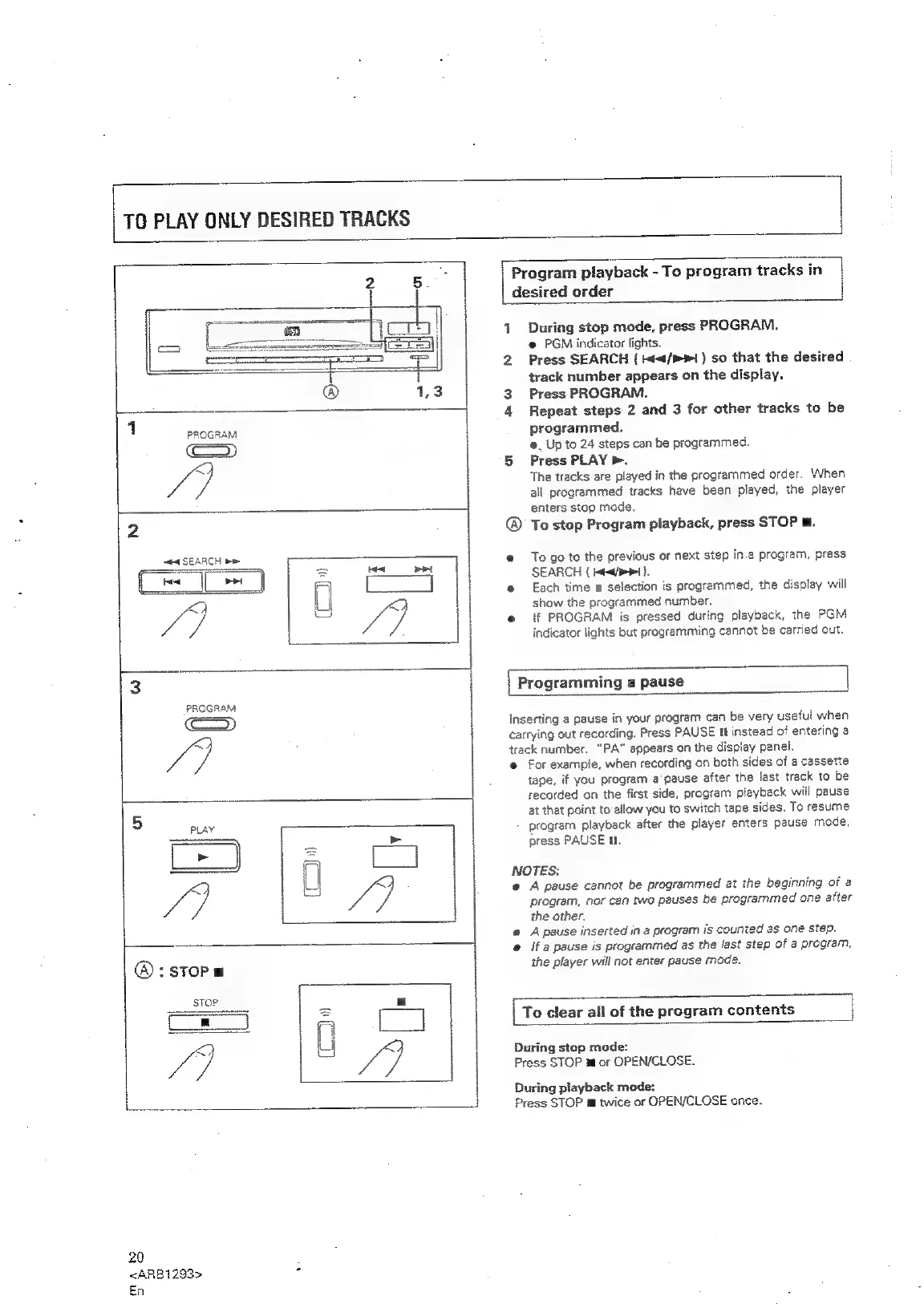
TO
PLAY
ONLY
DESIRED
TRACKS
ta
SEARCH
be
-_
1
PROGRAM
(came)
ih
2
®:sToP
=
STOP
o_ee
y
20
<ARB1293>
.
En
Program
playback
-
To
program
tracks
in
desired
order
1
During
stop
mode,
press
PROGRAM.
@
PGM
indicator
lights.
2
Press
SEARCH
{
</>
1)
so
that
the
desired
track
number
appears
on
the
display.
3
Press
PROGRAM.
4
Repeat
steps
2
and
3
for
other
tracks
to
be
programmed.
@_
Up
to
24
steps
can
be
programmed.
5
Press
PLAY
>.
The
tracks
are
played
in
the
programmed
order.
When
all
programmed
tracks
have
been
played,
the
player
enters
stop
mode.
®
To
stop
Program
playback,
press
STOP
m.
@
Togo
to
the
previous
or
next
step
In.a
program,
press
SEARCH
(
Ht
).
@
Each
time
a
selection
is
programmed,
the
display
will
show
the
programmed
number.
e@
if
PROGRAM
is
pressed
during
playback,
the
PGM
indicator
lights
but
programming
cannot
be
carried
out.
|
Programming
a
pause
Inserting
a
pause
in
your
program
can
be
very
useful
when
carrying
out
recording.
Press
PAUSE
It
instead
of
entering
a
track
number.
“PA”
appears
on
the
display
panel.
@
For
example,
when
recording
on
both
sides
of
a
cassette
tape,
if
you
program
a
pause
after
the
last
track
to
be
recorded
on
the
first
side,
program
playback
will
pause
at
that
point
to
allow
you
to
switch
tape
sides.
To
resume
program
playback
after
the
player
enters
pause
mode,
press
PAUSE
i.
NOTES:
@
A
pause
cannot
be
programmed
at
the
beginning
of
a
program,
nor
can
two
pauses
be
programmed
one
after
the
other.
@
A
pause
inserted
in
a
program
is
counted
as
one
step.
@
if
a
pause
is
programmed
as
the
last
step
of
a
program,
the
player
will
not
enter
pause
mode.
=
|
To
clear
all
of
the
program
contents
During
stop
mode:
Press
STOP
m
or
OPEN/CLOSE.
During
playback
mode:
Press
STOP
m@
twice
or
OPEN/CLOSE
once.

Related product manuals