EasyManua.ls Logo

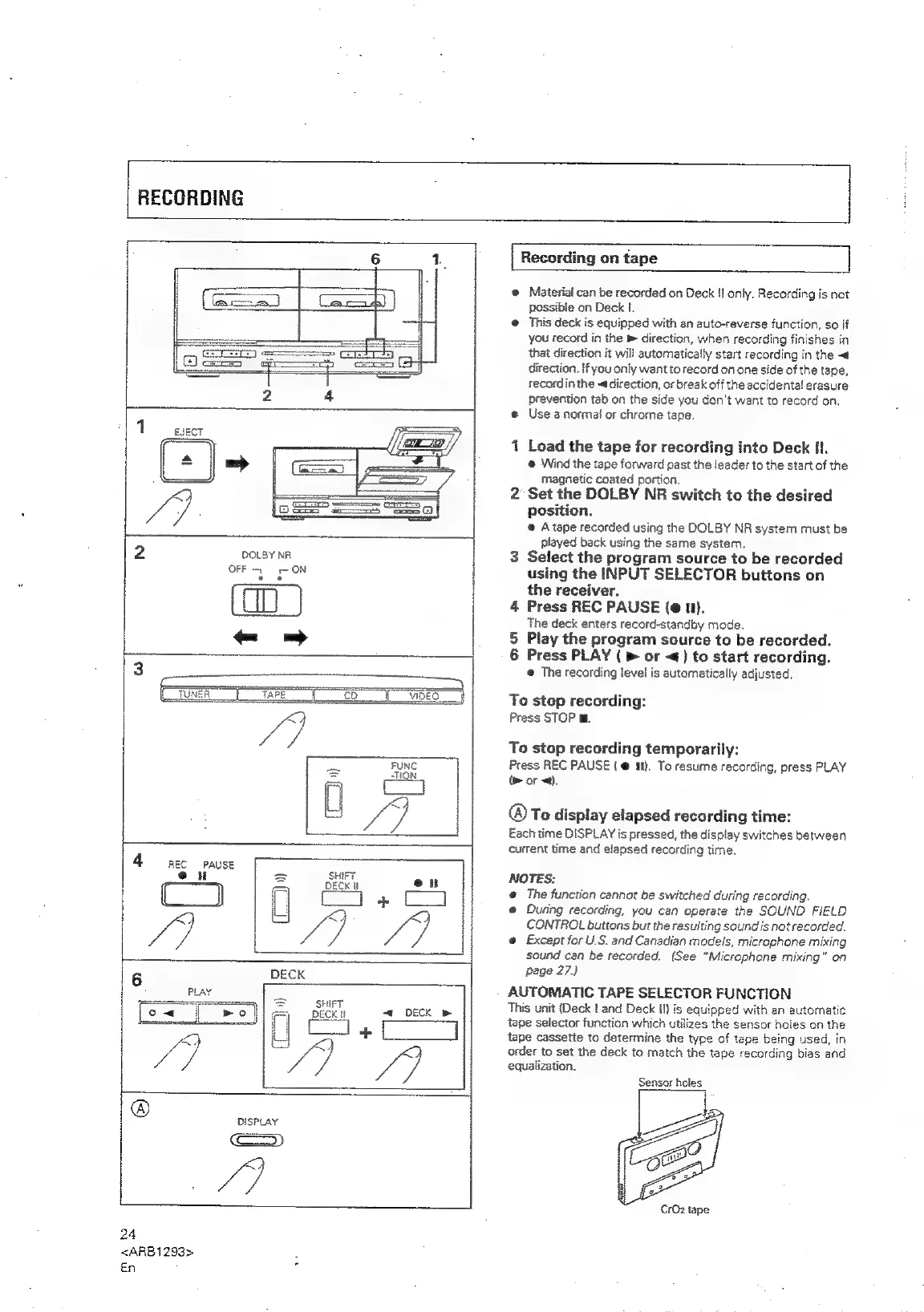
Pioneer XR-P310 - RECORDING ON TAPE; Recording Procedure; Automatic Tape Selector

Pioneer XR-P310
36 pages
Print Icon
To Next Page IconTo Next Page
To Previous Page IconTo Previous Page
Loading...
RECORDING
ay
1
EJECT
2
DOLBY
NR
OFF
ON
3
-~
3
i
co
4
REC
PAUSE
SHIFT
DECK
I
“i
DECK
&
24
<ARB1293>
En
Recording
on
tape
®
Material
can
be
recorded
on
Deck
I]
only.
Recording
is
not
possible
on
Deck
I.
@
This
deck
is
equipped
with
an
auto-reverse
function,
so
if
you
record
in
the
»
direction,
when
recording
finishes
in
that
direction
it
will
automatically
start
recording
in
the
~
direction.
If
you
only
want
to
record
on
one
side
of
the
tape,
recordin
the
~ddirection,
or
break
off
the
accidental
erasure
prevention
tab
on
the
side
you
don't
want
to
record
on.
@
Use
a
normal
or
chrome
tape.
1
Load
the
tape
for
recording
into
Deck
Hl.
@
Wind
the
tape
forward
past
the
leader
to
the
start
of
the
magnetic
coated
portion.
2
Set the
DOLBY
NR
switch
to
the
desired
position.
@
A
tape
recorded
using
the
DOLBY
NR
system
must
be
played
back
using
the
same
system,
3
Select
the
program
source
to
be
recorded
using
the
INPUT
SELECTOR
buttons
on
the
receiver.
4
Press
REC
PAUSE
(e
i).
The
deck
enters
record-standby
mode.
5
Play
the
program
source
to
be
recorded.
6
Press
PLAY
(
>
or
«)
to
start
recording.
@
The
recording
level
is
automatically
adjusted.
To
stop
recording:
Press
STOP
m.
To
stop
recording
temporarily:
Press
REC
PAUSE
(
@
it}.
To
resume
recording,
press
PLAY
(>
or
<<).
@®To
display
elapsed
recording
time:
Each
time
DISPLAY
is
pressed,
the
display
switches
between
current
time
and
elapsed
recording
time.
NOTES:
@
The
function
cannot
be
switched
during
recording.
@
During
recording,
you
can
operate
the
SOUND
FIELD
CONTROL
buttons
but
the
resulting
sound
is
not
recorded.
e@
Except
for
U.S.
and
Canadian
models,
microphone
mixing
sound
can
be
recorded.
(See
“Microphone
mixing”
on
page
27.)
AUTOMATIC
TAPE
SELECTOR
FUNCTION
This
unit
(Deck
|
and
Deck
Il}
is
equipped
with
an
automatic
tape
selector
function
which
utilizes
the
sensor
holes
on
the
tape
cassette
to
determine
the
type
of
tape
being
used,
in
order
to
set
the
deck
to
match
the
tape
recording
bias
and
equalization.
Sensor
holes
CrOz
tape

Related product manuals