Need help?
Do you have a question about the Pioneer XV-S100DV and is the answer not in the manual?
Warnings about electric shock, voltage, water, flames, ventilation, and power.
Laser product warning and recommended operating conditions.
Advice on spacing, ventilation, and cleaning.
Specific safety instructions for handling the power cord.
Key product technologies and guidance on using the manual.
Tips for choosing a location and preventing condensation.
Supported disc types, formats, and DVD region restrictions.
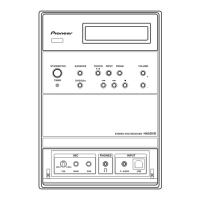
Identification of buttons and indicators on the unit's front panel.
Detailed explanation of buttons on the remote control.
Meaning of symbols and text shown on the unit's display.
Powering on the system and setting the internal clock.
Configuring surround sound modes and speaker distances.
Adjusting individual speaker volume levels for balanced audio.
Configuring TV output and fine-tuning speaker levels.
Guided initial setup process for basic system preferences.
Programming the remote control to operate the TV.
How to play DVDs, CDs, and VCDs.
Using Play/Pause, Stop, Scan, and Skip controls.
Interacting with DVD and Video CD menus.
Instructions for tuning into FM and AM radio stations.
Enhancing FM stereo reception and saving station presets.
Using auxiliary inputs and adjusting input sensitivity.
Accessing amplifier sound settings like Bass, Treble, and Effects.
Choosing surround modes and using them with digital audio sources.
Details on specific surround modes and adjusting DSP effects.
Using Midnight/Quiet modes and direct recording features.
Searching for content and starting disc playback.
Changing camera angles, subtitles, and audio language.
Selecting audio channels and creating custom playback sequences.
Using repeat modes for tracks, titles, discs, and A-B looping sections.
Saving playback positions and player preferences per disc.
Showing track, chapter, title, and video transmission rate.
Explaining the information displayed during DVD playback.
Introduction to RDS features for radio reception.
Viewing RDS data and finding stations by program type.
How to play MP3 files and navigate folders/tracks.
Using random and repeat playback for MP3 files.
Showing track name, folder name, bit rate, and playback time.
Building custom playback sequences for MP3 tracks.
Information on supported MP3 formats and disc types.
Configuring the alarm clock function to turn on the system.
Reviewing timer settings and using the sleep timer function.
Adjusting audio dynamics and reducing subwoofer output.
Adjusting playback for discs with dual-mono audio.
Fine-tuning individual speaker output levels.
Introduction to DVD settings and how to navigate the menu.
Configuring aspect ratio and S-Video output for the TV.
Enabling screen saver and adjusting picture quality settings.
Selecting preset modes or creating custom picture settings.
Configuring static image display and on-screen information visibility.
Selecting languages for menus, audio, and subtitles.
How the automatic language selection feature works.
Enabling, disabling, or assisting subtitle display.
Introduction to parental controls and region code settings.
Connecting to TV via S-Video and audio from TV/VCR.
Connecting external digital audio devices via optical cable.
Connecting AM and FM antennas for improved reception.
Adjusting display brightness and enabling child lock.
Definitions of technical terms used throughout the manual.
Instructions for cleaning the unit, discs, and proper storage.
Diagnosing problems with amplifier, DVD player, and general faults.
Explanations for system messages and troubleshooting advice.
Restoring the unit to its factory default settings.
Specifications for amplifier and DVD player sections.
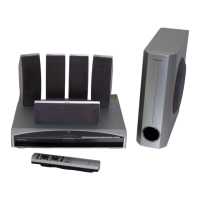
Details on the speaker system and included accessories.
 General
| Audio Channels | 5.1 |
|---|---|
| Power Output | 100 W per channel |
| Frequency Response | 20 Hz - 20 kHz |
| Dimensions | 430 x 330 x 130 mm |
| Weight | 5.5 kg |
| Type | DVD receiver |
| DVD player | Yes |
| Tuner | AM/FM |
| Input Sensitivity | 200 mV |
| Total Power Output | 500 W |
| Inputs | 6 x Audio, 2 x Video, 1 x Optical, 1 x Coaxial |

 To Next Page