10
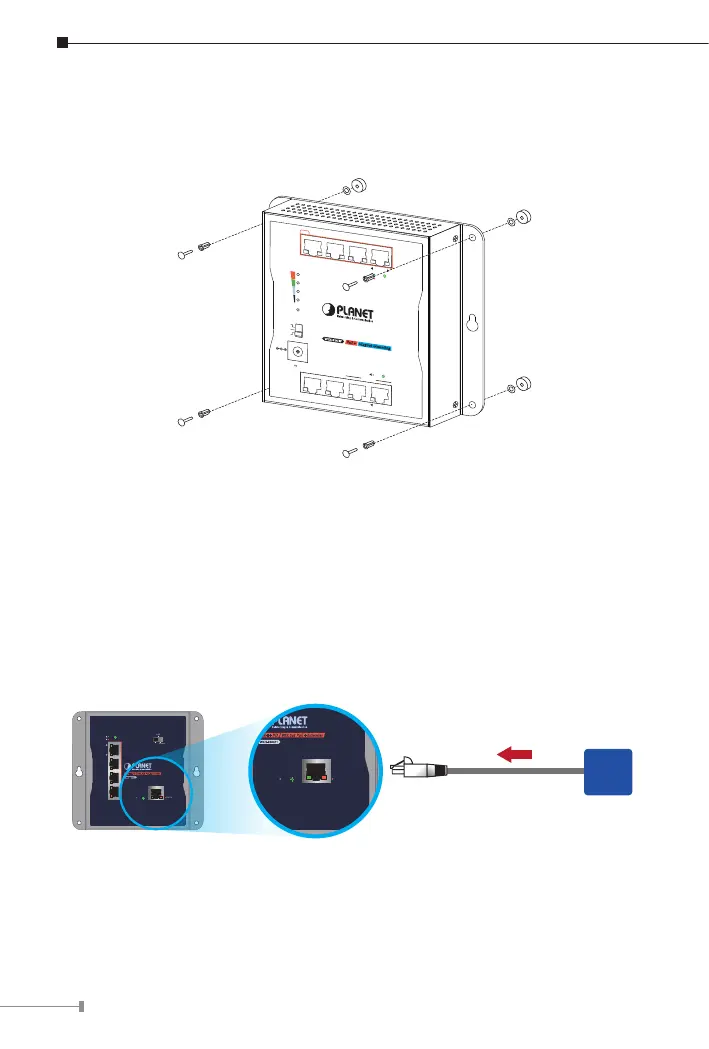
3.3 Magnet Installation
To install the Industrial PoE Extender on a magnetic surface, simply follow the
following diagram:
PoE+
3 421
7 865
Uplink
60W
PoE Usage
45W
30W
15W
PWR
ACTLNK
PoE-in-Use
ACTLNK
WGS-814HP
PoE+
Magnet Mounting
DC Input Range
48-56V
, 1.5A max.
Industrial 8-Port Gigabit
Ethernet Switch with 4-Port PoE+
Standard
VLAN
Extend
3.4 Connecting WGS-E304PT to PSE
The Industrial PoE Extender has ve RJ45 ports of which one is the PoE++
In port (Port 5) connected to the PSE and the other four are PoE+ Out ports
connected to the PDs.
Step 1: Connect a standard Cat5e/6 UTP cable from a remote PSE, such as
802.3bt PoE++ switch, to the “PoE In” port of the Industrial PoE
Extender.
802.3bt/Ultra PoE input
PoE
PSE
WGS-E304PT
PoE
++
PD 802.3at PoE
+
Extender
5
4
3
2
1
VLAN
ExtendStandard
ACTLNK
PoE-in-Use
ACTLNK
PoE IN
WGS-E304PT
PoE
++
PD 802.3at PoE
+
Extender
5
4
3
2
ACTLNK PoE IN



 To Next Page