4
2. Hardware Introduction
This section describes the functionalities of the Industrial PoE Extender’s
components.
2.1 Front Panel
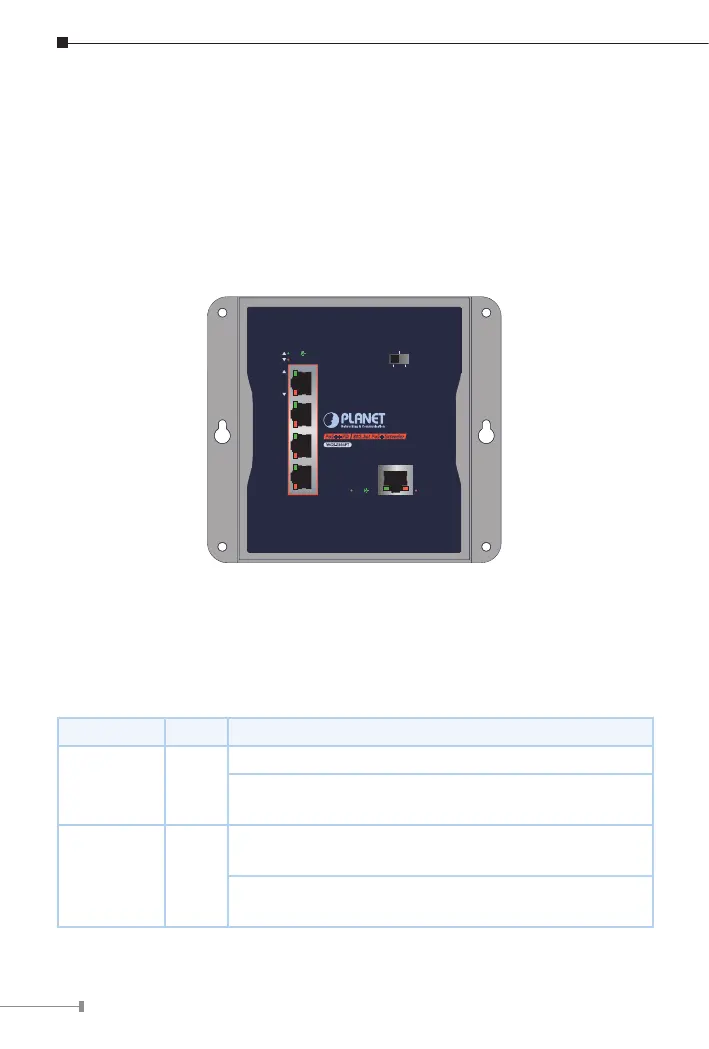
Figure 2-1 shows the front panel of Industrial PoE Extender.
WGS-E304PT
PoE
++
PD 802.3at PoE
+
Extender
5
4
3
2
1
VLAN
ExtendStandard
ACTLNK
PoE-in-Use
ACTLNK
PoE IN
Figure 2-1: WGS-E304PT Front Panel
2.2 LED Indicators
PoE Input Port (Port 5)
LED Color Function
LNK/ACT Green
Lights to indicate the port is linked up.
Blinks to indicate that the WGS-E304PT is actively
sending or receiving data over that port.
PoE-in-Use Amber
Lights to indicate the port is obtaining PoE power
from PSE devices.
OFF to indicate the port is not obtaining PoE power
from PSE devices.



 To Next Page