9
3.2 DIN-rail Mounting Installation
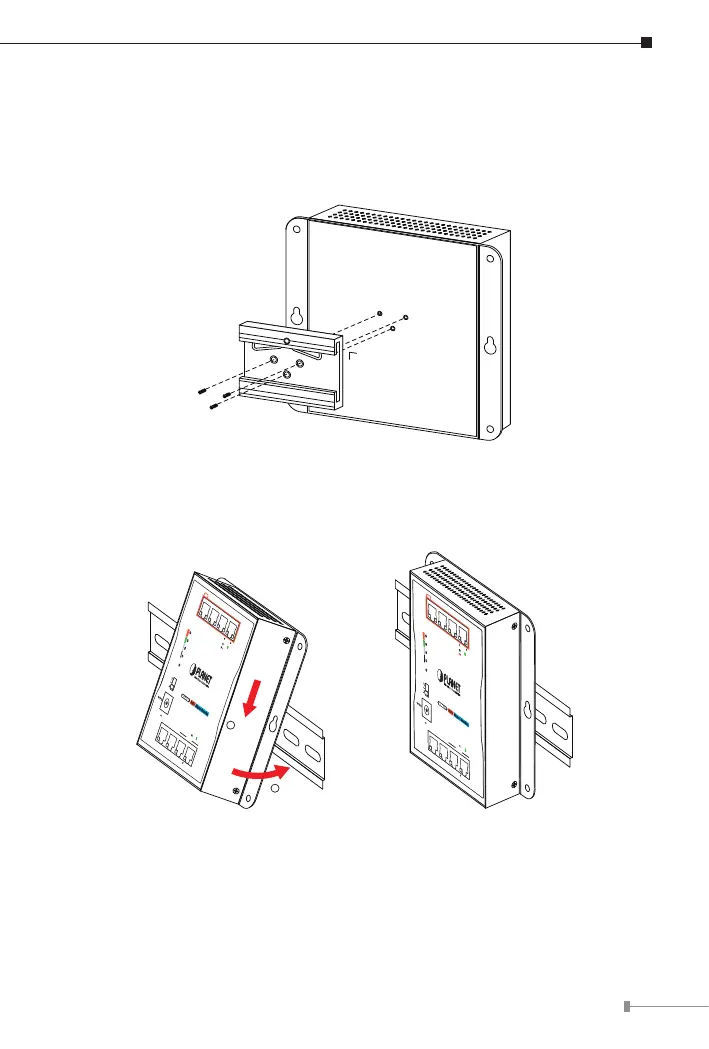
The DIN-rail kit is included in the Industrial PoE Extender package. To hang up
the Industrial PoE Extender, follow the steps below:
Step 1: Screw the DIN-rail bracket on the Industrial PoE Extender.
Step 2: Lightly press the bottom of DIN-rail bracket into the track.
Step 3: Check whether the DIN-rail bracket is tightly on the track.
3 421
7 865
Data+ Power
Data
120
PoE Power
Usage (W)
90
60
30
PWR
8-Port Gigabit Ethernet Switch
with 4-Port PoE+
ACTLNK
1000
ACTLNK
PoE In-Use
1
Push
2
Click
3 421
7 865
Data+ Power
Data
120W
PoE Usage
90W
60W
30W
PWR
ACTLNK
1000
ACTLNK
PoE-in-Use
Industrial 8-Port Gigabit Ethernet
Switch with 4-Port PoE+
WGS-804HP
PoE
Magnet Mounting
V+
Ground
DC Input Range
48-56V
, 3A max.
PoE+
3 421
7 865
Uplink
60W
PoE Usage
45W
30W
15W
PWR
ACTLNK
PoE-in-Use
ACTLNK
WGS-814HP
PoE+
Magnet Mounting
DC Input Range
48-56V
, 1.5A max.
Industrial 8-Port Gigabit
Ethernet Switch with 4-Port PoE+
Standard
VLAN
Extend
PoE+
3 421
7 865
Uplink
60W
PoE Usage
45W
30W
15W
PWR
ACTLNK
PoE-in-Use
ACTLNK
WGS-814HP
PoE+
Magnet Mounting
DC Input Range
48-56V
, 1.5A max.
Industrial 8-Port Gigabit
Ethernet Switch with 4-Port PoE+
Standard
VLAN
Extend



 To Next Page