12
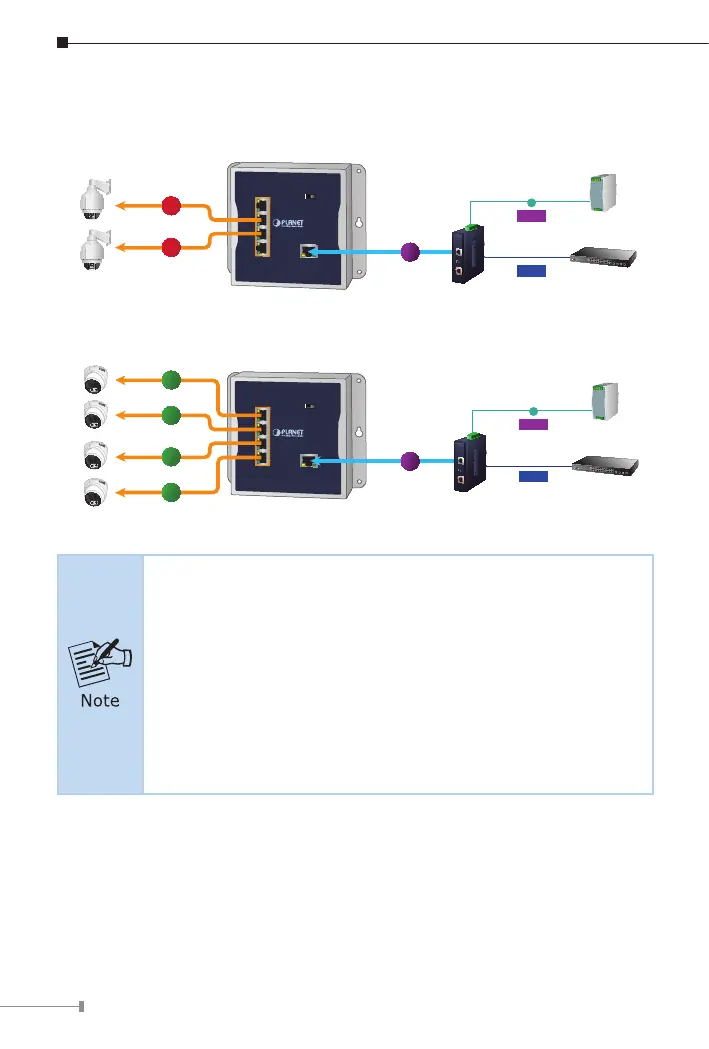
Step 3: Once the Industrial PoE Extender detects the existence of an IEEE
802.3at/af device, the PoE-in-Use LED indicator will be lit steadily,
showing it is providing power.
PoE PTZ
IP Camera
PoE Dome
IP Camera
IEEE 802.3at PoE+
IEEE 802.3at PoE+
15w
15w
15w
15w
25w
25w
95w
802.3bt PoE++
95w
802.3bt PoE++
Industrial
Switch
Power
Supply
Data
Power
DC Input
DC
Industrial
Switch
Power
Supply
Data
Power
DC Input
DC
WGS-E304PT
WGS-E304PT
1. If the connected device is not fully complying with IEEE
802.3af/at standard or in-line power device, the PoE-in-Use
LED indicator of the Industrial PoE Extender will not be lit
steadily.
2. According to IEEE 802.3af/at standard, the Industrial PoE
Extender will not inject power to the cable if not connecting
to a standard IEEE 802.3af/at device.
3. DO NOT connect any PSE to ports 1 to 4 of the Industrial
PoE Extender; it may damage the device permanently.



 To Next Page