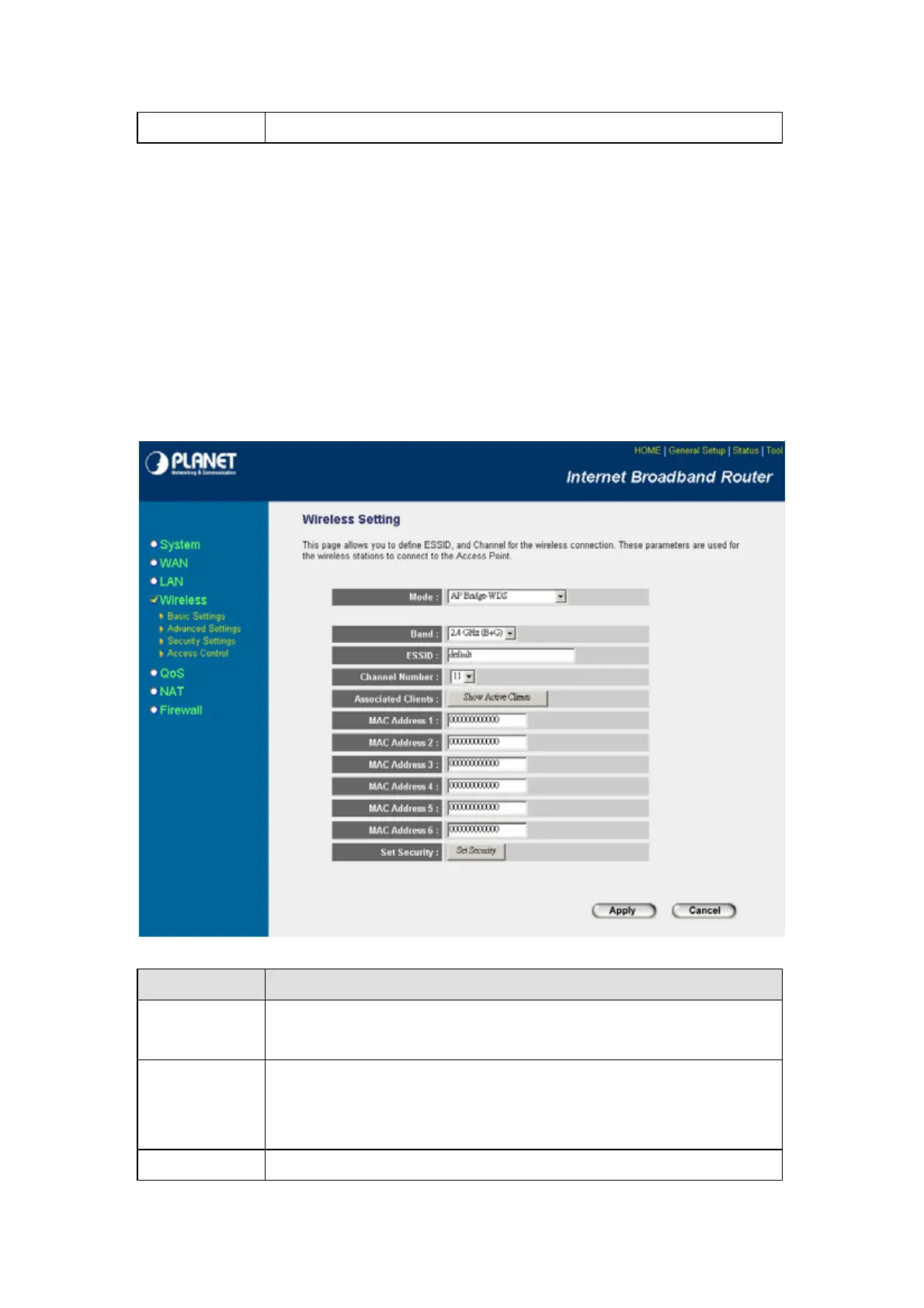
configure the detail settings.
After configuration complete, please click “Apply” button to save the configuration. Then you will see
a screen to prompt you the settings are save successfully. You may press “Continue” for configure
other settings or “Apply” to restart WRT-414 with new configuration.
6.6 AP Bridge - WDS Mode
If you want WRT-414 to bridge to other WRT-414 and provide access for other wireless clients
at the same time, you have to set the WRT-414 to “AP Bridge - WDS”. Simply speaking, “AP
Bridge - WDS” function is the combination of “AP mode” and “AP Bridge-Point to Multi-Point
mode”.
Parameter Description
Mode Shows the current operation mode. You may set WRT-414 to other operating mode
by select other operating mode.
Band
2.4GHz (B): It allows to select the transmit rate up to 11Mbps.
2.4GHz (G): It allows to select the transmit rate up to 54Mbps.
2.4GHz (B+G): It allows selecting the 802.11b and 802.11g data rates.
ESSID The ESSID
u
to 32
rintable ASCII characters
is the uni
ue name identified in a
- 66 -



 To Next Page