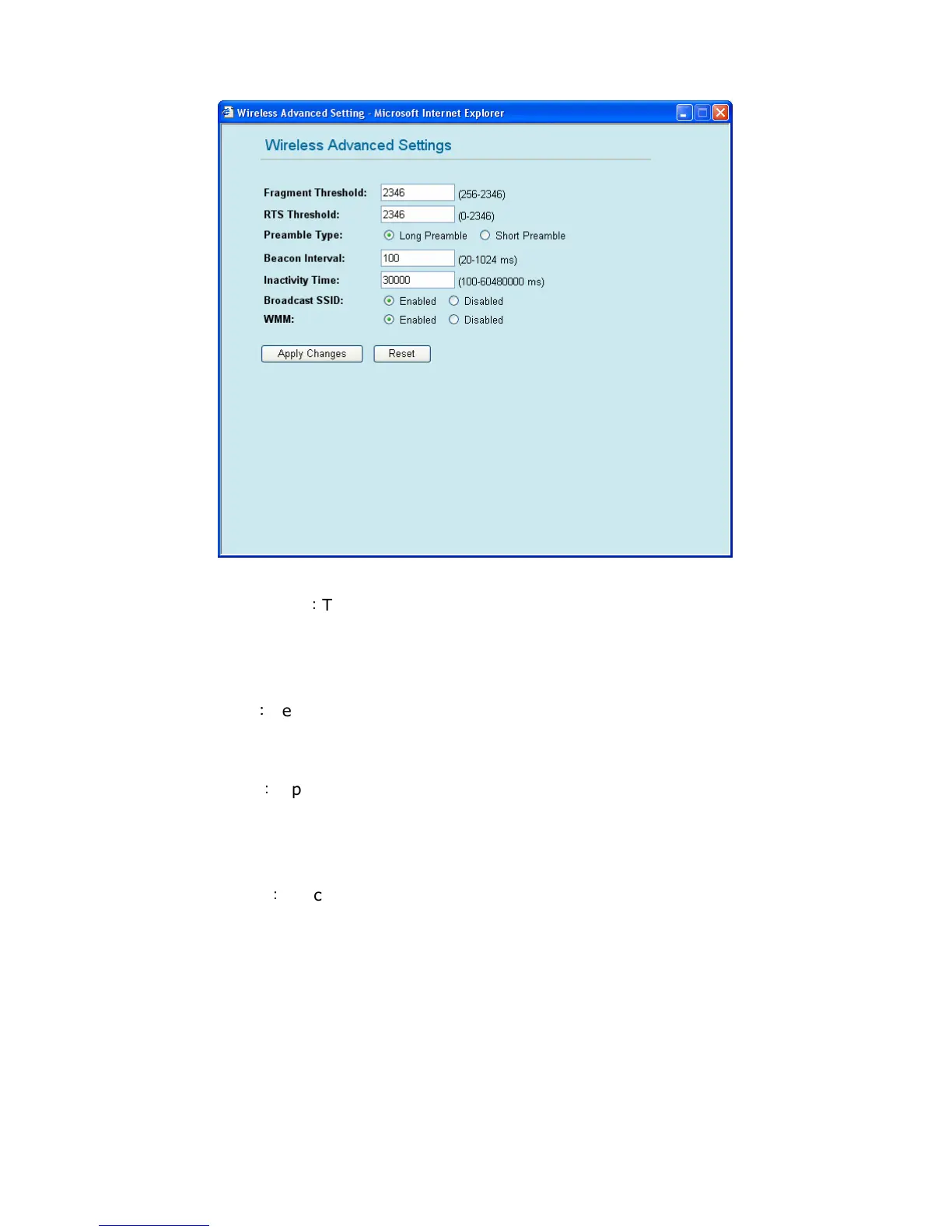
3. Wireless Advanced Settings
Fragment Threshold
:
This value can define the maximum packet sized, so the packets bigger
than this size will be segmented. If you set the lower value, and found there is higher packets
error value, you can set the value higher, however, that may decrease the whole performance of
GW-MF54G2. The default value is 2346, and you can set a value between 256~2346.
RTS Threshold
:
Here you can define the minimum value of RTS (Request to Send) packets and
prevent “Hidden Nodes” problems. Please enter a value between 0~2347, and when the
packets are bigger than the RTS value the function will start to work.
Preamble Type
:
A preamble is a signal used in wireless environment to synchronize the
transmitting timing including synchronization and start frame delimiter. It can also define the
length of CRC (cyclic redundancy check) blocking. There are two Preambles: Long and Short.
When the traffic is heavier, the shorter preamble should be used.
Beacon Interval
:
Beacon Interval is the amount of time between beacon transmissions. Before
a station enters power save mode, the station needs the beacon interval to know when to start
up again and receive the beacon.
Inactivity Time: GW-MF54G2 will disconnect from the network if there are no network actions
within the inactivity time.
Broadcast SSID: If you check the check box of “Disable”, SSID of GW-MF54G2 will not appear
on the other PC’s wireless network list. Therefore, the Wireless Router/AP can block the users
without authentication.
WMM: You can enable or disable this function. GW-MF54G2 supports WMM(Wi-Fi Multimedia)
function. WMM is short for Wi-Fi Multimedia. It is a standard created to define quality of service
(QoS) in Wi-Fi networks. It is a precursor to the upcoming IEEE 802.11e WLAN QoS draft
standard, which is meant to improve audio, video and voice applications transmitted over Wi-Fi.


 To Next Page