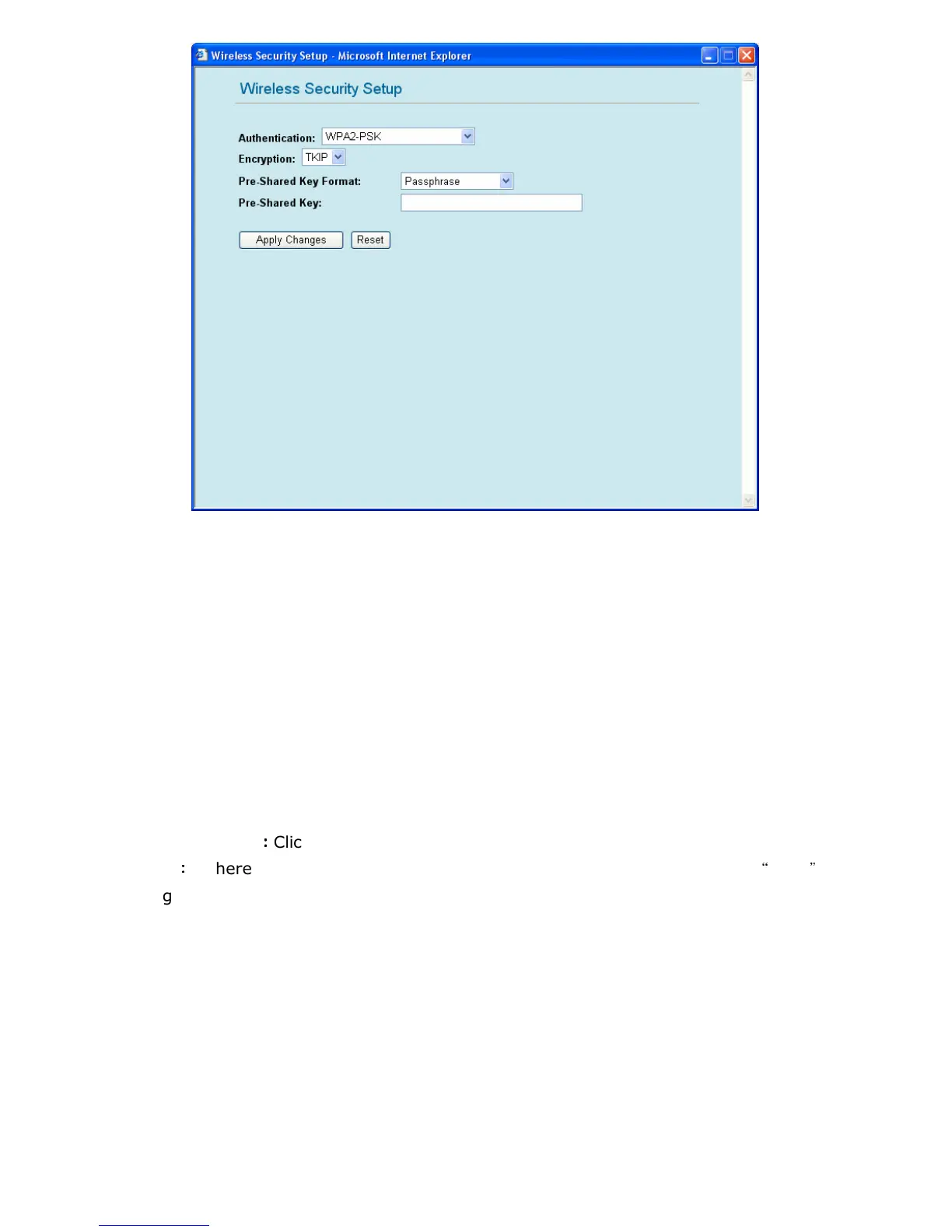
1.7. WPA2-PSK
Encryption: Scroll down the list and choose your encryption. You can choose either TKIP or
AES.
TKIP – It is short for Temporal Key Integrity Protocol. TKIP scrambles the key using a
hashing algorithm and, by adding an integrity-checking feature, ensures that the keys
haven’t been tampered with.
AES – Short for Advanced Encryption Standard, a symmetric 128-bit block data
encryption technique. It works at multiple network layers simultaneously and has a fixed
block size of 128-bits and a key size of 128, 192, or 256-bits.
Pre-shared Key Format: Scroll down the menu to choose either “Passphrase” or “Hex”.
Pre-shared Key: Only computers sharing the same key with the AP can connect with it. The
more random your pre-shared key is, the safer your system is.
Apply Changes
:
::
:
Click this button to save the settings and restart GW-MF54G2.
Reset
:
::
:
If there is anything wrong with the settings you made, you can click
“
reset
”
to
configure the page again.



 To Next Page