11. DDNS
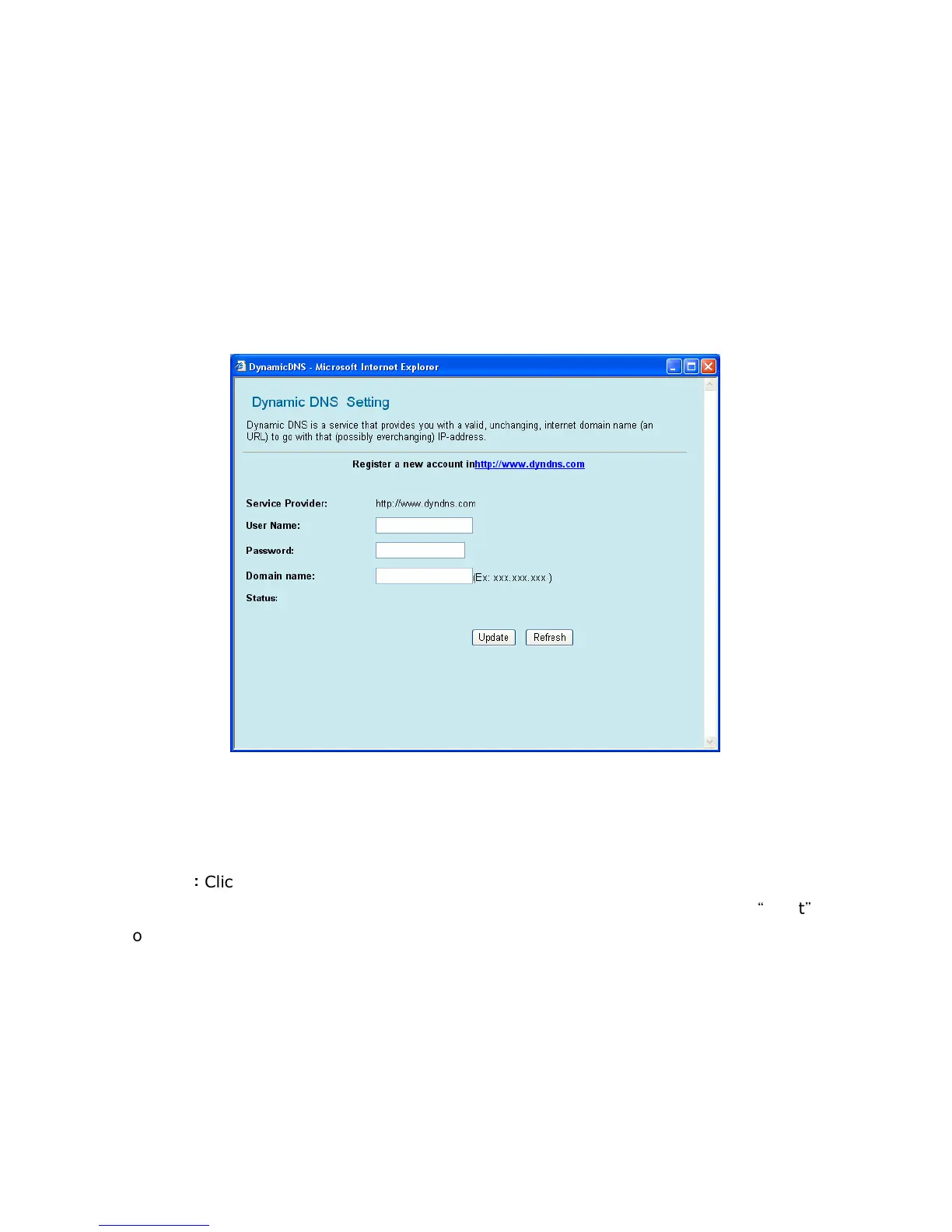
Dynamic DNS can let you connect with one or more DDNS services to update your current dynamic IP
address. To make a WEB server publicly accessible on the Internet, a static global IP address needs to be
assigned to GW-MF54G2. Even when there is an always-on connection, however, disconnection does
occur and the IP address may dynamically change after reconnection. When Dynamic DNS is enabled, the
IP address of the product is reported to a Dynamic DNS server at regular intervals so that it can use the
same static host name even after IP has changed.
GW-MF54G2 supports DynDNS Dynamic DNS services. DynDNS is a free service. Before enabling DDNS
configuration on the product, be sure to access the website and register your user name, password, host
name, and so on.
User Name: Enter the User Name you provided while registering for DDNS services.
Password: Enter the Password you provided while registering for DDNS services.
Domain Name: Select the Domain Name which you registered.
Update
:
::
:
Click this button to save the settings and restart GW-MF54G2.
Reset: If there is anything wrong with the settings you made, you can click
“
reset
”
to
configure the page again.


 To Next Page