4.4. PPTP
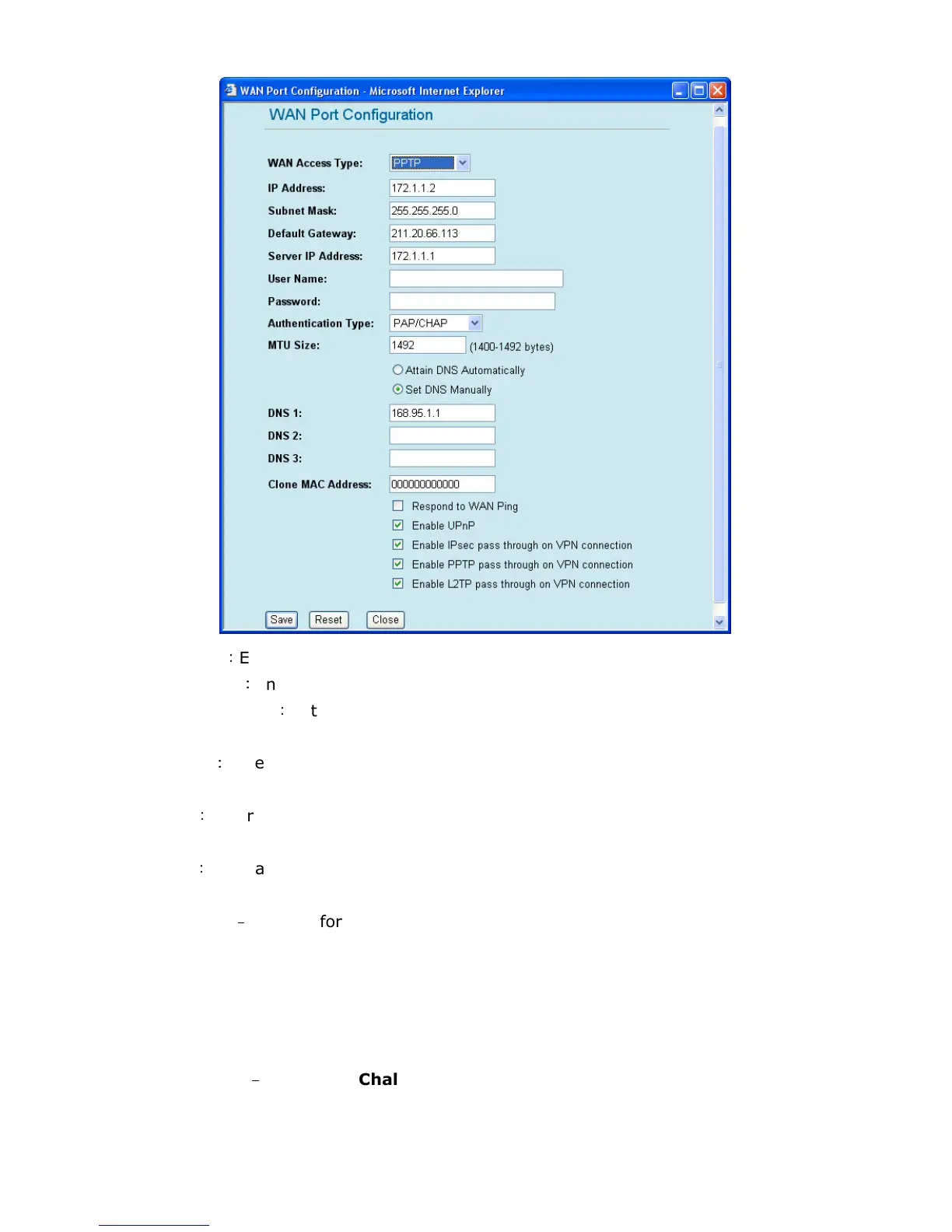
If you are connecting to the Internet via PPTP, please configure GW-54MFG2 as the following steps.
IP Address
:
Enter the IP address provided by your ISP.
Subnet Mask
:
Enter the Subnet Mask address provided by your ISP.
Default Gateway
:
Enter the Gateway address provided by your ISP.
Server IP Address: Enter the Server IP address provided by your ISP.
USER Name
:
Enter the User Name provided by your ISP. (The User Name must be alphanumeric
characters and case sensitive.)
Password
:
Enter the Password provided by your ISP. (The password must be alphanumeric
characters and case sensitive.)
Auth Type
:
You may choose PAP, CHAP or MSCHAP-v1/ MSCHAP-v2 authentication to enhance
the security of data transmission.
PAP
–
––
–
Short for Password Authentication Protocol, the most basic form of
authentication, in which a user's name and password are transmitted over a network and
compared to a table of name-password pairs. Typically, the passwords stored in the table
are encrypted. The Basic Authentication feature built into the HTTP protocol uses PAP. The
main weakness of PAP is that both the username and password are transmitted "in the
clear" -- that is, in an unencrypted form.
CHAP
–
––
–
Short for Challenge Handshake Authentication Protocol, a type of
authentication in which the authentication agent (typically a network server) sends the
client program a random value that is used only once and an ID value. Both the sender
and peer share a predefined secret.
MSCHAP-v1/ MSCHAP-v2: MSCHAP-v1/ MSCHAP-v2 are the Microsoft’s version of



 To Next Page