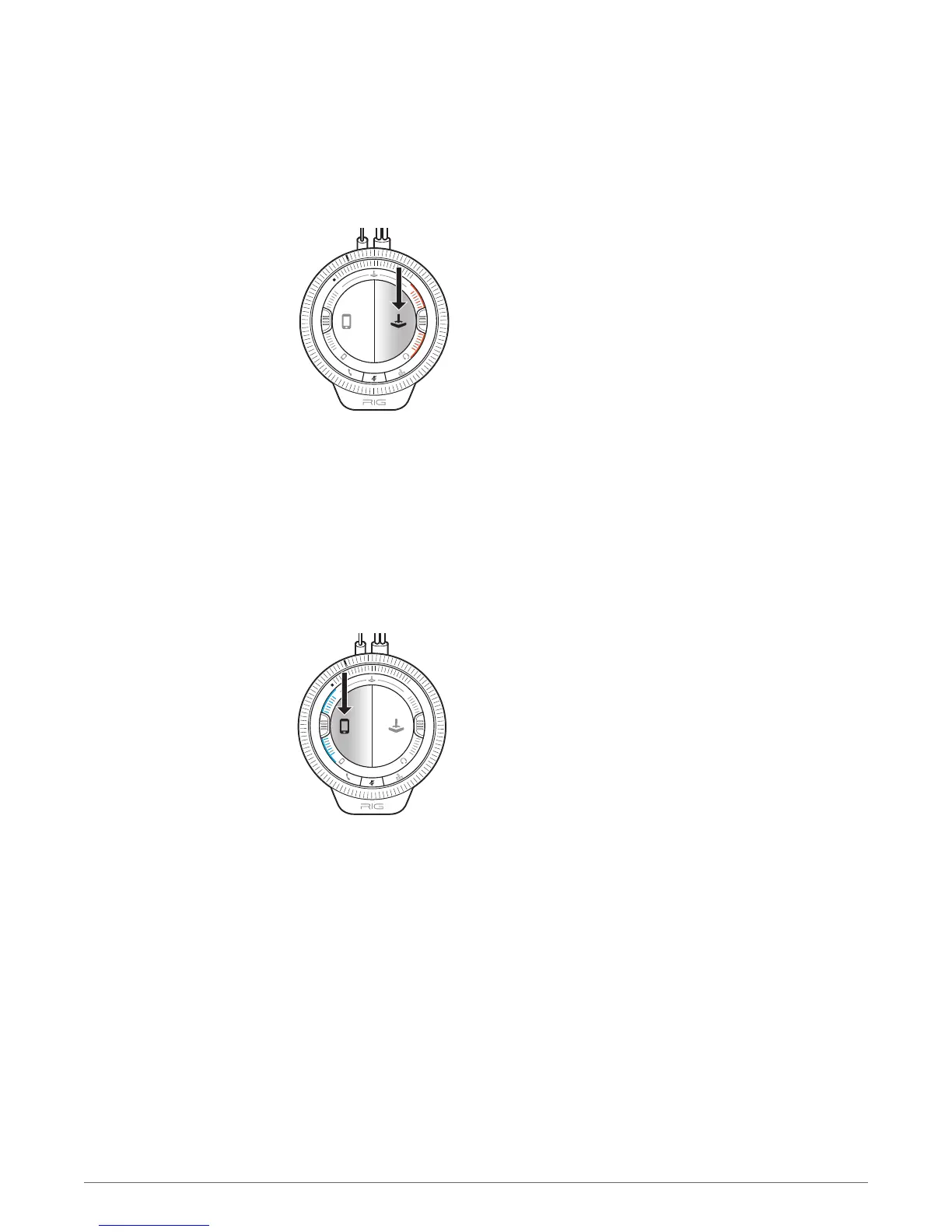
Find a good balance of game and voice audio by adjusting the Game/chat sound balancer on
the right side of the mixer (over the orange LEDs). Remember that the 3 o'clock position will
enable equal volume of both game and voice audio signal. Sliding the control upward makes
game sound louder and voice (game chat) quieter. Sliding the control downward increases
voice (game chat) while making game audio quieter.
When the Mic rocker switch is deployed to the Mobile mode (blue), the Game/mobile sound
balancer is active and controls the balance of game audio to mobile audio (Rx). Remember that
the 9 o'clock position enables each game and mobile audio source to be heard at full volume.
Sliding the control upward makes game sound louder and mobile audio quieter. Sliding the
control downward increases mobile volume while making game audio quieter.
PRO TIP: Most people will prefer game sound to be present while taking a mobile call, but not
as loud as when they are playing normally. The best setting for the Game/mobile sound
balancer is some where between 9 o'clock and the bottom of the slider travel. This way, game
sound is always lowered automatically when deploying the Mic rocker switch to the Mobile
mode and accepting a call. If you listen to music while gaming, attenuate the volume by using
the control on your mobile device.
To mix music with game audio, play music from a connected mobile device's music player or
any other choice of media app. The Call button on the mixer acts as a play/pause and track
forward/back control with most mobile devices.
NOTE The phone volume must be set loud enough to hear through standard headphones/earbuds in
order for the mixer to amplify the sound. A good rule of thumb is to start out from at least 50% or
greater volume on the connected mobile device.
PRO TIP Music isn't the only thing that can be mixed in and smartphones aren't the only devices
that are compatible. Consider the possibilities: watching a Twitch.tv stream via a connected laptop,
Skype video chat via connected tablet, and listening and playing along with walkthroughs on YouTube
instead of pausing gameplay to watch the video. RIG enables a dedicated mobile channel for audio
and chat - take advantage! Play more. Pause less.
Game/mobile sound
balancer
Mixing and controlling
music from a mobile
device
19



 To Next Page