12 | F200 and F300 User Manual
6 - Calibrating your Platemeter
To ensure the Platemeter accurately measures the compressed
height of pasture, the counter must be calibrated. This
requires setting a base level of zero so measurements can be
benchmarked against this. If the counter does not return to
zero after each ‘plonk’ it will not record the measurement and
the counter won’t beep.
If the counter is removed from the black tube or receives
a severe knock it may jump a groove on the steel shaft,
which will put the counter out of calibration and it will need
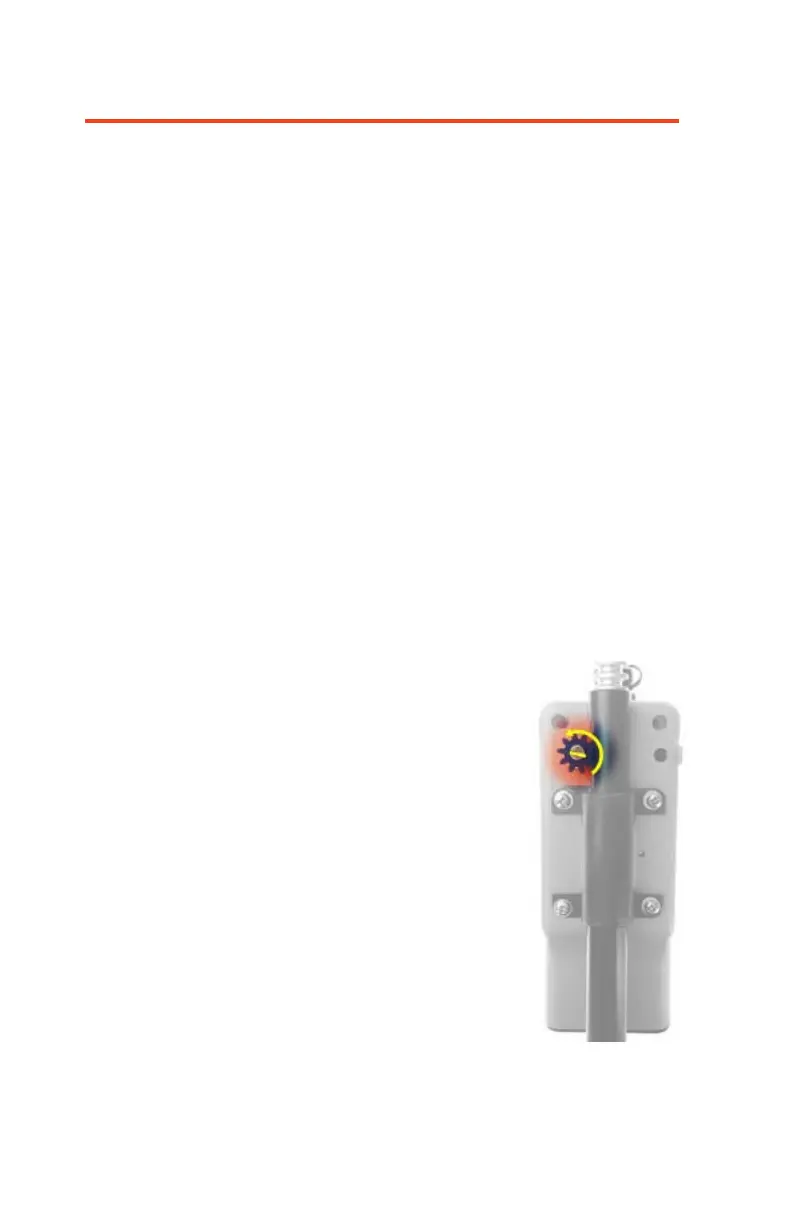
to be recalibrated. You’ll need a small flat blade screwdriver
that will fit into the slot of the silver shaft at the back of the
counter.
How to calibrate:
- Ensure the unit is switched off plate is fully down on a
firm flat surface and the .
- Hold down the COUNT button
while switching the unit on. The
display will change to CAL briefly
and display a colon ‘:’ followed by a
number. Let’s assume you see ‘: 5’
when you switch on.
- The colon signifies that it is in fine
calibration mode.
- Use a flat blade screwdriver and
turn the silver shaft within the cog,
clockwise (looking at the display)
until the display reads ‘0’. NB: The
cog and steel shaft must remain
stationary.


 To Next Page