Docking Station with Video User’s Manual
8
B. On Mac OS X
® 10.4+
Drivers for the Mac are beta level, with significant limitations including disabling of the
network interface on the docking station. Limitations may change or improve over time.
We recommend downloading and installing the latest drivers from http://displaylink.com/
C.
On Windows
®
XP / Windows Vista
®
For legacy Windows 2000 drivers and for the latest XP and Vista drivers, we
recommend visiting http://displaylink.com/ for the latest graphic drivers and
http://www.asix.com.tw/download.php (choosing “USB to Fast Ethernet” family and
“AX88772” product) for the latest networking drivers. To instead use the drivers
provided on CD:
1. Insert the provided CD into your disc drive, find the Asix Network Driver, and click
setup.exe to install drivers for the network function of the dock.
2. Now, locate and double-click the DisplayLink Windows driver installer to install
drivers for the DVI/VGA graphics function of the dock.
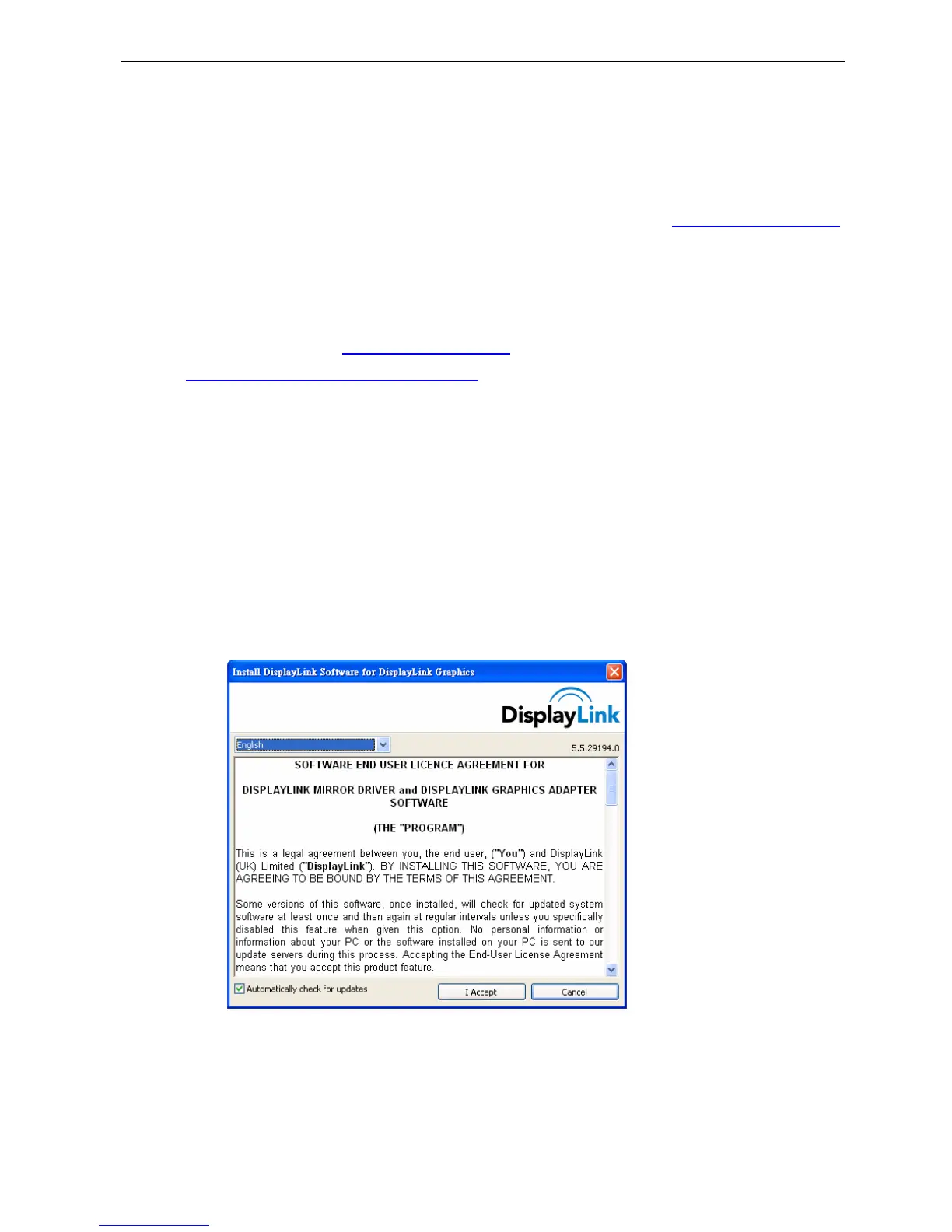
3. Please click I Accept after reading the statement of “SOFTWARE END USER
LICENCE AGREEMENT FOR DISPPLAYLINK MIRROR DRIVER and
DISPLAYLINK GRAPHICS ADAPTER SOFTWARE”.
Do not connect the docking station to your computer at this stage. Please
proceed to next section to continue with the video component installation.
4. Please wait while Windows configures DisplayLink Core Software. Your screens
may temporarily go black or flash during this process.


 To Next Page