Page 10/22
4 Switching the “plusoptiX S16” on and off and adjusting settings
Press the On / Off button briefly to turn the device on. The screen will come on immediately
and the “plusoptiX S16” will start up. After approx. 30 seconds, the “plusoptiX S16” is ready
to operate. The first time you start the device up, you will see the data and time settings
page.
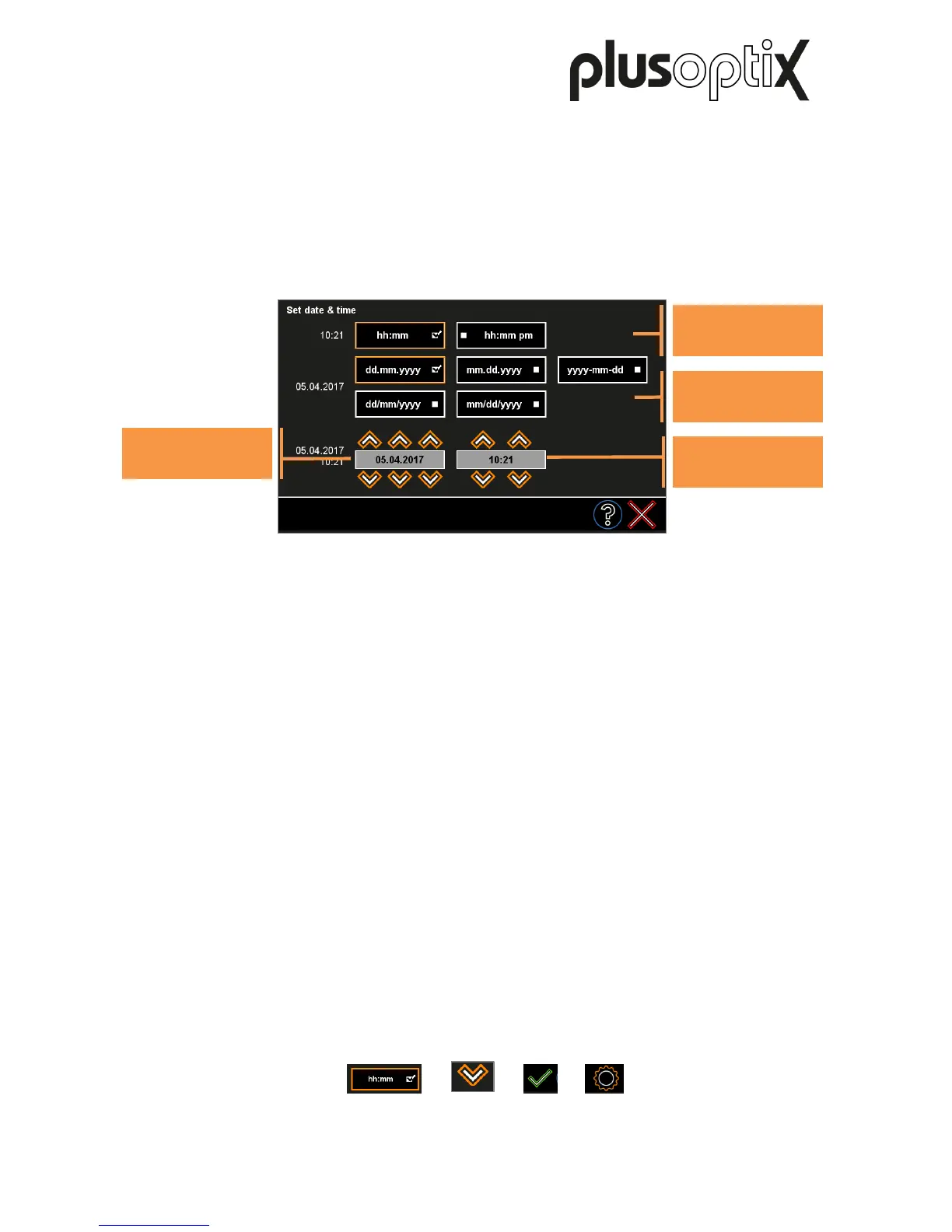
The selected time and date format is highlighted (1). Using the orange arrows (2), set the
right date and current time. Confirm your entries with the green checkmark (3). The date,
time and display format can be changed at a later date in the settings (4).
Zum Ausschalten drücken Sie kurz den Ein-/Aus-Taster. Der „plusoptiX S16“ fährt dann
herunter.
More information about adjusting the settings and implementing a WLAN connection can be
found in short manual 1 on our homepage (www.plusoptix.com), under support.
1) 2) 3) 4)



 To Next Page