User manual 8
Engli sh
Power supply and installation testing
» Check the cables and connections again
» Close the gate manually
» Connect the system to a 10A power supply
» Press the number 1 key on the remote control
» The gate should open and stop when it reaches the end of the race
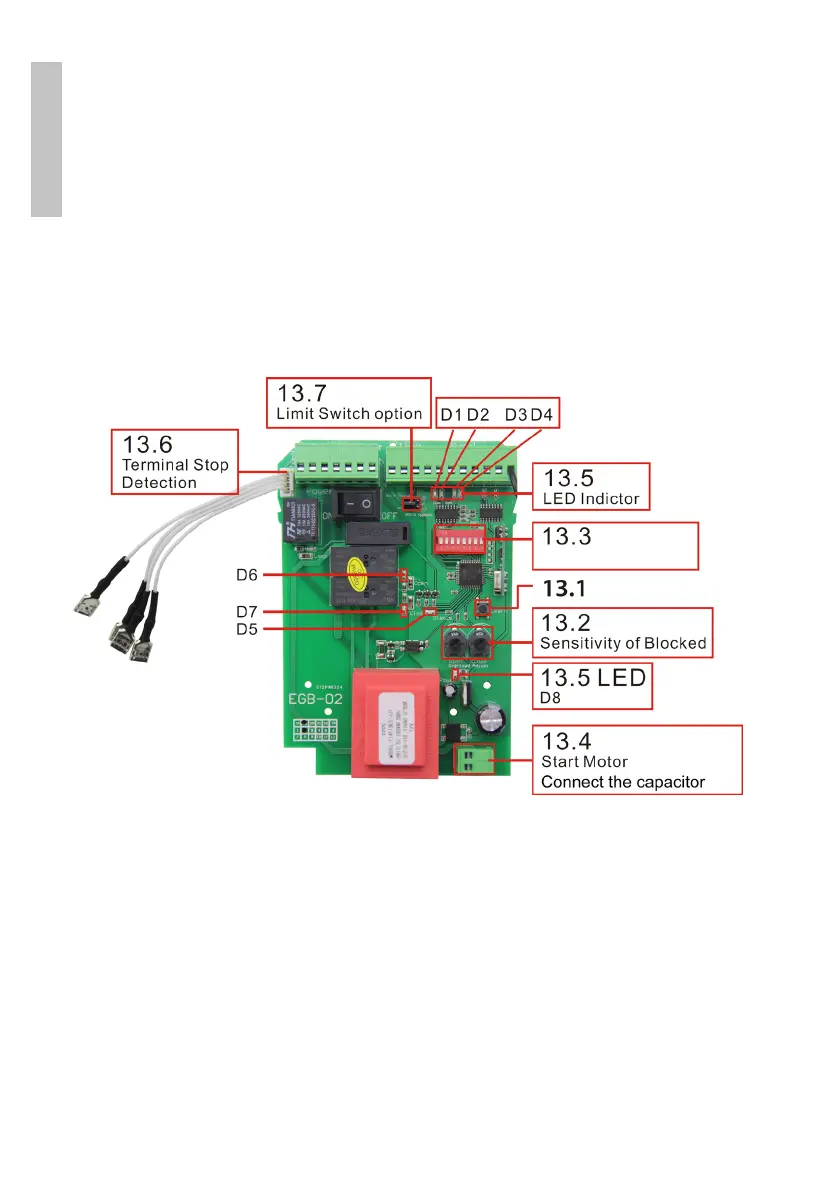
Mainboard
13.1 - Paring remote control
Press the LEARN button on the board (13.1). The D5 LED will flash for 10
seconds. During this time, press any key on the remote control. If the code
has been learned, the D5 LED will flash twice. The remote control is now
paired.
If no button is pressed, the D5 LED will turn o after 10 seconds, and the
system will automatically exit the learning mode.
Hold down the LEARN button for 6 seconds, the D5 LED will flash, release



 To Next Page