Home
Pocketbook
eBook Reader
Basic Lux 4
Page 18
Pocketbook Basic Lux 4 - Page 18
103 pages
Manual
Save Page as PDF
To Next Page
To Next Page
To Previous Page
To Previous Page
Loading...
Getting Started
18
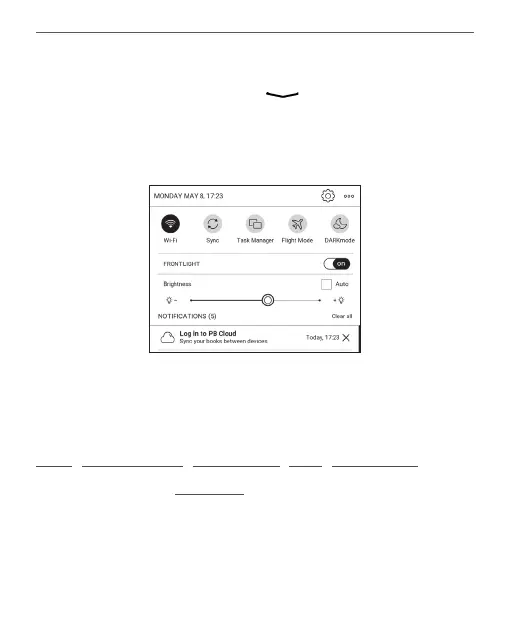
Notification panel gives an easy access to configuration of
Wi-Fi
,
T
ask Manager
,
Flight Mode
,
Sync
,
DARKmode
of net
-
work services and
Frontlight
.
Notification panel
T
ouch or slide down the icon
to open a
Notification
panel
.
17
19
Table of Contents
Main Page
Table of Contents
2
Tatle TT Ttntents
3
Tatle TT Ttntents
4
Safety Precautions
6
Appearance
12
Technical Specifications
13
Getting Started
14
Charging Battery
14
Device Management
16
Main Menu Overview
17
Gestures
19
Working with On-Screen Keyboard
20
Frontlight
22
Connecting to the Internet
23
Inserting Micro SD Card
25
Applications
27
Library
28
Store
28
Browser
30
Notes
32
General
36
Calendar & Clock
36
Calculator
36
Gallery
36
Photo Frame
37
RSS News
39
Games
40
Klondike
40
Sudoku
40
Chess
41
Scribble
41
Services
42
Dropbox Pocketbook
42
Send-To-Pocketbook
44
Reading Books
49
Gestures in Reading Mode
50
Reading Menu
51
Adjust Brightness in Reading Mode
52
Contents
53
Bookmarks
54
Dictionary
55
Note
58
Settings
60
Following Links
65
Loading Files
65
Library
71
Pocketbook Cloud
74
Settings
79
Wi-Fi
79
Accounts and Synchronization
80
Personalize
84
Languages
88
Related product manuals
Pocketbook Touch Lux
96 pages
Pocketbook Basic Lux
68 pages
Pocketbook Color Lux
89 pages
Pocketbook Touch Lux 5
94 pages
Pocketbook Touch Lux 4
92 pages
Pocketbook Basic Lux 3
78 pages
Pocketbook Touch Lux 2
95 pages
Pocketbook Basic Lux 2
62 pages
Pocketbook InkPad 4
110 pages
Pocketbook Color
100 pages
Pocketbook Touch HD
95 pages
Pocketbook Touch HD 3
103 pages















 To Next Page