20
Importance: The Protective cap (e) must be inserted back and
cover the Utility knife (d) to prevent any danger from the Utility
knife (d). Beware hands/fingers to get injury by the exposed
Utility knife (d) when the Protective cap (e) is removed.
Note: Cleaning Performance may vary according to hair type
(human or animal) and length.
Note: It is recommended to clean the roller brush after each use to
have a better result.
Stand
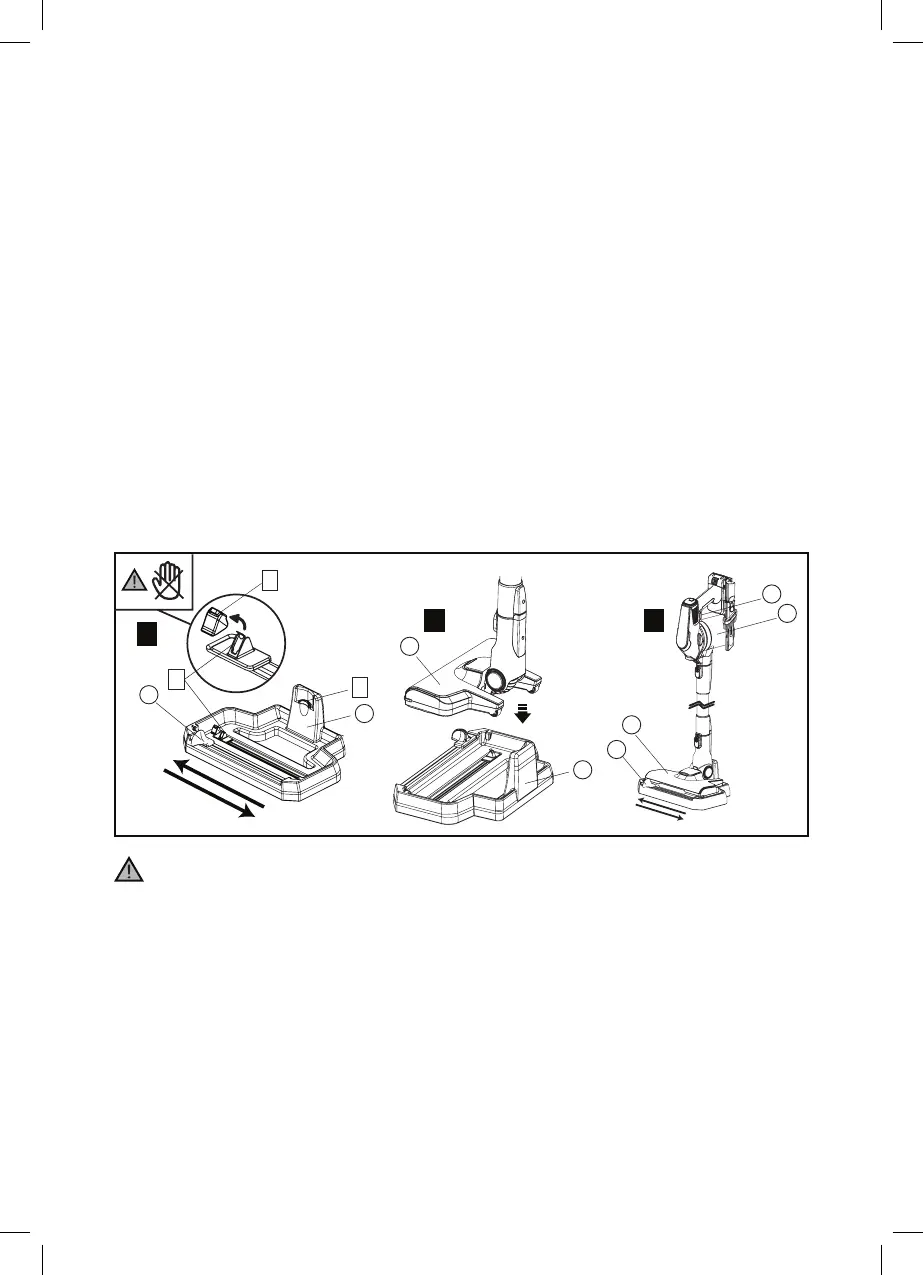
1. Before use, remove the Protective cap (e) from the Utility knife (d).
* After each cleaning of the roller brush, insert back the Protective
cap (e) to cover the Utility knife (d).
2. Place the stick vacuum cleaner on the Stand (X). Ensure the Floor
Nozzle (S) is inserted stably on the Hook (C) of the Stand (X). The
floor brush surface is horizontal but not tilting.
3. Turn on the vacuum cleaner by pressing the On/O switch (G) once.
Check the roller brush is rotating, then slowly slide the Stand slider
button (W) left and right 5 cycles or above.
4. Most of the dust and hair are cut by Utility knife (d) and sucked into
the Dust container (D).
5. After each cleaning, insert back the Protective cap (e) to cover the
Utility knife (d).
S
X
X
W
c
d
e
G
S
D
W
1
2 3



 To Next Page