24
PRODUCT SPECIFICATIONS
Model : POVC10ANIMAL
Battery : 21.6V Li-ion
Adaptor :
Input: AC 100-240V~ 50/60Hz
Output: DC 27V 500mA
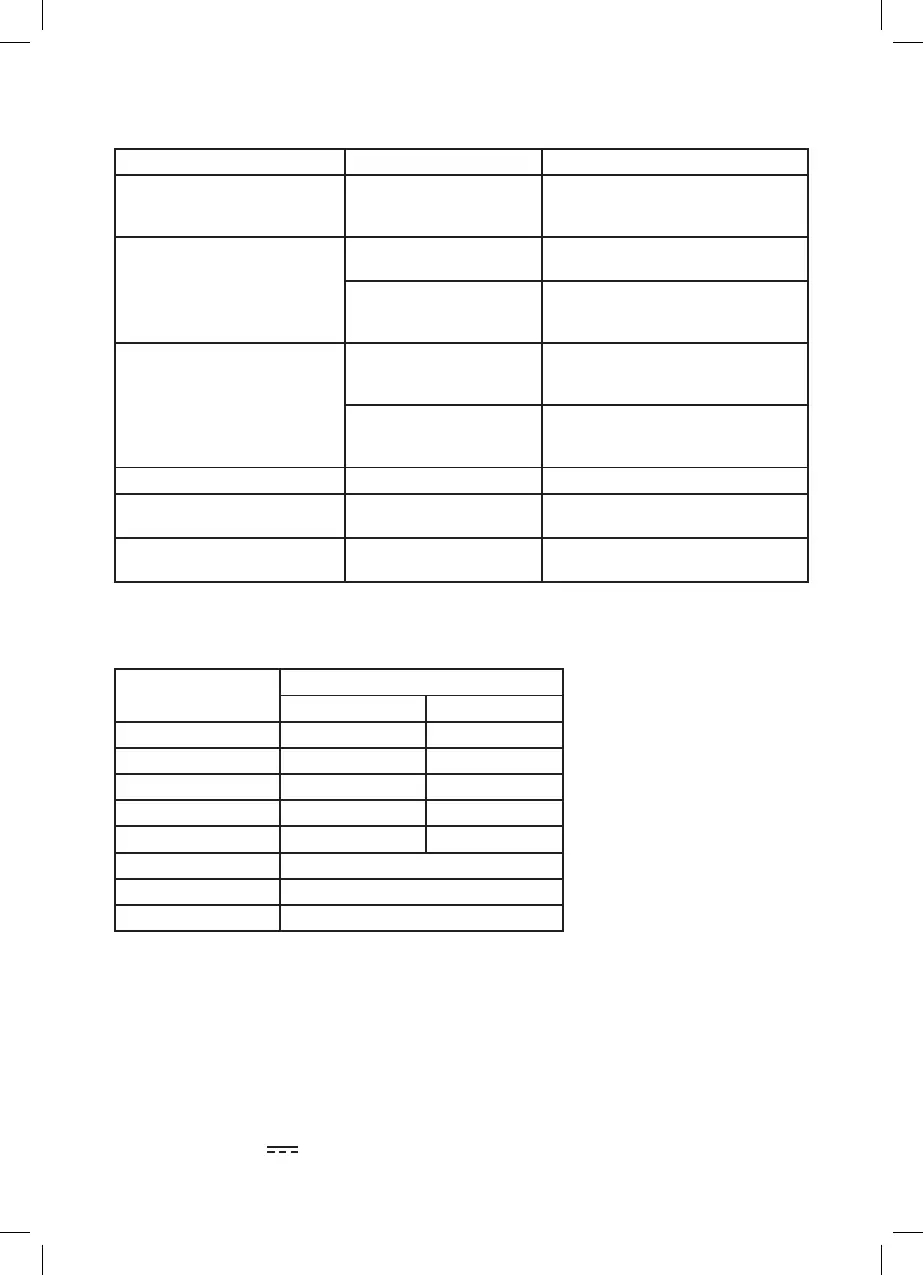
STATUS
LED Indication
RED BLUE
Power ON OFF ON
Low Battery OFF Flashing
Out of Battery Flashing OFF
Charging OFF Breathing
Charge complete OFF ON
Roller brush jam Red on + Purple flashing
Main motor jam All LED o after few seconds
Battery failure Red & Blue alternative flashing
TROUBLE SHOOTING
INDICATOR LIGHT STATUS
Problem Possible cause Solution
The vacuum cleaner will not start
The vacuum cleaner has not
been charged
Make sure the vacuum cleaner has been
fully charged for using the first time or if
it has not been used for a long time.
The vacuum cleaner is not
charging
The power switch is not
turned on
Make sure the power switch of main
power supply is turned on.
The power cord is damaged
Do not use a damaged power cord. Contact
any authorized repair department for
maintenance.
The suction power is decreasing The crevice tools or tube may
be blocked
Check that there are no blockages in the
crevice tools and/or tube. If so, clear the
blockages before using.
Filter is dirty Clean the filter. It is recommended to
replace the filter to maintain maximum
performance.
Vacuum cleaner is over heating Filter is dirty Check the filter and clean o any dirt.
The battery/charging indicator
light is blinking
The vacuum cleaner is out
of power
Recharge the vacuum cleaner to its full
capacity. The light will stop blinking.
Device turns o, charging indicator
is blinking red/ purple
Roller brush is jammed Clean the brush



 To Next Page