15
1) date,
2) time,
3) measurement from 1 sensor (T1),
4) battery voltage,
5) power supply,
6) name of file
9 ALARMS
Type of alarms depends on set parameters set in application AVIA
9.1 Temperature / humidity
User will be notified in case of:
• Damage of sensor 1 or sensor 2 (indications transcend over the acceptable operating range of
sensor),
• Values from sensor 1 or 2 transcend over the acceptable operating range set in parameters-
alarms event and the time set in column ‘delay’ passed by.
• Return of the value on sensor 1 or 2 to the set temperature and acceptable range.
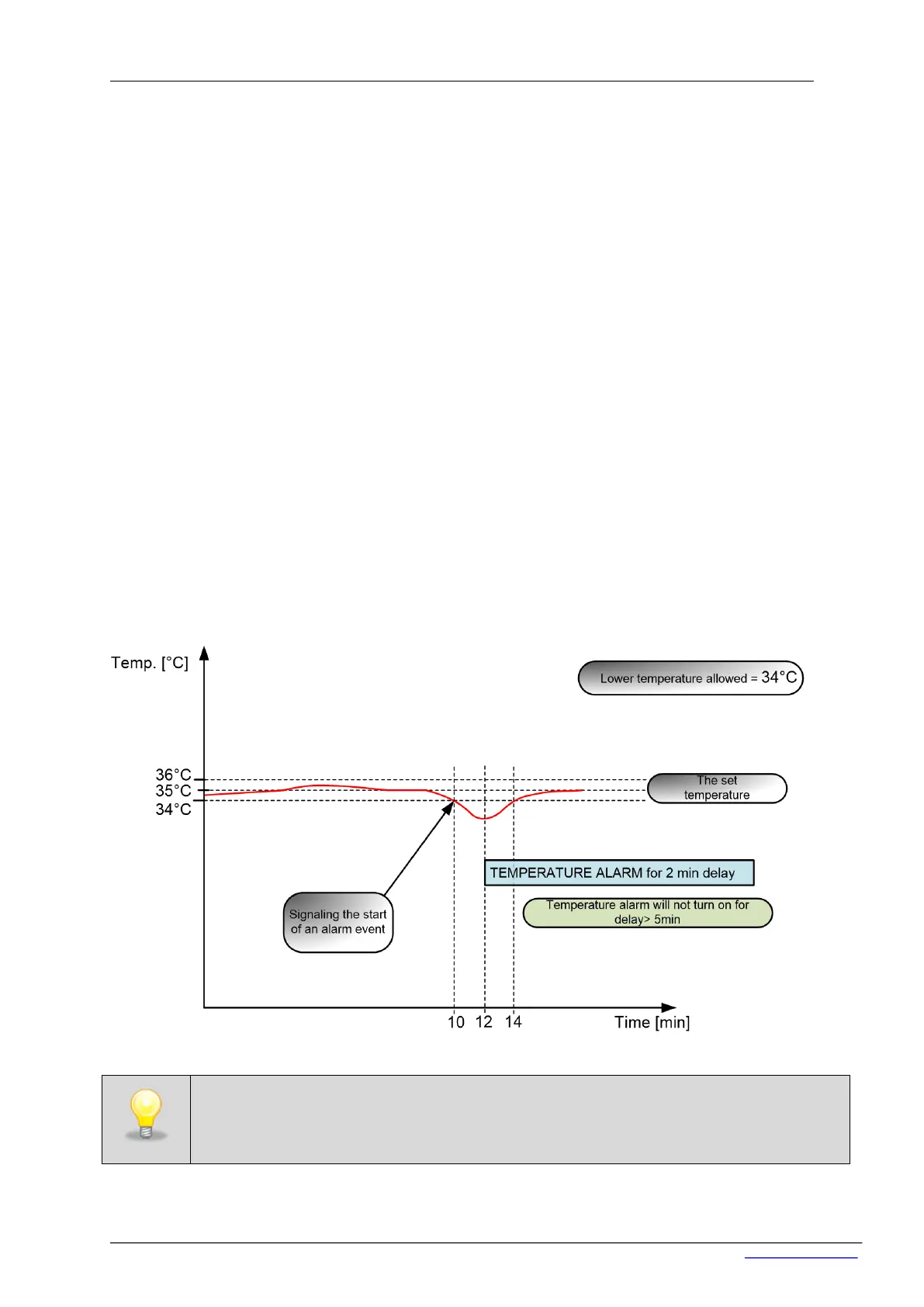
If the ‘delay’ is set e.g to 5 min (in case temperature will exceed), the alarm will not turn on if the
temperature value will return to acceptable range in faster than 5 minutes (see chart below).
By setting the delay properly you can prevent unnecessary alarms caused by e.g opening the
door to load the samples or defrosting function in the refrigerator.


 To Next Page