Instruction manual RT 2014
POL-EKO-APARATURA sp.j. • ul. Kokoszycka 172 C • 44-300 Wodzisław Śl. • tel./fax +48/ 32 453 91 70 • e-mail info@pol-eko.com.pl
25
ATTACHMENT 1 INSTALLATION OF USB DRIVERS FOR
WINDOWS 7
When you connect your device to your computer via USB, the computer detects the new hardware. If
the USB drivers have not been previously installed, go through the installation process. Here is the
example installation on Microsoft Windows 7.
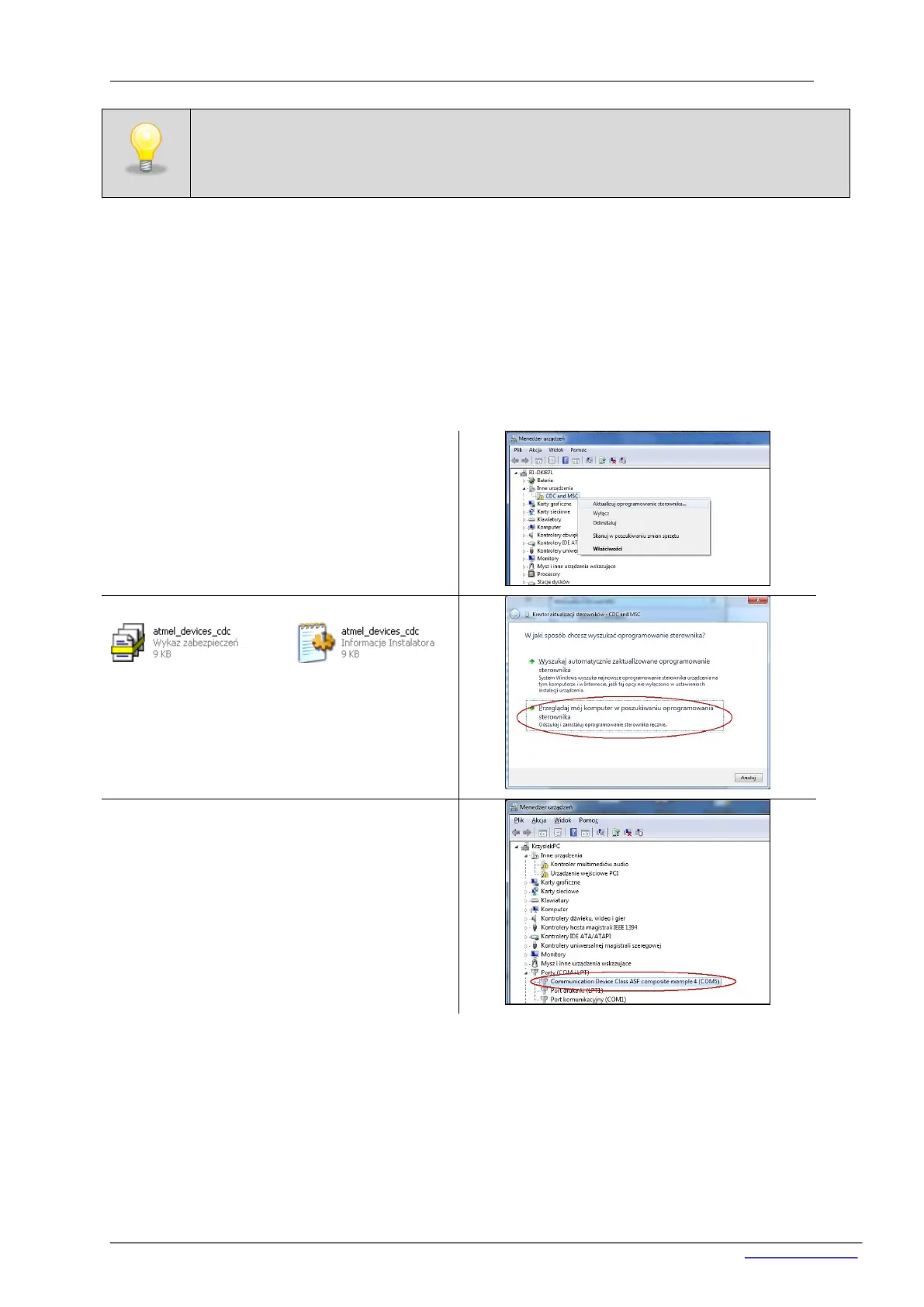
Go to Device Manager (right click on My Com-
puter icon/Properties/Device Manager), choose
position ‘CDC and MSC’ (right click) and go to
‘Update driver software’.
Mark the location where are the files:
atmel_devices_cdc. – the location is on delivered
DVD in Driver folder. Copy the files to the PC on
the local hard disc (e.g C:) and indicate the
correct patch.
Correctly installed port to operate the device - in
brackets will display the COM port number
(in this case, COM5) to which the device is
connected.
After doing the point above, you are ready to use the device.
The drivers installation should be carried out automatically during the installation of the AVIA
software. In case of any problems occured while connecting RT 2014 to the computer, refer
to the following attachments describing how to install the drivers.


 To Next Page