
 Need help?
Do you have a question about the Poly Savi 8240 and is the answer not in the manual?
Guides on installing the battery and assembling the headset with different wearing styles.
Steps to re-subscribe the DECT USB adapter to the headset if disconnected or purchased separately.
Details the physical buttons and their primary functions on the headset.
Covers making, answering, ending calls, adjusting volume, and muting.
Addresses common headset issues like instability and poor talk time performance.
Solves problems related to softphone application not working or audio issues.
The Plantronics Savi 8240/8245 UC Wireless Headset System is a versatile communication device designed for use with a PC, offering a range of features for enhanced audio quality, comfort, and connectivity. This user guide provides comprehensive instructions for setting up, using, and maintaining the headset, ensuring an optimal experience for various professional environments.
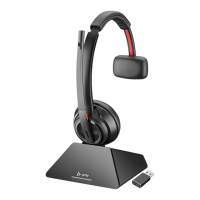
The Savi 8240/8245 UC is a DECT-based wireless headset system primarily intended for softphone calls and media streaming on a PC. It consists of a wireless headset and a DECT USB adapter, which comes pre-subscribed to the headset for immediate use. The system supports both wideband (conversation) and narrowband audio modes, allowing users to optimize audio quality based on their activity. A key feature is its DECT Enhanced Security, which incorporates the latest recommendations from the DECT Forum and ETSI, covering registration, authentication, authorization, and encryption procedures to protect against known vulnerabilities. The headset is designed to provide clear audio and reliable wireless connectivity, making it suitable for office and remote work settings.
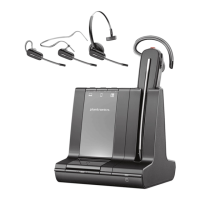
The headset offers flexible wearing styles, including over-the-ear, over-the-head, and behind-the-head, with a fit kit provided to customize the fit and microphone position for maximum comfort and audio clarity. The microphone is designed to rest as close to the cheek as possible without touching, and its pivoting earpiece allows for precise adjustment.
Basic headset controls include a mute button, volume buttons, and a call button. The mute button allows users to mute and unmute themselves during a call, with an LED indicator showing the mute status. The volume buttons enable adjustment of listening volume. The call button is used to place, answer, or end calls, and can also be used to answer a second incoming call or switch between active calls.
The system supports conference calls, allowing up to four additional headsets to join. This feature is particularly useful for team collaborations or multi-person discussions. Guests can join a conference call manually by pressing specific buttons on their headsets and the primary user's headset. Guest headsets can remain connected through multiple calls, and can be removed by pressing their call button or docking the primary user's headset.
For PC connectivity, the DECT USB adapter is inserted into a laptop or PC. The adapter's LED indicators provide visual cues for its status: solid red when powered off or not subscribed, red and blue flashes for subscribe mode, solid blue for successful subscription and connection, triple blue flashes for an incoming call, and blue flashes when on a call or streaming media. The USB adapter can be configured through the PC's sound settings to play music or manage call behavior.
The Plantronics Hub software, available for Windows and Mac, significantly enhances the user experience by providing configurable settings. Through Plantronics Hub, users can manage call control for softphones, change the headset language, update firmware, and enable/disable various features. Specific settings include answering call alerts, audio channel tone, audio sensing, close conversation limiting (to reduce background noise), online indicators, second incoming call behavior, mute on/off alerts, mute reminders, headset to PC radio link, and Plantronics product improvement program.
The software also allows for customization of PC ringtone and volume, wearing preference for volume control, ring location, dial tone, target softphone, media player action on incoming calls, and softphone/media player integration. Advanced settings include audio quality optimization (wideband or narrowband), over-the-air subscription management, range adjustment (High, Medium, Low), anti-startle protection, and noise exposure limits.
The range setting is particularly useful for managing PC audio quality, user density, or restricting the operational distance of the headset. The default range is up to 300 ft, with options for 150 ft (Medium) and 50 ft (Low).
The Savi 8240/8245 UC is designed with user-friendly maintenance in mind, particularly concerning its power source. The headset features a replaceable battery, and users are advised to use only the battery type supplied by Plantronics.
Charging the headset is straightforward: it is placed in the charge cradle, where an LED indicator flashes during charging and turns off when fully charged. A full charge takes approximately 3 hours, with at least 20 minutes of charging recommended before first use. The headset provides up to 4.5 hours of talk time in wideband mode and up to 6.5 hours in narrowband mode.
For the Savi 8245 UC model, a spare battery can be charged in the battery compartment of the charge stand or charge accessory. A unique feature is the ability to replace the battery during an active call, providing unlimited talk time. During a battery swap, the headset mutes automatically, and upon inserting a charged battery with the power switch in the "on" position (revealing green color), the user hears "base connected" and "mute off," indicating reconnection to the call.
Headset battery status can be determined by listening to voice prompts after powering on the headset, hovering over the Plantronics Hub system tray icon, or viewing it within the Plantronics Hub app.
Troubleshooting guidance is provided for common issues. If the headset is unstable, users are advised to ensure the microphone is correctly positioned. For degraded talk time, the battery may be wearing out, and support contact is recommended. If no audio is heard, users should check if the headset is powered on, charged, and if the call button is pressed. Ensuring the headset is the default sound device in PC settings and subscribed to the USB adapter are also key steps. For softphone issues, verifying Plantronics Hub installation, softphone compatibility, and restarting the computer are suggested. Audio distortion or echo can be addressed by adjusting volumes, pointing the microphone towards the chin, or lowering headset volume. If PC speakers no longer produce audio, changing the default sound device in PC settings is recommended. Finally, for no audio connection to the PC, unplugging and reconnecting the USB adapter, or restarting the PC/softphone application, are effective solutions.
The Plantronics Hub software also facilitates firmware updates, ensuring the headset system remains current with the latest features and performance improvements. This proactive maintenance capability helps extend the lifespan and functionality of the device.
 General
| Wireless Technology | DECT 6.0 |
|---|---|
| Noise Cancellation | Yes |
| Charge Time | 3 hours |
| DECT Security Certification | Yes |
| Voice Prompts | Yes |
| Charging Time | 3 hours |
| Warranty | 2 years |
| Range | Up to 590 feet |
| Connectivity | DECT, USB |
| Microphone | Noise-canceling |
| Wearing Style | Convertible (over-the-ear, over-the-head, behind-the-head) |
| Battery Type | Rechargeable Lithium-ion |
| Microphone Frequency Response | 100 Hz - 8 kHz |
| Speaker Frequency Response | 20 Hz to 20 kHz |
| Conference Calls | Up to 4 headsets |
| Compatibility | Desk phone |
| Earpiece Type | Monaural |
| Weight | 21 grams (earpiece) |


 To Next Page