o Make the desired changes following the same process you would for updating the configuration of an
individual phone
o When changes are saved, the telephone button programming and/or ring tone will be saved for all
telephones matching the model selected (e.g., all Poly VVX 410 telephones)
o Close your browser window to log out of the Phone Profile Editor
o Reboot each telephone: on each telephone (e.g. on each VVX 410), press Home button + Settings + Basic +
Update Configuration + Yes and wait up to five minutes for the telephone to learn its new configuration
Modify Telephone Display Background Image (only for models listed below)
To modify the background image on the telephone display:
o Create an image file of the following file type and size using an image editor of your choice:
o JPEG and PNG file formats are supported
o Optimal background image sizes (in pixels):
▪ VVX 31X - 208 x 104 pixels
▪ VVX 41X - 320 x 240 pixels
▪ VVX 50X - 320 x 240 pixels
▪ VVX 60X - 480 x 272 pixels
▪ VVX 250 - 320 x 240 pixels
▪ VVX 350 - 320 x 240 pixels
▪ VVX 450 - 480 x 272 pixels
o Avoid using white in the background image to maintain contrast with programmable button text which
displays in white
o Upload the image file to a web server that you maintain, which must be accessible by the phones over the
internet
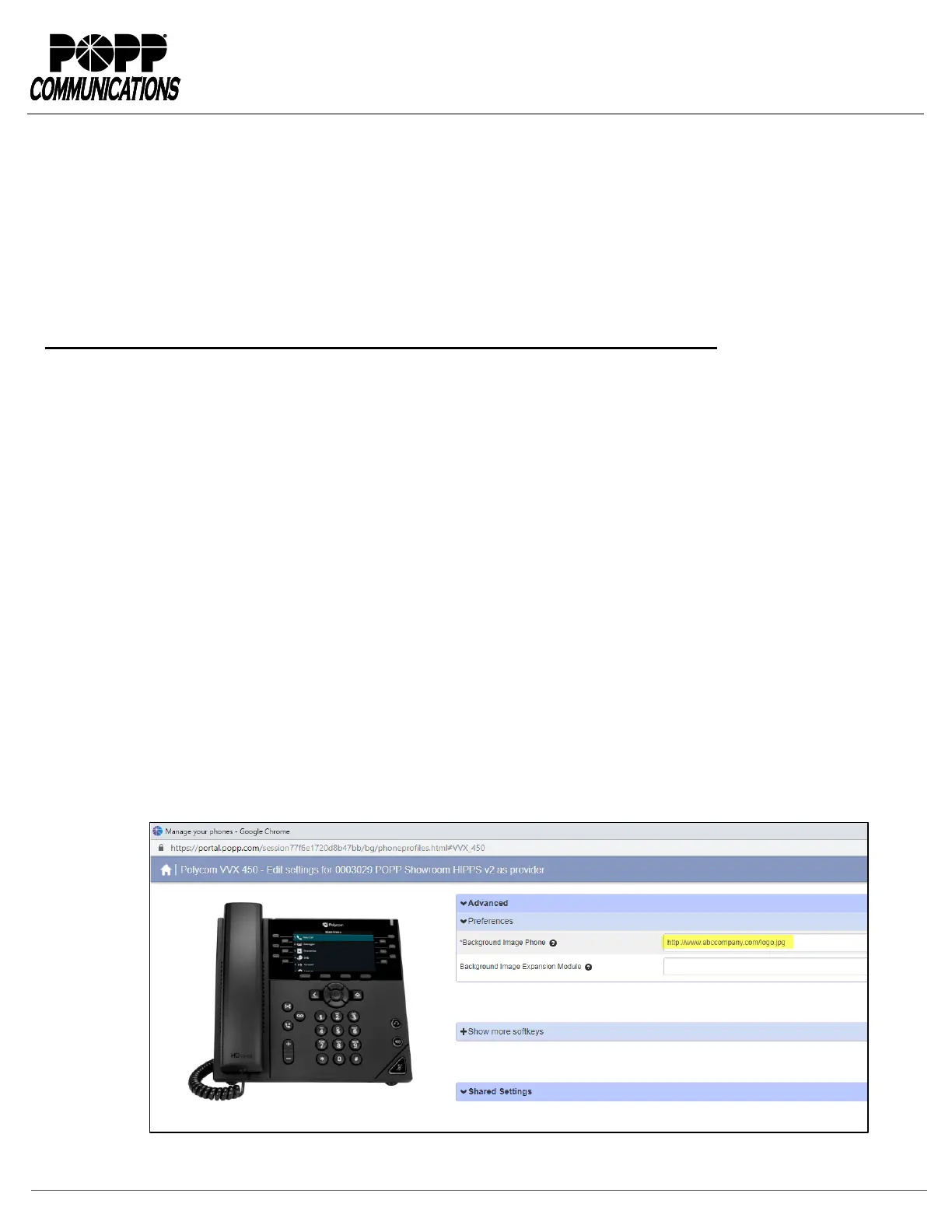
o Enter the URL for the image file into the Background Image Phone field of the phone profile
o Reboot the phone(s) to pick up the new image file


 To Previous Page