SoundStation2W™ User Guide - 25
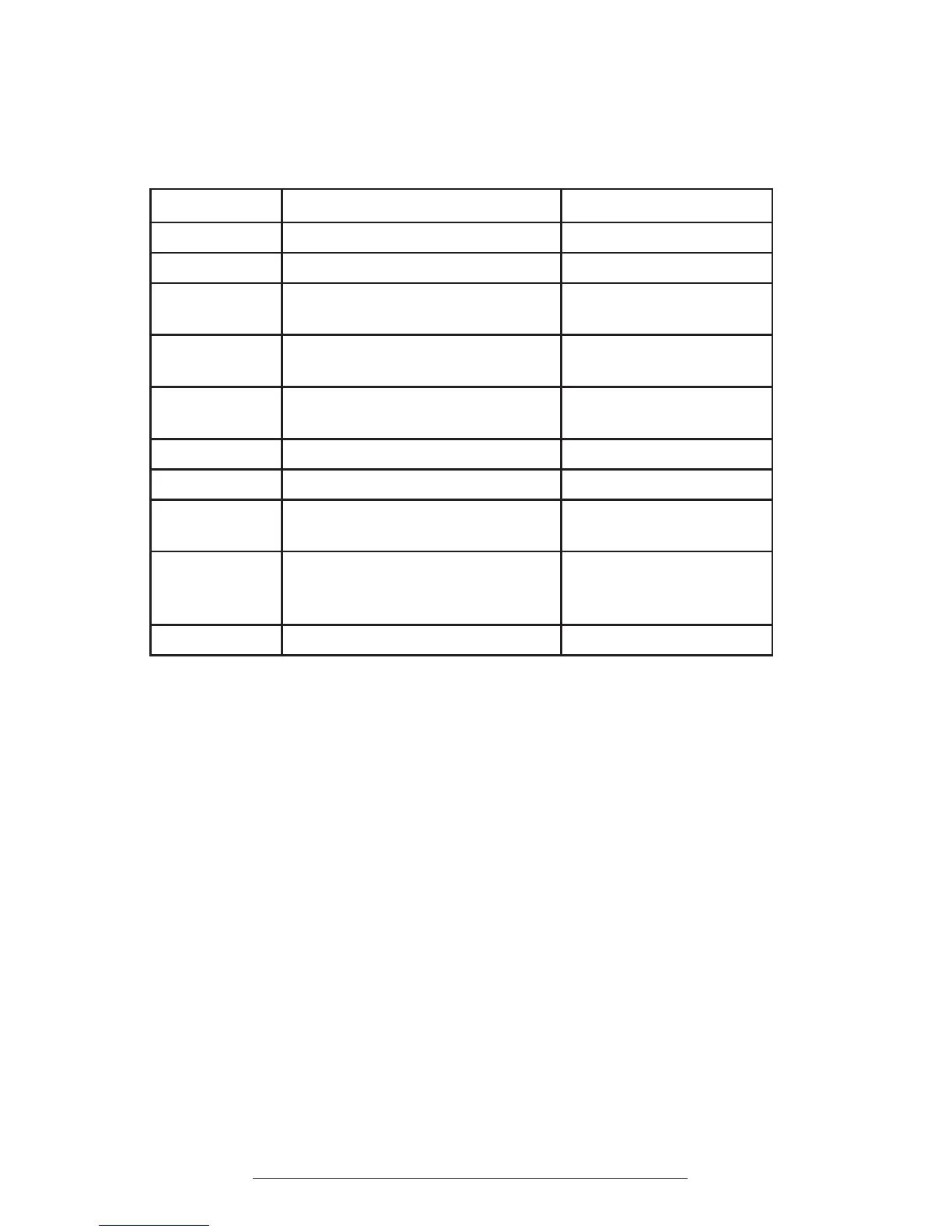
LCD Message Summary
The following messages are displayed on the console LCD to represent various
usage conditions.
LCD Message What it means: What you will see:
Ready
Phone is in idle state and ready to make calls. Idle screen.
No Signal
Signal strength is too weak to carry a call. Antenna icon will show zero bars.
Call Ended
The call has been dropped. “Call Ended” with elapsed time
indicated.
Mobile Phone In
A mobile phone is plugged in to the mobile phone
jack OR a mobile phone call has been initiated.
“Mobile Phone In”
Searching for
Signal
Attempting to contact the base station to establish
a connection.
“Searching for Signal”
Enter Number
Enter the number you wish to dial. Digits of the number you are dialing.
Charging
A charger is plugged in and battery is recharging.
“Charging”
Base Paging
Page button on base was pressed to locate the
console.
Base paging. Press any key to stop
beeping.
Battery Low
The charge in the battery has depleted. A
recharge is required to continue reliable operation
of your SoundStation2W™.
The remaining talk time and an
audible warning tone.
Incoming Call
Phone received an incoming call. “Incoming Call”












 To Next Page