SoundStation2W™ User Guide - 25
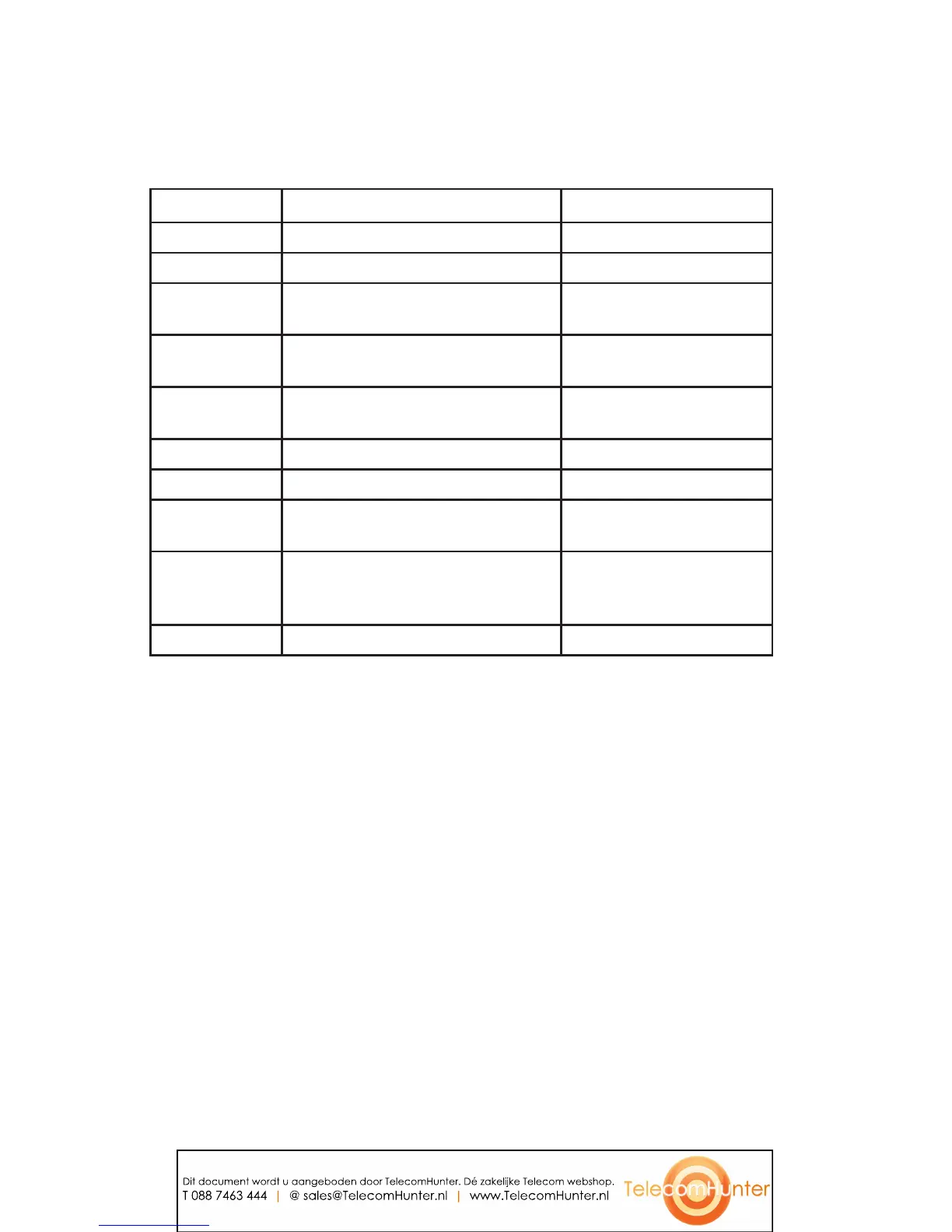
LCD Message Summary
The following messages are displayed on the console LCD to represent various
usage conditions.
LCD Message What it means: What you will see:
Ready
Phone is in idle state and ready to make calls. Idle screen.
No Signal
Signal strength is too weak to car
ry a call. Antenna icon will show zero bars.
Call Ended
The call has been dropped. “Call Ended” with elapsed time
indicated.
Mobile Phone In
A mobile phone is plugged in to the mobile phone
jack OR a mobile phone call has been initiated.
“Mobile Phone In”
Searching for
Signal
Attempting to contact the base station to establish
a connection.
“Searching for Signal”
Enter Number
Enter the number you wish to dial. Digits of the number you are dialing.
Charging
A charger is plugged in and batter
y is recharging. “Charging”
Base Paging
Page button on base was pressed to locate the
console.
Base paging. Press any key to stop
beeping.
Batter
y Low
The charge in the battery has depleted. A
recharge is required to continue reliable operation
of your SoundStation2W™.
The remaining talk time and an
audible war
ning tone.
Incoming Call
Phone received an incoming call. “Incoming Call”
Dit document wordt u aangeboden door TelecomHunter. Dé zakelijke Telecom webshop.
T 088 7463 444 | @ sales@TelecomHunter.nl | www.TelecomHunter.nl









 To Next Page