Barracuda Phone System
Polycom VVX-400/410 VoIP Phone Quick Reference Guide 1 / 4
Polycom VVX-400/410 VoIP Phone Quick Reference Guide
https://campus.barracuda.com/doc/45712761/
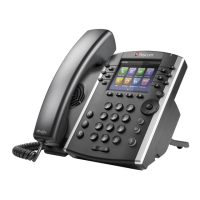
This article explains the basic operation of the Polycom VVX-400 and -410 VoIP phones.
Soft Keys
The four buttons immediately below the LCD display are soft keys.
Each soft key performd the action displayed immediately above it.
Soft key behavior is context sensitive – the associated soft key action changes according to the
current phone state.
Place a Call
Dial the desired internal extension or external number.
Lift the receiver or press the speakerphone button to call.
Voicemail Access
To access voicemail messages, press the (Messages) key to the left of the keypad.
Depending on your system configuration, you may be asked for your voicemail passcode.
Last Number Redial
Press the right arrow key to bring up the Placed Calls list.
Use the up/down arrow keys to select a number to redial.
















 To Next Page