Visit www.inverx.com.au for more information Page 19 of 23
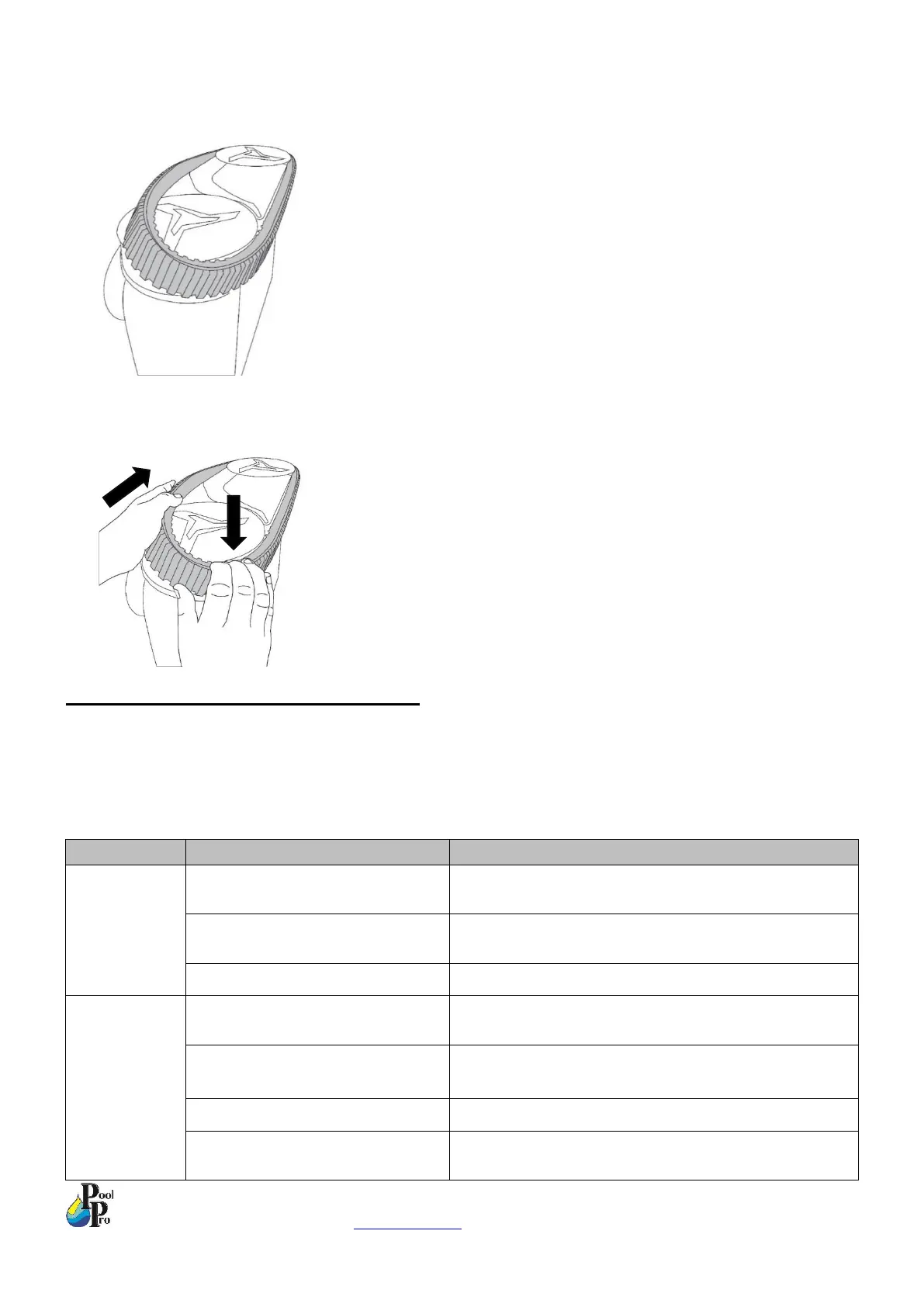
5. Ensure the belt is sitting correctly in the grooves of the small front wheel. Pull the track belt over the rear large
wheel as much as possible.
6. Hold the belt on the large rear wheel with a downward pressure, while pushing the track belt so it turns the
wheels. The track belt should slowly latch on to the wheel as you are turning the belt/wheels. Check the track
belt fits correctly all the way around.
SECTION 4. TROUBLE SHOOTING
In addition to the below troubleshooting, also see Section 2.1 for error code identification. Pressing the power button
on the robot, or charging the robot, will clear any error codes. Contact your authorised dealer if an error code cannot
be cleared. Please note the robot will stop at the side of the pool if it encounters a failure, or when the batter is less
than 15% charged.
Remove the magnetic safety cap from underneath the
robot (Refer to Section 1.3, Step 1)
Remove the magnetic safety cap from underneath the
robot (Refer to Section 1.3, Step 1)


 To Next Page