14 | FR
4. USE
By default, the heat pump is in heating mode.
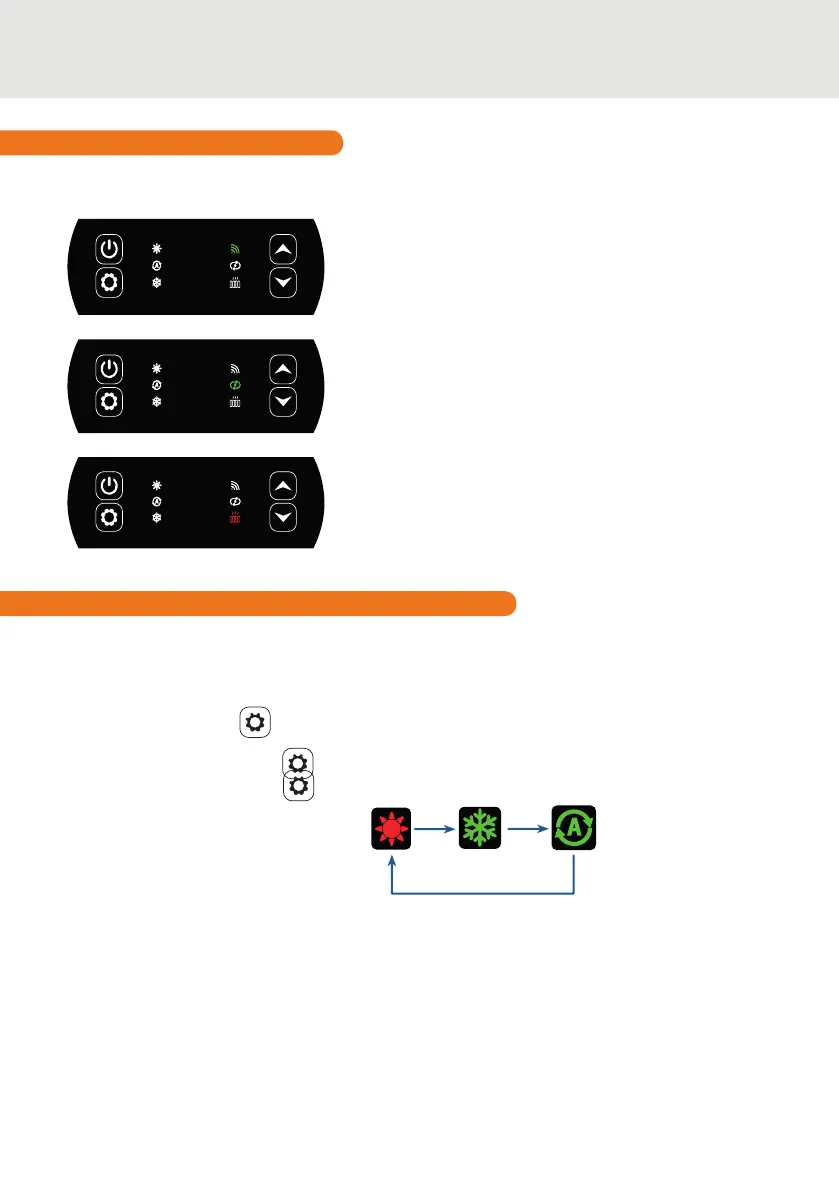
To change the mode of use, when the heat pump is ON:
• Press the button for 3s, the heat pump will then switch to cooling.
• Press the button again for 3s, the heat pump will then switch to automatic.
• Press the button again for 3s, the heat pump will then switch heating.
The dierent modes thus form a cycle:
Good to know:
The heat pump can take several minutes to change operating mode in order to preserve the
refrigerant uid.
The maximum set temperature is 40°C.
4.3 Functions overview
Circulation pump indicator
On when the circulation pump is active:
• Fixed light in automatic mode,
• Flashing in manual mode.
Heater pilot indicator
The RECH light is on when the heater is active:
• Fixed light in automatic mode,
• Flashing in manual mode.
WiFi indicator
Indicates your Wi connection status.
Flashes during pairing (see paragraph 4.9 “Pairing the heat
pump”). It remains on when a connection is active.
The indicators to the right of the control panel indicate the O’SPA heat pump’s other functions.
4.4 Heat pump operating mode selector


 To Next Page