18 | FR
4.7 Pairing the heat pump
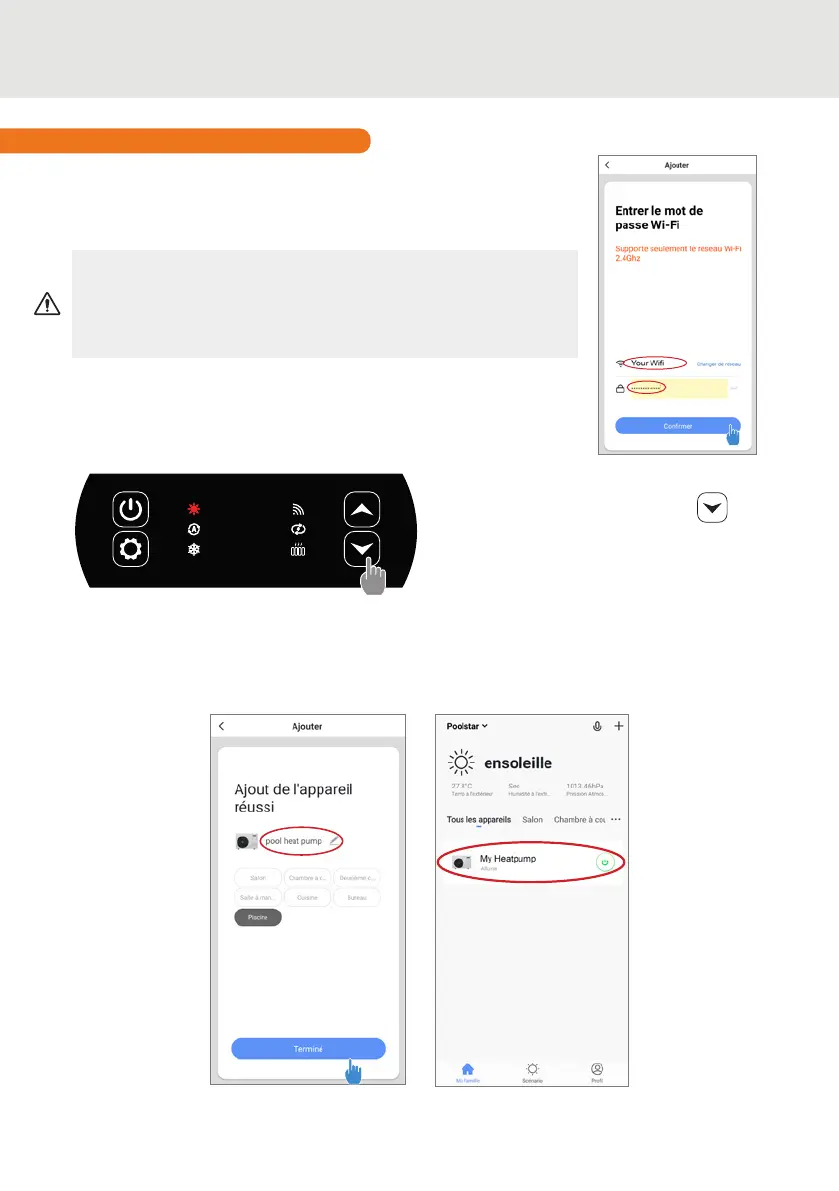
Note: The ashing stops when the box is connected to WiFi
Step 1 : Now start the pairing.
Choose your home WiFi network, enter the WiFi password and press
«Conrm».
Step 2 : Activate the pairing mode on your heat pump according to
the following procedure:
The procedure depends on the model of your control box:
CAUTION The «Smart Life» application only supports 2.4GHz
WiFi networks.
If your WiFi network uses the 5GHz frequency, go to the interface of
your home WiFi network to create a second 2.4GHz WiFi network
(available for most Internet boxes, routers and WiFi access points).
4. USE
With the heat pump on, press on for
5 seconds to start the WiFi pairing. The
WiFi logo ashes.
The pairing is successful, the "WiFi" logo remains xed, you can rename your Poolex heat pump
then press “Done”.
Congratulations, your heat pump can now be controlled from your smartphone.


 To Next Page