23
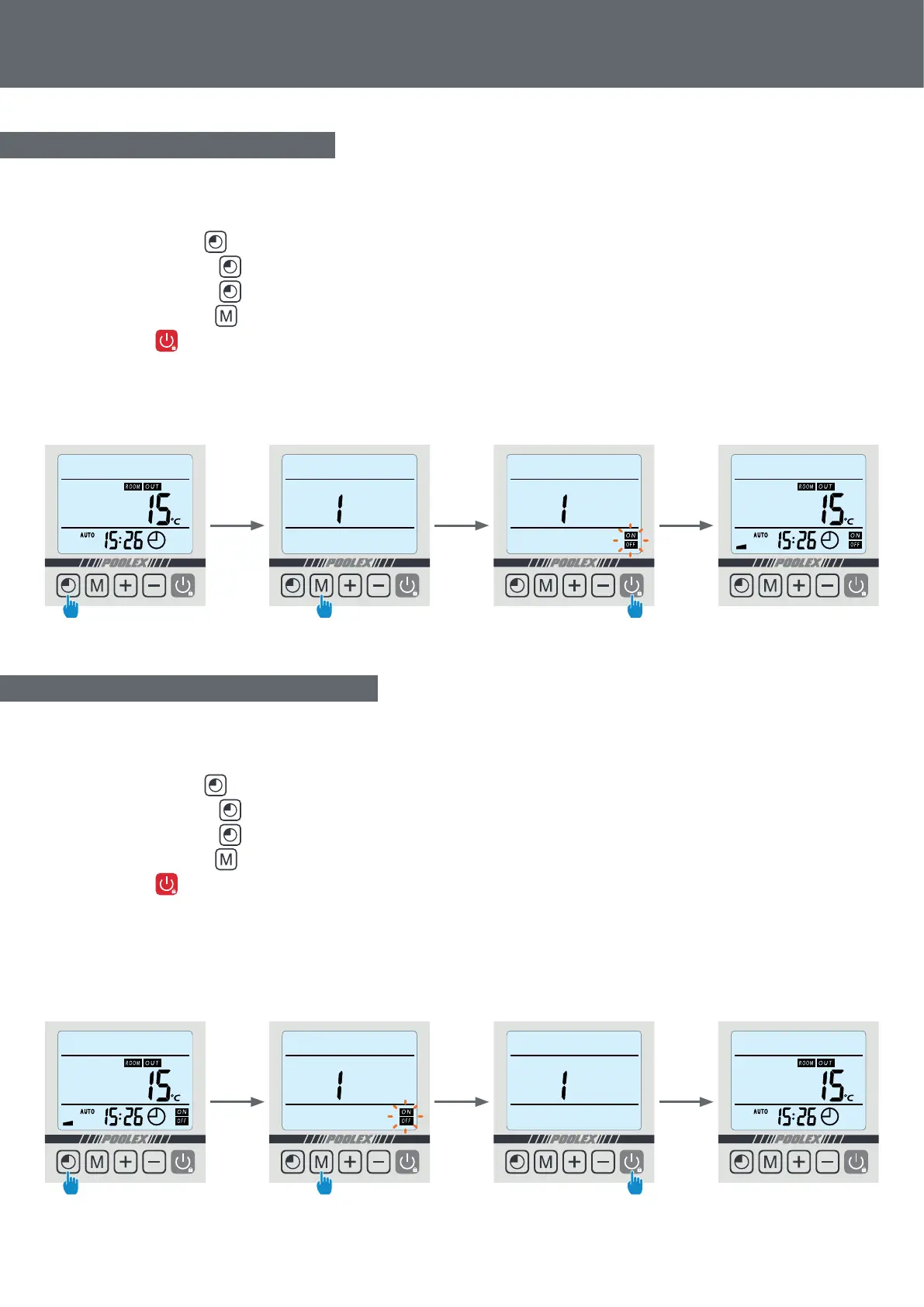
Once the programme has been dened, it can be activated as follows:
Once the programme has been activated, it can be deactivated as follows:
Step 1: Select the programme to be activated,
- Press twice to select programme 1.
- Press 3 times to select programme 2.
- Press 4 times to select programme 3.
Step 2: Keep pressing until the ON/OFF indicator lights are displayed and start ashing.
Step 3: Press to return to the main screen.
The ON/OFF lights indicate an active programme; the numeral above the line indicates the number of the active
programme.
Step 1: Select the programme to be deactivated
- Press twice to select programme 1.
- Press 3 times to select programme 2.
- Press 4 times to select programme 3.
Step 2: Keep pressing until the ON/OFF indicator lights disappear
Step 3: Press to return to the main screen
The ON/OFF lights indicate an active programme; the numeral above the line indicates the number of the active
programme.
4. Use
4.6 Activating a programme
4.7 Deactivating a programme
Step 3
Step 3
Step 4
Step 4
Step 2
Step 2
Step 1
Step 1
x2
x2
4 sec
4 sec



 To Next Page