8
www.powershield.com.au
2-2. Operating principle
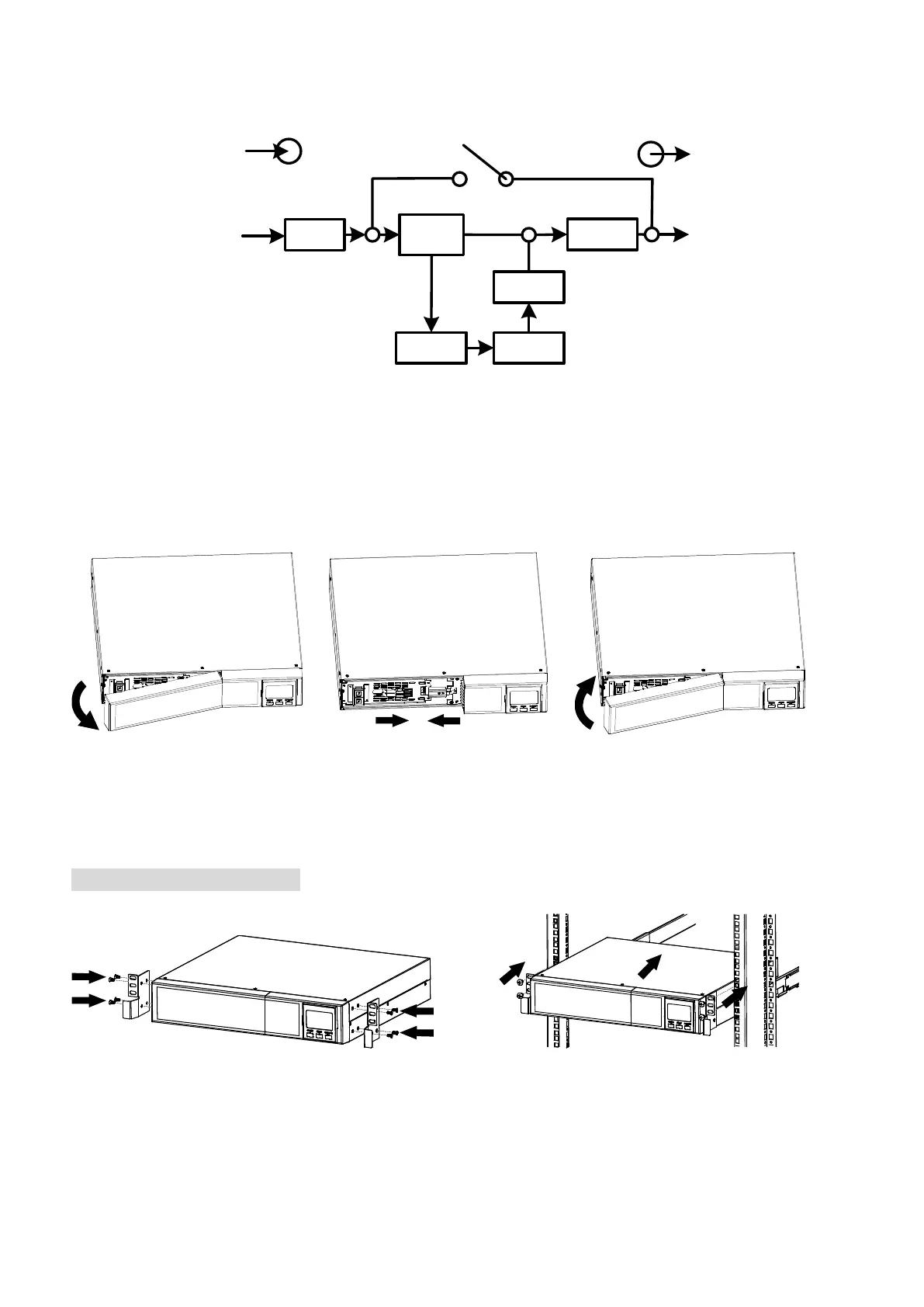
The operating principle of the UPS is shown as below
EMI/RFI
Filters
Battery
Charger
Battery
DC-to-DC
Converter
Inverter
Rectifier
/PFC
Input
Output
The UPS is composed of mains input,
EMI/RFI filters, rectifier/PFC,
inverter, battery charger, DC-to-DC
converter, battery, dynamic bypass and
UPS output.
Dynamic
Bypass
The UPS is composed of mains input, EMI/RFI filters, rectifier/PFC, inverter, battery charger,
DC-to-DC converter, battery, dynamic bypass and UPS output.
2-3. Installing the UPS
The UPS is usually shipped from the factory with the battery wires connected. Note: LCD and
alarm will indicate if battery wires are not connected at the start of the power up sequence. If
not connected, please follow the steps below to re-connect the battery wires.
Re-connect DC battery wires
and connect the AC input.
Put the front panel back to the
unit.
This UPS can be used as either a stand-alone tower or rack mounted in a 19” chassis. Please
choose from the appropriate installation instructions below to position the UPS accordingly.
Rack-mount Installation
Step 1 Step 2



 To Next Page