NOTE: Before installation, please inspect the unit. Be sure that nothing inside the package is
damaged. Please keep the original package in a safe place for future use.
NOTE: There are two different types of online UPS: standard and long-run models. Please
refer to the following model table.
NOTE : Long Runtime UPS systems do not contain batteries in the UPS system. Battery bank
needs to be purchased when Long Runtime model is used.
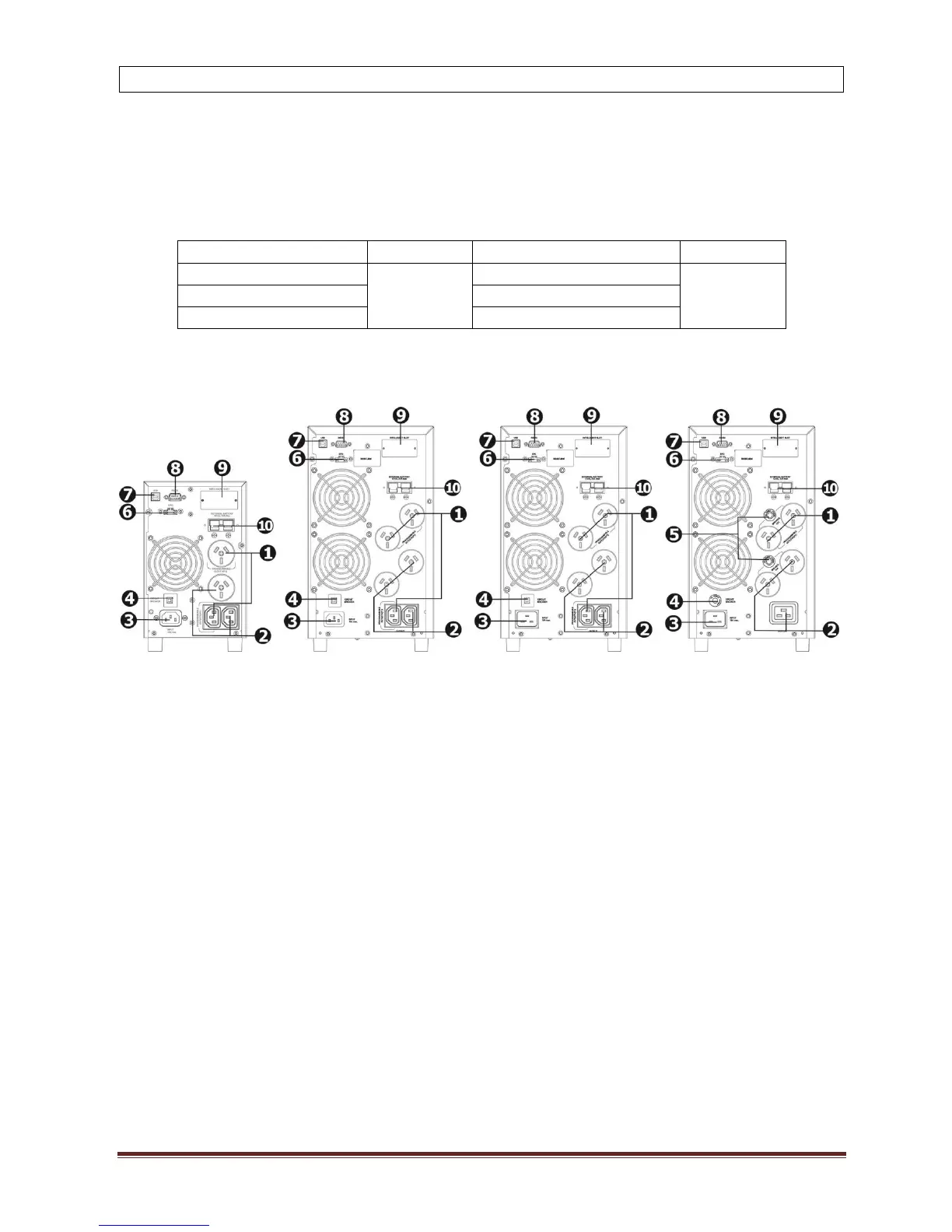
2-1. Rear panel view
PSCE1000(L) PSCE2000 PSCE2000L PSCE3000(L)
1. Programmable outlets (WHITE COLOUR OUTLETS): connect to non-critical loads.
2. General outlets (BLACK COLOUR OUTLETS): connect to mission-critical loads.
3. AC input inlet
4. Input circuit breaker
5. Output circuit breaker
6. Emergency power off function connector (EPO)
7. USB communication port
8. RS-232 communication port
9. SNMP /AS400 intelligent slot
10. External battery connection
11. 15A outlet



 To Next Page