PQR
Series Model D52
Page 17
www.Powertronics.com
V2.1
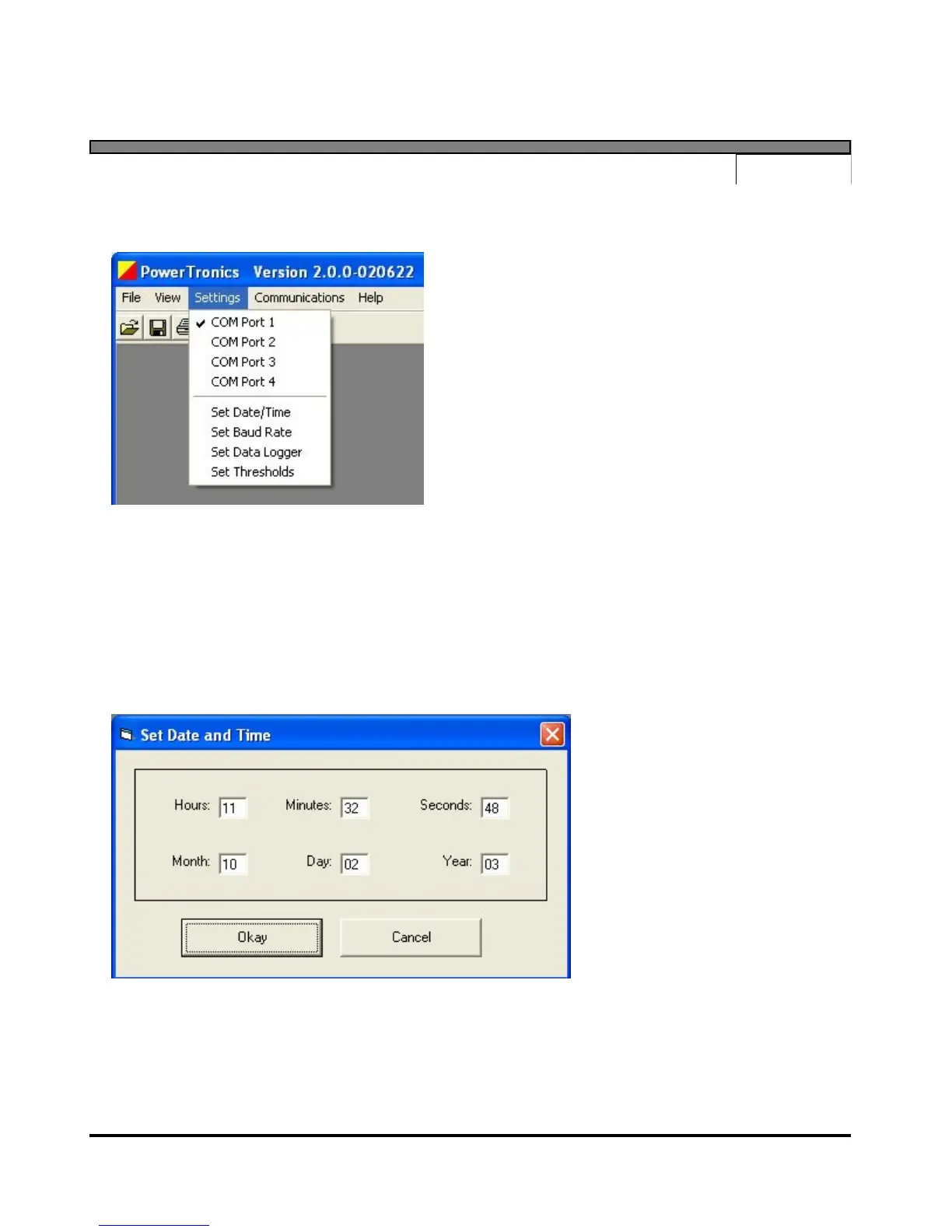
Settings Menu
The "Settings" menu contains items that allow the
user to specify certain settings for communication
between the software and the PQR device. The
menu also provides an interface for setting the
PQR device parameters.
COM Port 1 - COM Port 4
The "COM Port" menu items are used to specify which computer COM port the PQR device is
connected to. Selecting one of the options will change the program setting to that particular
port. The current settings are indicated by a check mark next in the Settings menu. The current
COM port setting is also displayed in the status bar at the bottom of the main program window.
Set Date/Time
Select the "Set Date/Time" menu
item to set the device date and
time.
A dialog box will be displayed
that provides the user an interface
with which to specify the date and
time. The settings will be
defaulted to the current date and
time, or to the date and time
specified previously in the same
program session.
After inputting the desired date and time, pressing the "Okay" button will instruct the program
to set the device to the specified settings. This process may take a few seconds.



 To Next Page