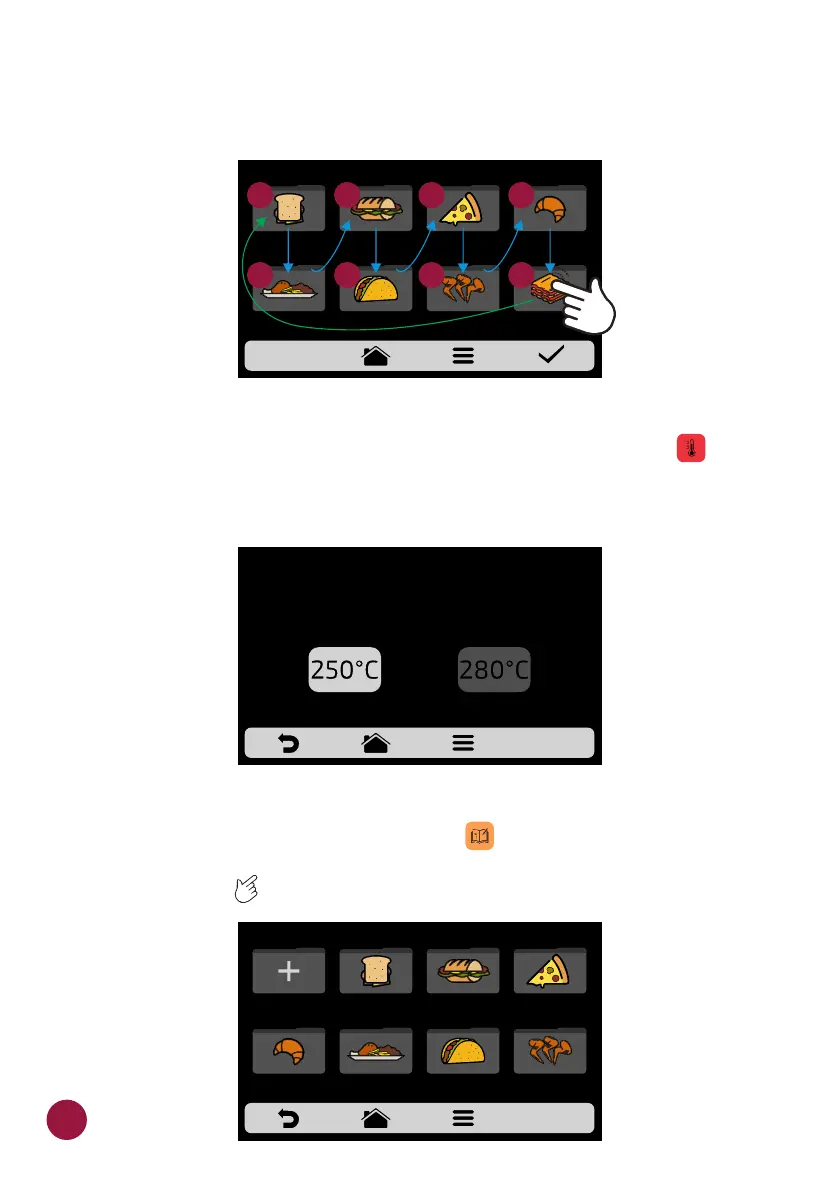
d) If the substitution is done randomly, once the position is selected, the
groups will be ordered sequentially (1, 2, 3, 4, 5, 6, 7 and 8), as shown in the
image below:
CHANGE GROUP TEMPERATURE
a) Choose the desired preheating temperature to the selected group .TEC
Note: Recipes set in group 1 will only be available when running Preheating 1
and the same applies to group 2.
USER'S SETTINGS: EDIT RECIPES
a) To edit the recipes, click on the icon . The groups screen will be TEC
displayed. Choose in which group you wish to change the recipes. Use the
gridview, sliding on the touch screen to see all recipes.TEC
CHANGE GROUP TEMPERATURE
CURRENT GROUP TEMPERATURE:
250 ° C
PREHEATING 1 PREHEATING 2
SELECT THE GROUP
MEAL
FINISHING
TEX-MEX CHICKEN
WINGS
GRATIN
BREAKFAST
SANDWICH
PIZZASUBS BAKERY
1
3
4
5
6
7
8
2
40
PIZZA
BAKERY
SUBSBREAKFAST
SANDWICH
CHICKEN
WINGS
TEX-MEXMEAL
FINISHING
NEW GROUP
SELECT GROUP - pag. 1



 To Next Page