PORTUGUÊS
CHANGE LANGUAGE
ENGLISH
ESPAÑOL
FRANÇAIS
DEUTSCHE
РУССКИЙ
POLSKIE
PT
EN
ES
FR
DE
RU
PL
ZH
中国人
Ελληνικά
CHANGE LANGUAGE
EL
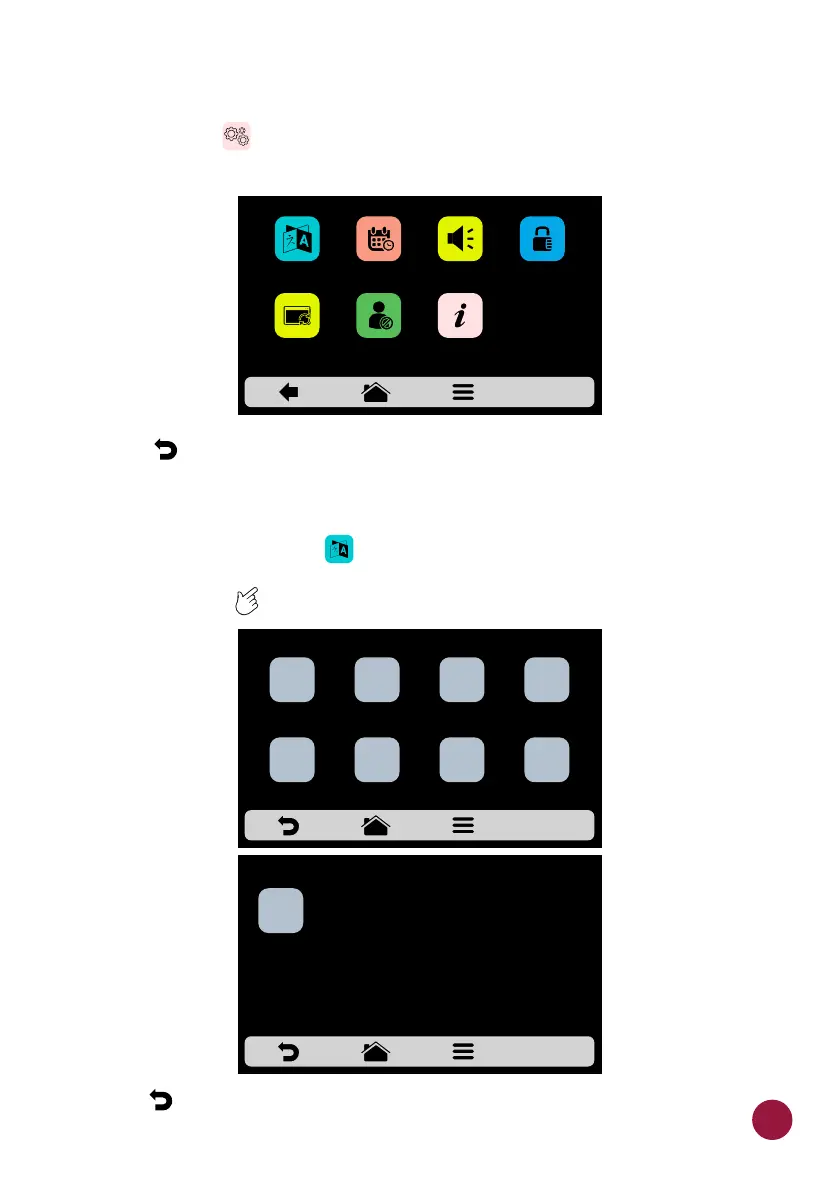
USER'S SETTINGS: SYSTEM
a) The Systen screen is composed by seven items. Understand each TEC
item in detail in the following pages.
b) Use to return to the user editing options.TEC
SYSTEM: LANGUAGE
a) To change the language , just click on the icon and choose the desired TEC
language. We currently have the main languages around the world. Use the
gridview, sliding on the touch screen to see all languages.TEC
b) Use to return to the user editing options.TEC
61
VOLUME
LANGUAGE
DATE/TIME
CHANGE
PASSWORD
RESTORE
ORIGINAL SETTINGS
EDIT ACESS
MANUFACTURER
INFORMATION
SYSTEM



 To Next Page